

Best desktop speakers
The best desktop speakers in the UK for 2026: Edifier M60, Edifier S1000MKII, Yamaha HS4, Edifier MR3 and Creative Pebble Pro, with price per watt RMS.
On this page
At a glance
The Edifier M60 is the best desktop speaker pair for most UK buyers in September 2026. The Edifier M60 delivers 66 W RMS from 3-inch aluminium woofers and 1-inch silk dome tweeters, takes digital audio straight from a PC over USB-C and streams LDAC Bluetooth from Android phones, all in cabinets just 100 mm wide. The Edifier S1000MKII is the premium pick, the Yamaha HS4 is the studio monitor for music production, and the Edifier MR3 is the best pair under £100, while the Creative Pebble Pro is the RGB pick for a gaming desk.
Every pick here is buyable on Amazon UK with a UK 3-pin plug, and every power figure in this guide is RMS. Peak power numbers are ignored because they describe a momentary burst, not what the amplifier sustains.
Which inputs do desktop speakers need?
A PC desk needs at least one digital input, either USB-C or optical, plus Bluetooth for a phone. The input decides whether the speakers get a clean digital signal or rely on the PC's analogue output, which on many motherboards picks up hiss and interference.
- USB-C audio:the PC sends digital audio over the cable and the speaker's own DAC converts it. The Edifier M60 and Creative Pebble Pro both work this way, and the Edifier M60 handles up to 24-bit/96 kHz.
- Optical and coaxial: the standard digital outputs on TVs, consoles and some motherboards. The Edifier S1000MKII has both, which makes it the only pick here that connects digitally to a TV.
- Bluetooth codecs: SBC is the baseline, LDAC (Edifier M60) and aptX HD (Edifier S1000MKII) carry higher bitrates from supported Android phones. iPhones use AAC, so the premium codecs make no difference to Apple users.
- Balanced TRS or XLR: the studio standard. The Yamaha HS4 and Edifier MR3 accept balanced cables from an audio interface, which rejects interference over longer cable runs.
- Subwoofer output: a line-level sub out lets a separate subwoofer handle the lowest octave. None of the five picks has one; the Edifier R1280DBs is the obvious alternative if a sub is part of the plan.
1. Edifier M60 - best desktop speakers overall

Edifier M60 specifications
- Power: 66 W RMS
- Woofer: 76 mm
- Tweeter: 25 mm silk dome
- Bluetooth: 5.3
- LDAC: Yes
- USB audio: Yes
- Cabinet width: 100 mm
The Edifier M60 is the most complete desktop pair for the money. Edifier rates the Edifier M60 at 66 W RMS in total, split as 18 W + 18 W for the woofers and 15 W + 15 W for the tweeters, with a DSP active crossover and dynamic range control that stops the small drivers distorting when the volume climbs. Each cabinet measures 100 x 168 x 147 mm, so the pair fits either side of a 27-inch monitor without eating into mouse space.
Connectivity is aimed squarely at a computer desk: USB-C for the PC, a 3.5 mm AUX input for a second source, and Bluetooth 5.3 with LDAC for a phone. Erin's Audio Corner measured a -3 dB point of roughly 67 Hz, which is deep for a 3-inch woofer but still leaves the lowest bass notes in films and games to the imagination. There is no headphone output and no subwoofer out, which are the two real omissions.
The Edifier M60 costs £159.99 on Amazon UK at the time of writing (September 2026), which works out at £2.42 per watt RMS, the best ratio on this list.
Edifier M60 - pros and cons
Where to buy
Check price
2. Edifier S1000MKII - best premium desktop speakers

Edifier S1000MKII specifications
- Power: 120 W RMS
- Woofer: 140 mm aluminium
- Tweeter: 25 mm titanium dome
- Frequency response: 45 Hz to 40 kHz
- Bluetooth: 5 with aptX HD
- Optical input: Yes
- Coaxial input: Yes
The Edifier S1000MKII is the premium pick for a deep desk or a room that doubles as a TV corner. Edifier rates the Edifier S1000MKII at 120 W RMS, made up of 25 W x 2 for the titanium dome tweeters and 35 W x 2 for the 5.5-inch aluminium woofers, and quotes a frequency response of 45 Hz to 40 kHz. The larger woofers are the main reason to pay more: a 5.5-inch cone moves far more air than the 3-inch drivers in the Edifier M60.
The Edifier S1000MKII has the widest spread of inputs here: optical, coaxial, two RCA line inputs and Bluetooth 5.0 with aptX HD. A PC can connect over optical from a motherboard or sound card, while a TV or console takes the other digital input. Hi-Res Audio certification covers playback up to 24-bit/192 kHz.
The trade-off is size. These are true bookshelf speakers with 5.5-inch woofers, so they suit a wide, deep desk and ideally stands that lift the tweeters to ear height. The Edifier S1000MKII costs £299.00 on Amazon UK at the time of writing (September 2026), or £2.49 per watt RMS.
Edifier S1000MKII - pros and cons
Where to buy
Check price
3. Yamaha HS4 - best desktop studio monitors
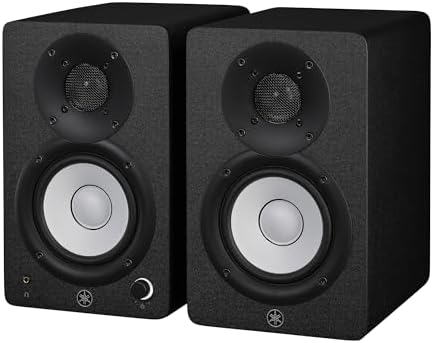
Yamaha HS4 specifications
- Power: 52 W (26 W + 26 W)
- Woofer: 114 mm cone
- Tweeter: 25 mm dome
- Frequency response: 60 Hz to 22 kHz
- Balanced input: Yes
- Headphone output: Yes
- Bluetooth: No
The Yamaha HS4 is the pick for anyone producing music, editing podcasts or mixing video on a desk. Yamaha tunes the HS series for a flat response rather than a pleasing one, and the Yamaha HS4 carries that approach into a 4.5-inch woofer and 1-inch dome tweeter cabinet rated at 60 Hz to 22 kHz. Room control and high trim switches on the back compensate for a wall behind the speakers or a bright room.
Yamaha rates the Yamaha HS4 amplifier at 26 W + 26 W, 52 W in total, which this guide treats as the rated continuous output. Inputs are a combination XLR/TRS jack, RCA and a 3.5 mm stereo mini jack, and the front panel has a headphone output, which is useful when a late-night session needs to go quiet. There is no Bluetooth and no USB, so the Yamaha HS4 expects an audio interface or a PC line output.
The Yamaha HS4 costs £208.00 on Amazon UK at the time of writing (September 2026). At £4.00 per watt, it is the most expensive power on this list, and that is the point: the money goes into accuracy, not volume.
Yamaha HS4 - pros and cons
Where to buy
Check price
4. Edifier MR3 - best desktop speakers under £100

Edifier MR3 specifications
- Power: 36 W RMS (18 W x 2)
- Woofer: 89 mm
- Tweeter: 25 mm
- Frequency response: 52 Hz to 40 kHz
- Bluetooth: 5.4
- Balanced input: Yes
- Headphone output: Yes
The Edifier MR3 is the best desktop pair under £100, and it costs £88.99 on Amazon UK at the time of writing (September 2026). Edifier rates the Edifier MR3 at 18 W x 2 RMS from 3.5-inch woofers and 1-inch tweeters in MDF cabinets, with a quoted response of 52 Hz to 40 kHz and Hi-Res Audio certification.
The Edifier MR3 borrows the studio-monitor layout of the Yamaha HS4, including balanced TRS inputs and a headphone output, then adds RCA, a 3.5 mm AUX input and Bluetooth 5.4 with multipoint. That makes it a flexible first pair for a student desk or a bedroom producer on a budget. At £2.47 per watt RMS, the Edifier MR3 matches the Edifier M60 and Edifier S1000MKII on value.
The missing piece is a digital input. A PC connects through its headphone jack or an audio interface, so a noisy motherboard output will be audible through the Edifier MR3.
Edifier MR3 - pros and cons
Where to buy
Check price
5. Creative Pebble Pro - best RGB gaming desktop speakers

Creative Pebble Pro specifications
- Power (USB PD adapter): 30 W RMS
- Power (USB bus): 10 W RMS
- Driver: 57 mm full range
- Bluetooth: 5.3
- USB audio: Yes
- Headset port: Yes
- RGB lighting: Yes
The Creative Pebble Pro is the pick for a gaming desk that wants lighting to match the keyboard and mouse. The Creative Pebble Pro has customisable RGB lighting, 2.25-inch drivers angled up at 45 degrees towards the listener, USB-C audio, Bluetooth 5.3, an AUX input and a headset and microphone port on the speaker itself, which saves reaching behind the PC.
Power depends on the supply. Creative rates the Creative Pebble Pro at 10 W RMS when powered from a computer's USB-C port and 30 W RMS when powered from a 30 W USB PD adapter; the 60 W figure on the box is peak and is ignored here. At £111.13 on Amazon UK at the time of writing (September 2026), the Creative Pebble Pro costs £3.70 per watt RMS on PD power and £11.11 per watt on bus power, so a PD adapter is worth having.
Creative Pebble Pro - pros and cons
Where to buy
Check price
Radar · 0-100 scores
- M60
- S1000MKII
- HS4
- MR3
Best desktop speakers UK 2026 spec sheet
| Spec | Edifier M60 | Edifier S1000MKII | Yamaha HS4 | Edifier MR3 | Creative Pebble Pro |
|---|---|---|---|---|---|
| Power (RMS) | 66 W | 120 W | 52 W | 36 W | 30 W |
| Woofer | 76 mm | 140 mm | 114 mm | 89 mm | 57 mm |
| Tweeter | 25 mm | 25 mm | 25 mm | 25 mm | n/a |
| Low-frequency rating | n/a | 45 Hz | 60 Hz | 52 Hz | n/a |
| Bluetooth version | 5.3 | 5 | n/a | 5.4 | 5.3 |
Which desktop speakers give the most power for the money?
The Edifier M60 gives the most RMS power per pound on this list, at £2.42 per watt. Compare Electronic's price-per-watt breakdown divides the Amazon UK price at the time of writing (September 2026) by the manufacturer's RMS rating for the pair. Peak power is deliberately excluded: peak figures are typically double the RMS number and are not calculated consistently between brands.
| Speaker | Amazon UK price | RMS power (pair) | Price per watt RMS |
|---|---|---|---|
| Edifier M60 | £159.99 | 66 W | £2.42 |
| Edifier MR3 | £88.99 | 36 W | £2.47 |
| Edifier S1000MKII | £299.00 | 120 W | £2.49 |
| Creative Pebble Pro (USB PD) | £111.13 | 30 W | £3.70 |
| Yamaha HS4 | £208.00 | 52 W | £4.00 |
| Creative Pebble Pro (USB bus) | £111.13 | 10 W | £11.11 |
Three of the five pairs land within 7p of each other, which says the Edifier M60, Edifier MR3 and Edifier S1000MKII are priced on the same curve and the choice between them is about size and inputs, not value. The Yamaha HS4 costs 65% more per watt than the Edifier M60 because Yamaha charges for studio tuning rather than output. Yamaha quotes 26 W + 26 W without labelling it RMS, so treat the Yamaha HS4 row as the closest like-for-like comparison available rather than an exact match. The Creative Pebble Pro is the clearest case for checking the power supply: the same speakers cost three times as much per watt on USB bus power.
Which desktop speakers have the right connections for your setup?
The Edifier S1000MKII is the only pick with optical and coaxial inputs, and the Edifier M60 and Creative Pebble Pro are the only two with USB-C audio. Compare Electronic's connectivity matrix lists every input and output from each manufacturer's spec sheet.
| Speaker | USB-C audio | Optical | Coaxial | Bluetooth | Balanced TRS | Sub out | Headphone out |
|---|---|---|---|---|---|---|---|
| Edifier M60 | Yes | No | No | Yes (LDAC) | No | No | No |
| Edifier S1000MKII | No | Yes | Yes | Yes (aptX HD) | No | No | No |
| Yamaha HS4 | No | No | No | No | Yes | No | Yes |
| Edifier MR3 | No | No | No | Yes (5.4) | Yes | No | Yes |
| Creative Pebble Pro | Yes | No | No | Yes (5.3) | No | No | Yes (headset) |
- PC only, clean digital signal: Edifier M60 or Creative Pebble Pro over USB-C.
- PC plus TV or console: Edifier S1000MKII, using optical for one and coaxial or RCA for the other.
- Audio interface for recording: Yamaha HS4 or Edifier MR3 over balanced TRS cables.
- Planning to add a subwoofer: none of the five has a sub out, so look at the Edifier R1280DBs or a 2.1 system instead.
Where should you put desktop speakers?
Desktop speakers sound best in an equilateral triangle with your head, with the tweeters at ear height and each speaker angled in towards you. At a typical 60 to 80 cm viewing distance, that puts the speakers 60 to 80 cm apart, roughly either side of a 27-inch or 32-inch monitor.
- Raise them: a speaker flat on the desk fires at your chest. Angled stands or isolation pads lift the tweeter and cut the desk resonance that muddies bass. The Creative Pebble Pro has a 45-degree angle built into the cabinet.
- Mind the wall:rear-ported speakers such as the Yamaha HS4 gain bass as they approach a wall and turn boomy within about 10 cm. Leave 10 to 20 cm, or use the Yamaha HS4's room control switch to trim the low end.
- Keep the desk edge clear: sitting the front baffle flush with the desk edge reduces reflections from the desk surface between you and the speaker.
- Mind the monitor: a large monitor between the speakers is fine, but a speaker partly behind the screen loses treble detail.
Do desktop speakers need a subwoofer?
Most desktop setups do not need a subwoofer. The Edifier S1000MKII is rated down to 45 Hz and the Edifier MR3 to 52 Hz, which covers the bass in most music and game soundtracks at desk listening distances. A subwoofer earns its place for film explosions and bass-heavy electronic music, where content runs below 50 Hz.
The practical problem is that none of the five picks has a subwoofer output, so adding a sub means using a sub with its own line-level input and crossover, fed from a spare output on the PC or audio interface. Buyers who already know they want a sub should shortlist a pair with a dedicated sub out from the start.
Are studio monitors better than multimedia speakers for a PC?
Studio monitors are better for making music and worse for casual listening. The Yamaha HS4 is tuned flat so that a mix which sounds right on it translates to other systems; the Edifier M60 and Creative Pebble Pro are tuned to sound full at low volume, which flatters games, films and streaming.
The Edifier MR3 sits between the two camps: studio-style balanced inputs and a flat-leaning tune, but Bluetooth 5.4 and a price under £100. Gamers who also want a headset for voice chat should read Best gaming headset UK 2026, and anyone who wants to mix music from a controller on the same desk should read Best DJ controller for beginners UK 2026.
Verdict
The Edifier M60 is the best desktop speaker pair for most UK buyers in September 2026: 66 W RMS, USB-C audio and LDAC Bluetooth in a 100 mm wide cabinet, at the lowest price per watt RMS on the shortlist. The Edifier S1000MKII is worth the extra for a large desk or a PC-and-TV setup, the Yamaha HS4 is the studio monitor for music production, and the Edifier MR3 is the pair to buy under £100. The Creative Pebble Pro suits a gaming desk that wants RGB and a headset port, as long as it runs from a USB PD adapter.
Frequently asked questions
What are the best desktop speakers in the UK in 2026?
The Edifier M60 is the best desktop speaker pair for most UK buyers in 2026. The Edifier M60 combines 66 W RMS, USB-C audio, a 3.5 mm AUX input and Bluetooth 5.3 with LDAC in cabinets 100 mm wide. The Edifier S1000MKII is the premium pick, the Yamaha HS4 suits music production and the Edifier MR3 is the best pair under £100.
Are desktop speakers under £100 worth buying?
Yes, the Edifier MR3 shows how much £100 now buys. The Edifier MR3 costs £88.99 on Amazon UK at the time of writing (September 2026) and delivers 36 W RMS, 3.5-inch woofers, 1-inch tweeters, balanced TRS inputs, a headphone output and Bluetooth 5.4. At £2.47 per watt RMS, the Edifier MR3 matches far pricier pairs on value.
Should I use RMS or peak power when comparing speakers?
Use RMS power. RMS describes the continuous output an amplifier sustains, while peak power describes a brief burst that manufacturers can calculate in different ways. The Creative Pebble Pro, for example, is rated at 30 W RMS and 60 W peak. Compare Electronic's price-per-watt figures use RMS only, so the Edifier M60, Edifier MR3 and Yamaha HS4 are compared on the same basis.
Do I need a subwoofer with desktop speakers?
Most desks do not need a subwoofer. The Edifier S1000MKII reaches 45 Hz on Edifier's rating, which covers most music and games. Small pairs such as the Edifier M60 and Creative Pebble Pro roll off higher, so bass-heavy gamers may want a sub. None of the five picks has a dedicated subwoofer output, so a sub needs its own line-level input and crossover.
Are studio monitors good for gaming and films?
Studio monitors work well for gaming and films, but they sound less flattering than multimedia speakers. The Yamaha HS4 is tuned for a flat response from 60 Hz to 22 kHz, which reveals mixing mistakes rather than boosting bass. Buyers who want a warmer sound for games should consider the Edifier M60 or Creative Pebble Pro instead.
Which desktop speakers connect to a PC over USB-C?
The Edifier M60 and Creative Pebble Pro both accept digital audio over USB-C, so they bypass the PC's headphone jack and its built-in noise. The Edifier S1000MKII uses optical and coaxial digital inputs instead, while the Yamaha HS4 and Edifier MR3 use analogue inputs and need a sound card, audio interface or the PC's line output.
How far apart should desktop speakers be?
Desktop speakers should sit roughly as far apart as they are from your head, forming an equilateral triangle, with the tweeters at ear height. For a typical 60 to 80 cm viewing distance that means 60 to 80 cm between the Edifier M60, Yamaha HS4 or Edifier MR3 cabinets, angled in towards the listening position and kept at least 10 to 20 cm from the wall behind.