
Chromebook or Windows?
Chromebook vs Windows laptop for students: what ChromeOS cannot run, UK university advice, updates and 4-year costs for the ASUS CX34, Acer 514 and IdeaPad.
On this page
At a glance
A Windows laptop is the better choice for most university students, and a Chromebook is the better choice for school pupils and essay-based courses on a tight budget. Windows 11 installs every program a UK degree is likely to list, including IBM SPSS Statistics, SOLIDWORKS and locked-down exam browsers; ChromeOS installs none of them. The Lenovo IdeaPad Slim 3 14 Gen 10 costs £599 and the ASUS Chromebook Plus CX34 £289 on Amazon UK at the time of writing (October 2026).
The price argument for a Chromebook is weaker than it looks. A renewed Dell Latitude 5420 with 16GB of RAM, a 512GB SSD and Windows 11 Pro costs £254, £35 less than the cheapest Chromebook Plus. The full shortlist sits in Best student laptop UK 2026.
Is a Chromebook or a Windows laptop better for students?
A Windows laptop is better for students whose course uses desktop software or online exams, and a Chromebook is better for students who work entirely in a browser. The split comes down to one fact: ChromeOS runs web apps, Android apps and Linux apps, but not Windows or macOS programs. Everything else, from battery to price, is secondary.
- Chromebook wins: price for a new machine (£289), automatic updates with a fixed end date, low maintenance, and Google Docs, Classroom and Microsoft 365 for the web.
- Windows wins: software range, exam compatibility, desktop Microsoft 365, offline work and storage. Every Windows pick here carries 512GB, against 128GB on the ASUS Chromebook Plus CX34.
What can a Chromebook not run?
A Chromebook cannot install Windows or macOS desktop programs, and that rules out several programs UK degrees use every week. The vendors' own platform lists make the point:
- IBM SPSS Statistics: IBM supports the desktop client on 64-bit Windows and macOS only. Psychology, nursing and social science courses use it for statistics modules.
- SOLIDWORKS: SOLIDWORKS 2026 runs on Windows 11 64-bit only, and Dassault makes no Mac or ChromeOS version.
- MATLAB: the desktop version will not install on ChromeOS. MathWorks supports MATLAB Online in a browser on ChromeOS, which covers most taught maths and engineering modules.
- Adobe Premiere Pro and Photoshop:Adobe sells the full desktop apps for Windows and macOS. Chromebooks are limited to Adobe's web and Android apps.
- Microsoft 365:Microsoft ended support for its Android Office apps on Chromebooks on 18 September 2021, so a Chromebook runs Word, Excel and PowerPoint for the web. Those versions need a connection and lack desktop extras such as Excel's Power Pivot.
Is a Chromebook OK for my course?
A Chromebook is fine for essay-based courses and school, risky for courses with locked-down online exams, and wrong for statistics, engineering, business and creative courses. Compare Electronic's decision table maps ten common courses against the software they use:
| Course | Typical software | Chromebook OK? | Why |
|---|---|---|---|
| English, history, languages | Word or Google Docs, library databases, Moodle or Blackboard | Yes | Everything runs in a browser; check exam software |
| Maths | MATLAB Online, Overleaf for LaTeX | Mostly | MathWorks supports MATLAB Online on ChromeOS |
| Computer science | Python, VS Code, Git | Partly | Linux apps run on ChromeOS; no Xcode or Windows tools |
| Law | Word, Westlaw and LexisNexis in the browser | Risky | Locked-down exam browsers need Windows or macOS |
| Nursing and midwifery | Online modules, e-portfolio, proctored exams | Risky | Inspera proctoring runs only on Windows and macOS |
| Psychology | IBM SPSS Statistics | No | IBM supports SPSS on Windows and macOS only |
| Business, economics, accounting | Desktop Excel with Power Pivot and macros | No | Excel for the web lacks Power Pivot |
| Engineering | SOLIDWORKS, Siemens NX, desktop MATLAB | No | SOLIDWORKS 2026 needs Windows 11 |
| Art, design, film | Adobe Photoshop, Premiere Pro | No | Adobe's desktop apps need Windows or macOS |
| School pupils (Year 7 to Year 13) | Google Classroom, Google Docs | Yes | Schools often run Google Workspace for Education |
"Risky" means the coursework works but exams may not: universities that run proctored or locked-down exams on a student's own laptop need Windows or macOS. The course-by-course picks, including engineering laptops with a graphics card, are in Best laptop for university by course.
What do UK universities say about Chromebooks?
UK university IT services advise against a Chromebook as a student's only laptop. Three published examples:
- Loughborough University states that it does not support Chromebooks or Linux-based systems, sets a minimum of 8GB of RAM and a 256GB SSD, and recommends 16GB and 500GB. It tells engineering students to use a Windows PC.
- The University of Edinburghtells new students to avoid Chromebooks because they "cannot run software that is required for some degree programmes", and lists 16GB of RAM and a 512GB SSD as its minimum.
- Leeds Beckett University recommends a Windows 11 laptop for a student with a single device and warns that online exam software will not install on a Chromebook.
Exam software explains the warning. Inspera, used for digital exams at many UK universities, supports its Integrity Browser and proctoring on Windows and macOS only; its ChromeOS lockdown option works only on managed Chromebooks, not a student's own.
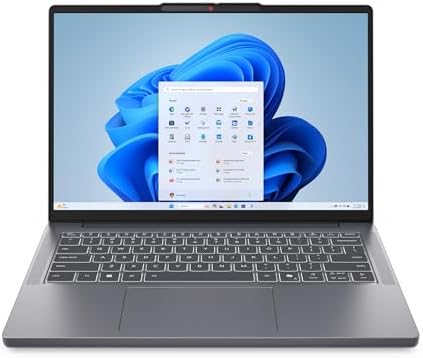
Lenovo IdeaPad Slim 3 14 Gen 10 - best Windows laptop for students

Lenovo IdeaPad Slim 3 14 Gen 10 (Ryzen 7 170) specifications
- Processor: AMD Ryzen 7 170 (8 cores, 16 threads)
- Graphics: AMD Radeon 680M
- Memory and storage: 16 GB / 512 GB SSD
- Display: 14 in 1920x1200 IPS
- Wi-Fi: Wi-Fi 7
- Operating system: Windows 11 Home
The Lenovo IdeaPad Slim 3 14 Gen 10 costs £599 on Amazon UK at the time of writing (October 2026), and it is the Windows laptop that answers every objection in the course table. It has an 8-core, 16-thread AMD Ryzen 7 170 boosting to 4.75 GHz, Radeon 680M graphics, 16GB of RAM, a 512GB SSD and Wi-Fi 7. Lenovo's specification sheet lists IPS models from 1.39 kg and rates the battery at up to 15.6 hours of local 1080p video at 150 nits with the 50 Wh pack, or 18 hours with the 60 Wh pack.
The savings show in a keyboard without a backlight and a standard IPS screen. It is the best-value Windows pick in the University tech checklist UK 2026.
Lenovo IdeaPad Slim 3 14 Gen 10 - pros and cons
Where to buy
Check price
ASUS Chromebook Plus CX34 - best Chromebook for students

ASUS Chromebook Plus CX34 (CX3402CVA) specifications
- Processor: Intel Core 3 100U (6 cores, 8 threads)
- Memory and storage: 8 GB LPDDR5 / 128 GB UFS
- Display: 14 in 1920x1080, 250 nits
- Battery: 50 Wh, up to 10 hours (ASUS)
- Weight: 1.44 kg
- Updates until: June 2032
The ASUS Chromebook Plus CX34 CX3402CVA costs £289 on Amazon UK at the time of writing (October 2026) and meets every Chromebook Plus minimum Google sets: 8GB of RAM, 128GB of storage, a Full HD IPS screen and a 1080p webcam. ASUS fits a 6-core Intel Core 3 100U, 8GB of LPDDR5 and 128GB of UFS storage, rates the 50 Wh battery at up to 10 hours and lists a weight of 1.44 kg. Google lists its Auto Update Expiration as June 2032.
It is the top pick in Best laptop under £300 UK 2026. The limits are the 128GB of storage and the 250-nit screen, which is dim outdoors.
ASUS Chromebook Plus CX34 CX3402CVA - pros and cons
Where to buy
Check price
Radar · 0-100 scores
- IdeaPad Slim 3 14 Gen 10 (Ryzen 7 170)
- Chromebook Plus CX34 (CX3402CVA, Core 3 100U)
- Chromebook Plus 514 CB514-5H
- Latitude 5420 (Renewed, Core i5-1135G7, 16GB, 512GB)
Acer Chromebook Plus 514 vs Dell Latitude 5420 (renewed)
The Acer Chromebook Plus 514 CB514-5H is the Chromebook for students who need storage, and the renewed Dell Latitude 5420 is the cheapest way into Windows. The Acer Chromebook Plus 514 costs £419 on Amazon UK at the time of writing (October 2026) with a 10-core Intel Core 5 120U, 8GB of RAM, a 512GB SSD and a 14-inch 1920x1200 IPS screen, and Google updates it until June 2033, a year longer than the ASUS.

The renewed Dell Latitude 5420costs £254 with an Intel Core i5-1135G7, 16GB of RAM, a 512GB SSD, two Thunderbolt 4 ports, a UK keyboard and Windows 11 Pro. Intel's 2020 chip is on Microsoft's Windows 11 processor list, and Dell lists a maximum weight of 1.37 kg. The battery is several years old, and the Amazon Renewed Guarantee gives a replacement or refund for one year from delivery. The trade-offs of buying renewed are covered in New vs renewed vs refurbished tech.
Dell Latitude 5420 (renewed) - pros and cons
Where to buy
Check price
Where to buy
Check price
How long will a Chromebook or a Windows laptop get updates?
A Chromebook gets updates until a fixed date Google publishes, and a Windows 11 laptop gets updates with no announced end date for the operating system. Google gives Chromebooks released from 2021 onwards 10 years of updates: its Auto Update Expiration list shows June 2032 for the ASUS Chromebook Plus CX34 and June 2033 for the Acer Chromebook Plus 514. Both outlast a four-year degree that starts in autumn 2026.
Microsoft supports each yearly Windows 11 version for 24 months on Home and Pro editions, and a laptop that meets the Windows 11 requirements (4GB of RAM, 64GB of storage and TPM 2.0) moves to the next version for free. The warning sign is Windows 10: Microsoft ended its support on 14 October 2025, and consumer Extended Security Updates run only to 12 October 2027. Any listing still running Windows 10 is a poor student buy.
Can a Chromebook work offline?
Partly. Google Docs, Sheets and Slides work offline once offline mode is switched on, but Microsoft 365 for the web needs a connection, and the ASUS Chromebook Plus CX34 holds only 128GB. A Windows laptop stores files locally by default: the IdeaPad Slim 3 14 and the Latitude 5420 both carry 512GB SSDs, four times the ASUS's storage.
Storage type matters as much as size. Samsung rates eMMC 5.1 at 250 MB/s for reading, UFS 3.1 at 2,100 MB/s and a PCIe 3.0 NVMe SSD at about 3,500 MB/s. The ASUS uses UFS and the Acer an SSD; cheaper non-Plus Chromebooks often use eMMC. Students who commute on trains with patchy signal, or who keep lecture recordings, should favour the Acer Chromebook Plus 514 or a Windows laptop.
Does a Chromebook last longer and weigh less?
Not automatically. ASUS rates the Chromebook Plus CX34 at up to 10 hours from a 50 Wh battery and lists it at 1.44 kg, while Lenovo rates the IdeaPad Slim 3 14 Gen 10 at up to 15.6 hours of video (50 Wh) or 18 hours (60 Wh) and lists IPS models from 1.39 kg. The Windows pick here is lighter and carries the higher battery rating, although the two brands rate battery life with different tests.
The renewed Latitude 5420 is the weak point on battery: its pack dates from about 2021 and holds less charge than when new. A student who needs a full day away from a socket should choose the IdeaPad or a MacBook Air, compared in Best student laptop UK 2026.
Is a Chromebook cheaper than a Windows laptop over a degree?
A new Chromebook is cheaper than a new Windows laptop, but a renewed Windows laptop is cheapest of all. Compare Electronic spread each Amazon UK price at the time of writing (October 2026) over a four-year degree, the length of a Scottish honours degree or an English degree with a placement year:
| Laptop | Price | Per year | Per month (48) | Updates until | £ per GB storage |
|---|---|---|---|---|---|
| Dell Latitude 5420 (renewed) | £254 | £63.50 | £5.29 | No end date set (Windows 11 Pro) | £0.50 |
| ASUS Chromebook Plus CX34 | £289 | £72.25 | £6.02 | June 2032 | £2.26 |
| Acer Chromebook Plus 514 CB514-5H | £419 | £104.75 | £8.73 | June 2033 | £0.82 |
| Lenovo IdeaPad Slim 3 14 Gen 10 | £599 | £149.75 | £12.48 | No end date set (Windows 11 Home) | £1.17 |
The ASUS Chromebook Plus CX34 saves £310 over the IdeaPad Slim 3 14, or £77.50 a year, and that is the real price of choosing ChromeOS. The Latitude 5420 costs £5.29 a month and gives the cheapest storage at £0.50 per GB, but its guarantee covers only year one. Software costs rarely change the sum: most UK universities give enrolled students Microsoft 365 free, but the desktop apps in that licence will not install on a Chromebook. More picks near this price are in Best laptop under £500 UK 2026.
Is a Chromebook more secure than a Windows laptop?
A Chromebook is easier to keep secure, and a Windows 11 laptop is secure when it is kept updated. ChromeOS checks its own system at every start-up with verified boot, runs each web page and app in a sandbox and installs updates in the background, so there is little for a student to manage. Windows 11 requires TPM 2.0 hardware and includes Microsoft Defender antivirus, but it relies on the user accepting updates and avoiding unsafe downloads.
The bigger risk on either platform is an out-of-date machine: Windows 10 laptops lost free security updates in October 2025, and a Chromebook past its Auto Update Expiration date stops receiving fixes.
Chromebook vs Windows laptop for kids: which is better?
A Chromebook is better for most school-age children. ChromeOS works with Google's Family Link parental controls, runs Google Classroom and Docs in the browser, and needs no antivirus or manual updates. The ASUS Chromebook Plus CX34 at £289 receives updates until June 2032, long enough for a pupil starting Year 7 in September 2026 to finish GCSEs.
The exception is a teenager taking Computer Science, design or media qualifications that use desktop software, or one who wants PC games; a Windows laptop suits them better. For a gaming-first teenager, see Best first gaming PC for a teenager.
Chromebook vs Windows laptop picks compared
| Spec | IdeaPad Slim 3 14 | Latitude 5420 | Chromebook Plus CX34 | Chromebook Plus 514 |
|---|---|---|---|---|
| Price (Amazon UK, Oct 2026) | £599 | £254 | £289 | £419 |
| Operating system | Windows 11 Home | Windows 11 Pro | ChromeOS | ChromeOS |
| Processor | AMD Ryzen 7 170 | Intel Core i5-1135G7 | Intel Core 3 100U | Intel Core 5 120U |
| Memory | 16 GB | 16 GB | 8 GB | 8 GB |
| Storage | 512 GB SSD | 512 GB SSD | 128 GB UFS | 512 GB SSD |
| Screen | 1920x1200 | 1920x1080 | 1920x1080 | 1920x1200 |
| Runs SPSS and exam browsers | Yes | Yes | No | No |
Verdict
Buy a Windows laptop for university and a Chromebook for school or a browser-only essay course. The Lenovo IdeaPad Slim 3 14 Gen 10 at £599 runs every program and exam browser in the course table, and the renewed Dell Latitude 5420 at £254 does the same for less. The ASUS Chromebook Plus CX34 at £289 is the Chromebook to buy, and the Acer Chromebook Plus 514 at £419 adds a 512GB SSD. Check the department's software list before buying; the wider shortlist is in Best student laptop UK 2026.
Frequently asked questions
Is a Chromebook or a Windows laptop better for students?
A Windows laptop is better for most university students, and a Chromebook is better for school pupils and essay-based courses on a tight budget. Loughborough, Edinburgh and Leeds Beckett universities all advise against a Chromebook as a student's only device. The Lenovo IdeaPad Slim 3 14 Gen 10 costs £599 and the ASUS Chromebook Plus CX34 £289 on Amazon UK in October 2026.
Can a Chromebook run Microsoft Office?
A Chromebook runs Microsoft 365 only as web apps in the browser. Microsoft ended support for its Android Office apps on Chromebooks on 18 September 2021 and points ChromeOS users to Office.com instead. Word, Excel and PowerPoint for the web handle essays and slides, but they need an internet connection and lack some desktop features, such as Excel's Power Pivot.
What university software will not run on a Chromebook?
A Chromebook cannot install Windows or macOS desktop programs. Common examples are IBM SPSS Statistics, which IBM supports on Windows and macOS, SOLIDWORKS, which needs Windows 11, desktop MATLAB and Adobe Premiere Pro. MATLAB Online does run in a Chromebook browser. Exam software such as the Inspera Integrity Browser runs only on Windows and macOS.
Is a Chromebook or a Windows laptop better for kids?
A Chromebook is better for most school-age children. ChromeOS updates itself, runs Google Classroom and Google Docs in the browser and works with Google's Family Link parental controls. The ASUS Chromebook Plus CX34 costs £289 on Amazon UK in October 2026 and receives updates until June 2032, enough to run from Year 7 to the end of GCSEs.
How long do Chromebooks get updates compared with Windows laptops?
Google gives Chromebooks released from 2021 onwards 10 years of updates, ending on each model's Auto Update Expiration date: June 2032 for the ASUS Chromebook Plus CX34 and June 2033 for the Acer Chromebook Plus 514. Windows 11 has no fixed end date for the operating system; Microsoft supports each yearly version for 24 months on Home and Pro editions.
Do UK universities recommend Chromebooks?
No. Loughborough University states that it does not support Chromebooks, the University of Edinburgh tells new students to avoid them because they often cannot run required software, and Leeds Beckett University warns that online exam software will not install on one. All three recommend Windows 11 or macOS. Students should still check their own department's software list.
Is a renewed Windows laptop better than a new Chromebook for university?
Often, yes. The renewed Dell Latitude 5420 costs £254 on Amazon UK in October 2026 with an Intel Core i5-1135G7, 16GB of RAM, a 512GB SSD and Windows 11 Pro, £35 less than the ASUS Chromebook Plus CX34. It runs SPSS and exam software, but its battery is several years old and the Amazon Renewed Guarantee lasts one year.