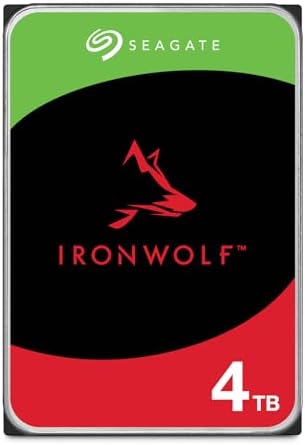

CMR or SMR for backup?
CMR suits repeated writes and NAS use; SMR suits read-mostly archives. Check the exact model and backup workload, then compare current UK prices on Amazon UK.
On this page
At a glance
Choose CMR for an active backup disk that receives frequent changes, small file writes or NAS activity; choose SMR for an inexpensive single-disk archive written in large batches and read occasionally. CMR and SMR describe how data tracks are arranged on the platter, not overall drive quality. Seagate's 4TB IronWolf ST4000VNZ06 is an all-CMR NAS drive; its BarraCuda ST4000DMZ04 is SMR. Amazon UK listed them at £178.98 and £167.48 respectively at the time of writing (November 2026).
The £11.50 gap is £2.88 per advertised TB at the same 4TB capacity. That is a 6.9% premium over the BarraCuda listing for a different drive class and warranty, not a controlled test of recording technology alone. Buyers should check model codes because neither "Seagate" nor "4TB" tells them whether a drive uses CMR or SMR. For the broader external-storage question, see external SSD versus hard drive and the external-drive buying guide.
What is the difference between CMR and SMR?
CMR writes each magnetic track beside the previous track without overlapping it. That layout supports more predictable random and sustained writes because changing one track does not generally require rewriting a neighbouring track. Seagate and Western Digital describe CMR as a suitable fit for NAS, RAID and write-heavy use, where writes can be frequent or happen alongside other operations.
SMR increases track density by writing each new track partly over the previous one, like roof shingles. Reading remains possible, but a change to an overlapped area can require the drive to rewrite adjacent data. Drive-managed SMR handles this work internally and can combine cached writes before placing them on the platter. During long or random write activity, the drive may need to reorganise data, so transfer rates can become uneven.
The difference is most visible in workloads that repeatedly alter data or sustain a large write. An occasional backup that writes a mostly complete archive in a sequential run is a better SMR fit than a small-file working directory that changes throughout the day. Neither recording method determines the exact speed on its own: platter density, rotational speed, cache, firmware, host and workload also matter.
Do not infer that all SMR drives are unsuitable for backup. A disconnected disk used to copy a photo archive once a month may be a reasonable cost choice if the backup completes in the available time. The risk is buying an SMR model for a job that expects steady random writes or RAID rebuild behaviour without checking the compatibility advice. A hard drive can be technically compatible while still being an inconvenient performer for the use pattern.
Model verification is essential. Seagate's IronWolf model datasheet identifies the ST4000VNZ06 as CMR. Its BarraCuda datasheet lists the 4TB ST4000DMZ04 as SMR. Manufacturer model-level sources are more useful than a generic product-family description.
Should a backup drive be CMR or SMR?
Choose CMR when the drive is a working NAS disk, receives frequent incremental changes, or is part of a RAID set that must rebuild after a disk replacement. A multi-user NAS can write metadata, small files and synchronised changes while other users read data. Predictable write behaviour matters more there than saving a few pounds on one disk. Follow the NAS vendor's list of supported drive models and workload limits.
Choose SMR when the drive stores a read-mostly copy, is used alone, and its occasional write job can finish without interruption. This may include an offline photo archive or a secondary backup rotated between computers, provided the backup software and operating system work with that drive's behaviour. Let long writes finish and verify the backup rather than assuming the copy completed because the progress window closed.
A backup drive should have a role and a schedule. Keep one copy disconnected after backup, use a second copy in another location for important material, and restore a few files periodically. A CMR drive cannot rescue a file that was deleted and then removed from every backup. Similarly, buying SMR does not make a backup inherently unsafe if the drive is used within its workload and the backup is verified.
| Exact model | Recording | Amazon UK price | Workload rating | Warranty |
|---|---|---|---|---|
| IronWolf ST4000VNZ06 | CMR | £178.98 | 180TB/year | 3 years |
| BarraCuda ST4000DMZ04 | SMR | £167.48 | 55TB/year | 2 years |
| Difference | Model type | £11.50 more for CMR | Not a life estimate | 1 extra year |
Radar · 0-100 scores
- Seagate IronWolf 4TB (ST4000VNZ06)
- Seagate BarraCuda 4TB (ST4000DMZ04)
Which hard drive should you buy for backup?
The Seagate IronWolf 4TB is the safer pick for an active backup disk or a NAS because it is a model-specific CMR drive rated for a 180TB annual workload. Amazon UK listed it at £178.98 on 12 November 2026, £11.50 more than the BarraCuda. The IronWolf also carries a three-year limited warranty and Rescue Services period according to its listing. Confirm the full ST4000VNZ06 code before ordering.

Seagate IronWolf 4TB specifications
- capacity tb: 4
- form factor: 3.5-inch internal
- interface: SATA 6 Gb/s
- rpm: 5400
- recording: CMR
- workload tb year: 180
- warranty years: 3
- rescue years: 3
Seagate IronWolf 4TB: pros and cons
Where to buy
Check price
The Seagate BarraCuda ST4000DMZ04 is a lower-priced SMR alternative for a single-drive desktop archive that is written occasionally. It was £167.48 for 4TB in the same dated Amazon UK snapshot. Seagate rates this desktop model at 55TB/year with a two-year warranty. It is not the right shortcut for a multi-drive NAS workload simply because the interface fits; use the model code and NAS maker guidance.

Seagate BarraCuda 4TB specifications
- model code: ST4000DMZ04
- capacity gb: 4000
- form factor: 3.5-inch
- interface: SATA 6 Gb/s
- rpm: 5400
- cache mb: 256
- seq read mb s: 190
- capacity tb: 4
Seagate BarraCuda 4TB: pros and cons
Where to buy
Check price
Is CMR worth the extra cost?
For a NAS, RAID rebuild or active backup that changes often, pay the £11.50 difference in this snapshot for the CMR IronWolf and its higher stated workload rating. For an offline archive written in one large batch occasionally, the £167.48 SMR BarraCuda may be adequate if its lower write consistency is acceptable. Check the exact model and plan multiple backup copies either way.
Read the portable-drive comparison, the external storage shortlist and the SSD capacity guide for other ways to size a storage plan.
Frequently asked questions
Is CMR or SMR better for backup?
CMR is the safer fit for a backup disk that receives regular changes, handles many small writes or sits in a multi-drive NAS. SMR can work for an occasional sequential backup or a read-mostly archive. The best choice depends on the writing pattern and exact model, not simply whether a drive is sold for a desktop.
Can I use an SMR drive in a NAS?
An SMR drive can work in some single-drive NAS or archival uses, but it is a poor default for a RAID array that rebuilds or receives sustained writes. Shingled recording may pause while the drive reorganises overlapping tracks. Check the NAS maker's supported-drive list and the exact hard drive's recording technology before buying.
Is SMR slower than CMR?
SMR can be slower during sustained or random writes because overlapping tracks may require rewriting nearby data. Sequential writes can still be acceptable for workloads that fit the drive's cache and recording behaviour. CMR writes tracks side by side and usually gives more predictable write performance for repeated updates.
Are all Seagate IronWolf drives CMR?
Seagate identifies the cited 4TB IronWolf ST4000VNZ06 as an all-CMR NAS drive, but buyers should still check the exact model number and capacity. Recording technology can differ across a brand family or generation. Seagate maintains a model list for CMR and SMR drives, so verify the specific SKU rather than relying on the IronWolf name alone.
Does CMR make backups safer?
No. CMR describes how a hard drive records magnetic tracks, not a guarantee against drive failure, deletion, fire or theft. CMR can make repeated writes more predictable, but a safe backup plan still needs a separate copy, preferably disconnected or stored elsewhere, and occasional restore checks.
How can I check if a hard drive is SMR?
Find the complete manufacturer model number on the listing or product label, then match it against the drive maker's current CMR/SMR list or datasheet. Do not infer recording technology from the brand, capacity, speed or product family alone, because families can contain different technologies and revisions.