

The home office laptop
The best laptop for working from home in the UK: ASUS Zenbook 14 OLED, two Lenovo IdeaPads, ThinkPad T14 Gen 5 and a £254 renewed Dell, plus a priced desk kit.
On this page
At a glance
The best laptop for working from home in the UK is the ASUS Zenbook 14 OLED UM3402YA at £460.62 on Amazon UK at the time of writing (October 2026): 16GB of RAM, a 512GB SSD and two USB-C ports that carry video and charging, so one cable connects it to a desk monitor. The best budget laptop for working from home is the renewed Dell Latitude 5420 at £254, with 16GB, Windows 11 Pro and Ethernet.
Home working puts different demands on a laptop than the office. Video calls make the webcam and microphones matter, a desk monitor makes the ports matter, and a work VPN or domain makes the operating system matter. Compare Electronic's kit table prices a full desk at £417.30 to £1,530.30, or 60p to £2.20 per working day over three years.
What is the best laptop for working from home?
The ASUS Zenbook 14 OLED UM3402YA is the best laptop for working from home because it is the cheapest laptop on Amazon UK that clears Compare Electronic's four home-working rules: 16GB of RAM for a browser, Teams and Office open all day; a USB-C port with video output for a single-cable monitor; a webcam of 1080p or better or room to add one; and a screen sharp enough for long documents.
The picks match the Best laptop under £500 UK 2026 shortlist, plus one business laptop from Best business laptop UK 2026 for employees whose company manages their device. 8GB laptops are excluded: the reasons are in Is 8GB RAM enough in 2026?
1. ASUS Zenbook 14 OLED UM3402YA - best laptop for working from home

ASUS Zenbook 14 OLED UM3402YA specifications
- Processor: AMD Ryzen 7 7730U (8 cores, 16 threads)
- Memory and storage: 16 GB, 512 GB SSD
- Display: 14 in 2880x1800 OLED, 90 Hz
- Ports: 2 x USB-C (DisplayPort Alt Mode and Power Delivery), USB-A, HDMI 2.1, microSD
- Battery: 75 Wh
- Weight: 1.39 kg
The ASUS Zenbook 14 OLED UM3402YA costs £460.62 on Amazon UK at the time of writing (October 2026). It pairs an 8-core AMD Ryzen 7 7730U with 16GB of RAM and a 512GB SSD, and its 14-inch 2880x1800 OLED screen at 90 Hz is the sharpest of the picks for spreadsheets and long documents. Notebookcheck measured about 12 hours of Wi-Fi browsing from the 75 Wh battery.
PCWorld's review of the Ryzen 7 7730U model found a 1080p webcam, two USB-C ports that both support Power Delivery and DisplayPort Alt Mode, and an HDMI 2.1 port. PCWorld also found the microphones recorded at adequate volume but with a hollow, compressed quality, so frequent callers should use a headset. The laptop ships with Windows 11 Home.
ASUS Zenbook 14 OLED UM3402YA - pros and cons
Where to buy
Check price
2. Lenovo IdeaPad Slim 3 15 Gen 10 (Snapdragon X) - best battery life

Lenovo IdeaPad Slim 3 15 Gen 10 (Snapdragon X) specifications
- Processor: Snapdragon X X1-26-100 (8 cores), 45 TOPS NPU
- Memory and storage: 16 GB LPDDR5X, 512 GB SSD
- Display: 15.3 in 1920x1200 IPS, 300 nits
- Ports: USB-C (5Gbps, DisplayPort 1.2, Power Delivery 45-65W), 2 x USB-A, HDMI 1.4, SD card reader
- Battery: up to 18.5 hours of local video (Lenovo)
- Weight: from 1.55 kg
The Lenovo IdeaPad Slim 3 15 Gen 10 with a Snapdragon X costs £499 on Amazon UK at the time of writing (October 2026). Lenovo rates it at up to 18.5 hours of local video playback, the longest of the picks, which suits home workers who move between the desk, the kitchen table and the sofa without a charger. Microsoft Teams and the Microsoft 365 apps run natively on its Arm processor.
Windows on Arm is the caveat for work. Microsoft states that its Prism emulation does not cover drivers, so some VPN clients and printer drivers fail; buyers should check that their employer's VPN has an Arm64 version. Lenovo's spec sheet lists either a 720p or a 5 MP camera depending on configuration, a dual-microphone array, and support for two external monitors through HDMI and USB-C.
Lenovo IdeaPad Slim 3 15 (Snapdragon X) - pros and cons
Where to buy
Check price
3. Lenovo IdeaPad Slim 3 14 Gen 10 (Ryzen 7 170) - best for full Windows compatibility

The Lenovo IdeaPad Slim 3 14 Gen 10 with an AMD Ryzen 7 170 costs £599 on Amazon UK at the time of writing (October 2026). It runs every Windows program, VPN client and printer driver natively, which the Snapdragon model cannot promise, and pairs the 8-core Ryzen 7 170 with Radeon 680M graphics, 16GB of RAM, a 512GB SSD, Wi-Fi 7 and a 14-inch 1920x1200 IPS screen at 1.39 kg.
Lenovo's spec sheet lists a 720p camera or a 1080p camera with an IR sensor for Windows Hello, a dual-microphone array, and support for two external monitors: HDMI up to 4K at 30 Hz and USB-C up to 4K at 60 Hz. The keyboard is not backlit, which matters for anyone working late in a dim room.
Lenovo IdeaPad Slim 3 14 Gen 10 (Ryzen 7 170) - pros and cons
Where to buy
Check price
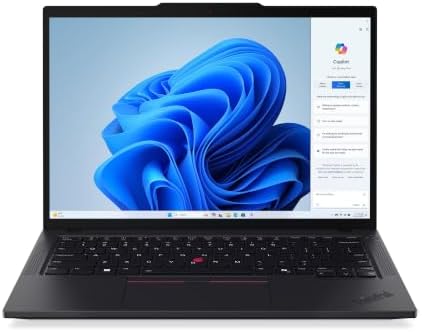
4. Lenovo ThinkPad T14 Gen 5 - best business laptop for home working

Lenovo ThinkPad T14 Gen 5 (Intel) specifications
- Processor: Intel Core Ultra 5 135U
- Memory: 16 GB DDR5, two slots, up to 64 GB
- Display: 14 in 1920x1200 IPS
- Camera and audio: 5 MP with privacy shutter; dual far-field microphones with Dolby Voice
- Ports: 2 x Thunderbolt 4, 2 x USB-A, HDMI 2.1, Ethernet
- Operating system: Windows 11 Pro
The Lenovo ThinkPad T14 Gen 5 costs £1,064.99 on Amazon UK at the time of writing (October 2026) with an Intel Core Ultra 5 135U, 16GB of DDR5, a 512GB SSD and Windows 11 Pro. It is the best laptop here for video calls: Lenovo's spec sheet lists a 5 MP camera with temporal noise reduction and a 360-degree far-field dual-microphone array with Dolby Voice.
The T14 Gen 5 also drives up to three external monitors through two Thunderbolt 4 ports and HDMI 2.1, has Ethernet for a wired connection, and keeps two memory slots for later upgrades. It suits employees who use their own laptop for work and need Windows 11 Pro to join a company domain. It costs £604.37 more than the Zenbook.
Lenovo ThinkPad T14 Gen 5 - pros and cons
Where to buy
Check price
5. Dell Latitude 5420 (renewed) - best budget laptop for working from home

Dell Latitude 5420 (renewed listing) specifications
- Processor: Intel Core i5-1135G7 (4 cores, 8 threads)
- Memory and storage: 16 GB, 512 GB SSD
- Display: 14 in 1920x1080
- Ports: 2 x Thunderbolt 4, 2 x USB-A, HDMI 2.0, Ethernet, microSD
- Operating system: Windows 11 Pro
The renewed Dell Latitude 5420 costs £254 on Amazon UK at the time of writing (October 2026), with a UK keyboard, an Intel Core i5-1135G7, 16GB of RAM, a 512GB SSD and Windows 11 Pro, covered by the one-year Amazon Renewed Guarantee. Two Thunderbolt 4 ports, HDMI 2.0 and Ethernet make it the best-connected laptop under £300 for a desk with a monitor and a wired router.
The webcam is the weak point. Dell's spec sheet lists 720p HD cameras on two of the Latitude 5420's three camera options, with 1080p only on the version with an IR sensor, so a renewed unit is likely to have 720p. The Logitech C920 HD Pro at £50 adds 1080p video and stereo microphones, and the pair still costs £304, less than any new 16GB Windows laptop on Amazon UK.
Dell Latitude 5420 (renewed) - pros and cons
Where to buy
Check price
Radar · 0-100 scores
- Zenbook 14 OLED UM3402YA (Ryzen 7 7730U, 16GB, 512GB)
- IdeaPad Slim 3 15 Gen 10 (Snapdragon X, 16GB, 512GB)
- ThinkPad T14 Gen 5 (Core Ultra 5 135U)
- Latitude 5420 (Renewed, Core i5-1135G7, 16GB, 512GB)
Does webcam resolution matter for working from home?
Yes. A 1080p webcam is the minimum for someone on video calls every day, because a 720p sensor loses detail and adds noise in the dim light of a typical home office. Google makes 1080p a requirement for every Chromebook Plus. Microphones matter as much: far-field arrays with noise processing, such as the ThinkPad T14 Gen 5's Dolby Voice system, pick up a voice across a desk without a headset.
| Laptop | Camera | Microphones | Monitor outputs | Windows edition |
|---|---|---|---|---|
| ASUS Zenbook 14 OLED UM3402YA | 1080p (PCWorld review unit) | Built-in microphones, hollow sound (PCWorld) | USB-C x2 (DP Alt Mode), HDMI 2.1 | Windows 11 Home |
| Lenovo IdeaPad Slim 3 15 (Snapdragon X) | 720p or 5 MP by configuration | Dual-microphone array | USB-C (DP 1.2), HDMI 1.4 | Windows 11 Home (Arm) |
| Lenovo IdeaPad Slim 3 14 Gen 10 | 720p, or 1080p with IR | Dual-microphone array | USB-C (4K 60 Hz), HDMI (4K 30 Hz) | Windows 11 Home |
| Lenovo ThinkPad T14 Gen 5 | 5 MP | Far-field dual array, Dolby Voice | 2 x Thunderbolt 4, HDMI 2.1 | Windows 11 Pro |
| Dell Latitude 5420 (renewed) | 720p on most options, 1080p with IR | Dual-array microphones | 2 x Thunderbolt 4, HDMI 2.0 | Windows 11 Pro |
Laptops with a 720p camera are easy to fix. The Logitech C920 HD Pro costs £50 on Amazon UK at the time of writing (October 2026) and records 1080p at 30 fps with a 78-degree field of view, autofocus and stereo microphones, according to Logitech. Clipped to a desk monitor, it also puts the camera at eye level. A headset beats any laptop microphone in a noisy house; see Best USB microphone UK 2026 for a desk mic.
How do you connect a laptop to a monitor at home?
Use a USB-C port with DisplayPort Alt Mode or the HDMI port. Every pick here has both, and a USB-C monitor with Power Delivery turns the laptop into a one-cable desk: video, charging and the monitor's USB ports run through a single lead. The Dell 27 Plus USB-C Monitor S2725DC costs £242 with a 27-inch 2560x1440 IPS panel at 144 Hz, 65W USB-C charging and a three-year warranty, according to Dell.
A monitor without USB-C needs a dock or hub. The Anker 8-in-1 USB-C Docking Station costs £30.99 and adds two HDMI outputs, Gigabit Ethernet, an SD card reader and 85W pass-through charging, according to Anker. On a budget, the AOC 24G4ZR costs £89.98 for a 23.8-inch 1920x1080 IPS screen with 130 mm of height adjustment and pivot; more cheap screens are ranked in Best budget gaming monitor UK 2026.
Do you need Windows 11 Pro to work from home?
Only when an employer requires it. Microsoft's comparison lists device encryption for Windows 11 Home, while BitLocker device encryption, support for Active Directory and Azure Active Directory (now Microsoft Entra ID), and Remote Desktop come with Windows 11 Pro. A self-employed worker or an employee who logs in through a browser and Teams can work on Home.
An employee whose company joins laptops to its domain or manages them through Entra ID needs Pro, as does anyone whose IT policy specifies BitLocker. The ThinkPad T14 Gen 5 and the renewed Latitude 5420 ship with Windows 11 Pro; the Zenbook and both IdeaPads ship with Home, which Microsoft sells an in-place upgrade for. Employers that supply a managed laptop set this up themselves.
How much does a home office setup cost?
A complete home office kit costs £417.30 to £1,530.30 on Amazon UK at the time of writing (October 2026), or 60p to £2.20 per working day over three years. Every kit includes the Logitech MK295 wireless keyboard and mouse at £23.32. Compare Electronic counts 232 working days a year: 260 weekdays less the 28 days of statutory annual leave a full-time UK worker receives, so 696 days over three years. The hybrid column assumes two days a week at home, about 278 days.
| Kit | Laptop | Monitor | Webcam | Mesh Wi-Fi | Total | Per day, full-time | Per day, hybrid |
|---|---|---|---|---|---|---|---|
| Budget | Dell Latitude 5420 (renewed) £254 | AOC 24G4ZR £89.98 | Logitech C920 £50 | None | £417.30 | £0.60 | £1.50 |
| Best overall | ASUS Zenbook 14 OLED £460.62 | Dell 27 Plus S2725DC £242 | Built in (1080p) | Deco X50 (3-pack) £199.99 | £925.93 | £1.33 | £3.33 |
| Battery | IdeaPad Slim 3 15 £499 | Dell 27 Plus S2725DC £242 | Built in | Deco X50 (3-pack) £199.99 | £964.31 | £1.39 | £3.47 |
| Business | ThinkPad T14 Gen 5 £1,064.99 | Dell 27 Plus S2725DC £242 | Built in (5 MP) | Deco X50 (3-pack) £199.99 | £1,530.30 | £2.20 | £5.50 |
The best-overall kit costs £1.33 a working day, and the monitor, keyboard and Wi-Fi outlast the laptop. The mesh Wi-Fi line is optional: it suits homes where the desk sits two or more walls from the router. Workers who need it only for one room can spend less, as explained in Wi-Fi extender vs mesh vs new router. The TP-Link Deco X50 (3-pack) costs £199.99 and TP-Link rates it at up to 604 m² of coverage; the alternatives are in Best mesh Wi-Fi UK 2026.
How should you set up a laptop for working from home?
Raise the screen and separate the keyboard. The Health and Safety Executive's posture guidance puts the top of the screen level with the eyes, about an arm's length away, and for long laptop sessions recommends a keyboard and mouse separate from the laptop so the screen can sit on a riser, or a separate display. HSE also states that employers must not charge home workers for equipment a workstation assessment shows they need.
- Desk. A sit-stand desk lets the screen height follow the user; picks are in Best standing desk UK 2026.
- Cables. A one-cable USB-C monitor removes most of the clutter; the rest is covered in How to hide cables on a desk.
- Connection. The ThinkPad T14 Gen 5, Latitude 5420 and Anker dock all take an Ethernet cable, the most reliable connection for video calls when the router is close.
What laptop should you buy for personal use at home?
For personal use, buy a laptop with 16GB of RAM, a 512GB SSD and a 1080p or sharper screen; the ASUS Zenbook 14 OLED UM3402YA meets all three for £460.62 and adds an OLED screen suited to streaming and photos. Households that live in a browser, Google Docs and streaming apps can spend less: the Acer Chromebook Plus 514 CB514-5H costs £419 with a 10-core Intel Core 5 120U and a 512GB SSD. Buyers who want full Windows compatibility at home should take the Lenovo IdeaPad Slim 3 14 Gen 10 at £599.
Verdict
The ASUS Zenbook 14 OLED UM3402YA at £460.62 is the best laptop for working from home in the UK on Amazon UK at the time of writing (October 2026): 16GB, a 1080p webcam and USB-C video for a one-cable desk. The renewed Dell Latitude 5420 at £254 is the best budget pick once a £50 webcam is added, the Lenovo IdeaPad Slim 3 15 (Snapdragon X) at £499 lasts longest away from the desk, and the Lenovo ThinkPad T14 Gen 5 at £1,064.99 is the pick for employees who need Windows 11 Pro and the best call quality. The rest of the budget shortlist is in Best laptop under £500 UK 2026.
Frequently asked questions
What is the best laptop for working from home in the UK?
The ASUS Zenbook 14 OLED UM3402YA is the best laptop for working from home in the UK in October 2026, at £460.62 on Amazon UK. It has an 8-core AMD Ryzen 7 7730U, 16GB of RAM, a 512GB SSD and a 2.8K OLED screen, and its two USB-C ports carry video and charging to a single-cable monitor. The ThinkPad T14 Gen 5 is the business step-up.
What is the best budget laptop for working from home?
The renewed Dell Latitude 5420 is the best budget laptop for working from home, at £254 on Amazon UK in October 2026. It has an Intel Core i5-1135G7, 16GB of RAM, a 512GB SSD, Windows 11 Pro, two Thunderbolt 4 ports, HDMI and Ethernet. Dell lists 720p webcams on most configurations, so a Logitech C920 at £50 improves video calls.
What laptop should I buy for personal use at home?
For personal use at home, buy a laptop with 16GB of RAM, a 512GB SSD and a 1080p or sharper screen. The ASUS Zenbook 14 OLED UM3402YA meets all three for £460.62 on Amazon UK in October 2026. Households that live in a browser and Google apps can spend less on the Acer Chromebook Plus 514 CB514-5H at £419.
Do you need Windows 11 Pro to work from home?
Only if an employer requires it. Microsoft lists device encryption for Windows 11 Home, but BitLocker device encryption, Active Directory and Azure Active Directory (now Microsoft Entra ID) support and Remote Desktop hosting come with Windows 11 Pro. An employer that joins laptops to a work domain needs Pro, which the Lenovo ThinkPad T14 Gen 5 and renewed Dell Latitude 5420 include.
Is a 1080p webcam important for working from home?
Yes, for anyone on video calls daily. A 1080p webcam captures more detail in low light than a 720p camera, and Google requires 1080p on every Chromebook Plus. The Lenovo ThinkPad T14 Gen 5 has a 5 MP camera. Laptops with a 720p camera, such as the renewed Dell Latitude 5420, pair well with the Logitech C920 at £50, a 1080p webcam with stereo microphones.
Can a Snapdragon laptop run Teams and a work VPN?
Microsoft Teams and the Microsoft 365 apps run natively on Snapdragon laptops such as the Lenovo IdeaPad Slim 3 15 Gen 10 with Snapdragon X. VPN clients and printer drivers are the risk, because Microsoft states that emulation on Windows on Arm does not cover drivers. Home workers should check that their employer's VPN client and their printer have Arm64 versions before buying.
How much does a home office setup cost in the UK?
A full home office setup costs £417.30 to £1,530.30 on Amazon UK in October 2026, from a renewed Dell Latitude 5420 with an AOC 24G4ZR monitor, Logitech MK295 and Logitech C920 to a ThinkPad T14 Gen 5 with a Dell 27 Plus USB-C monitor and mesh Wi-Fi. Over three years of 232 working days a year, that is 60p to £2.20 per working day.