

Best budget gaming monitors
The best budget gaming monitors in the UK for 2026, from the £89.98 AOC 24G4ZR to the LG UltraGear 27G610A and ASUS XG27AQDMES OLED, with price per Hz.
On this page
At a glance
The LG UltraGear 27G610A is the best budget gaming monitor in the UK in September 2026. The LG UltraGear 27G610A combines a 27-inch 1440p IPS panel, a 200 Hz refresh rate and VESA DisplayHDR 400 certification for £173.39 on Amazon UK at the time of writing. The AOC 24G4ZR is the pick under £150 at £89.98, the AOC Q27G42ZE delivers the most refresh rate per pound at 1440p, and the ASUS ROG Strix OLED XG27AQDMES is the best monitor under £400, bringing a QD-OLED panel and 240 Hz for £359.00.
Every price in this guide is the Amazon UK figure at the time of writing (September 2026), and every pick sits under its tier at that price. Recommendations rest on manufacturer specifications and UK pricing. This guide deliberately avoids the monitors in the best gaming monitor for PC guide, so the two can be read side by side.
How much should you spend on a budget gaming monitor?
£150 to £180 is the sweet spot for a budget gaming monitor in 2026, because that money now buys a 27-inch 1440p panel running at 200 Hz or more. The three tiers in this guide look like this:
- Under £150: 24-inch 1080p Fast IPS at 180 Hz to 260 Hz. The AOC 24G4ZR costs £89.98 and reaches 260 Hz.
- Under £250: 27-inch 1440p IPS at 180 Hz to 260 Hz, with DisplayHDR 400 at the top of the tier. The AOC Q27G42ZE costs £158.98 and the LG UltraGear 27G610A £173.39.
- Under £400: entry 1440p OLED. The Samsung Odyssey OLED G5 costs £324.95 at 180 Hz and the ASUS ROG Strix OLED XG27AQDMES £359.00 at 240 Hz.
The graphics card matters as much as the monitor. A 1440p 240 Hz panel paired with an entry graphics card wastes most of its refresh rate in demanding games, so check the pairing table further down before buying.
IPS, VA or OLED: which panel type suits a budget build?
IPS is the default choice under £250, and OLED is the upgrade under £400. The three panel types trade off like this:
- IPS (and Fast IPS): accurate colour, wide viewing angles and 1 ms grey-to-grey response times. Contrast sits around 1,000:1, so blacks look grey in a dark room. Three of the five picks here are Fast IPS or IPS.
- VA: roughly 3,000:1 contrast for deeper blacks than IPS, often on curved panels, but slower dark transitions that smear in fast motion. VA is cheap but has lost ground to Fast IPS at the same price.
- OLED: self-lit pixels give contrast ratios of 1,000,000:1 and above and a 0.03 ms response time. The trade-offs are lower full-screen brightness (200 nits typical on both budget OLEDs here) and a burn-in risk that warranties now address.
The full breakdown, including how each panel handles HDR and static desktop use, is in IPS vs VA vs OLED.
1. LG UltraGear 27G610A - best budget gaming monitor overall

LG UltraGear 27G610A specifications
- Screen size: 27 inches
- Resolution: 2560x1440
- Panel: IPS
- Refresh rate: 200 Hz
- Response time: 1 ms GtG
- Brightness: 400 nits
- HDR: DisplayHDR 400
- sRGB coverage: 99 %
The LG UltraGear 27G610A is the best budget gaming monitor for most UK buyers at £173.39 on Amazon UK at the time of writing. LG rates the 27G610A at 200 Hz, 1 ms grey-to-grey and 400 nits, and the panel carries VESA DisplayHDR 400 certification, which neither AOC pick at this tier has. LG quotes 99% sRGB coverage, so colours look correct out of the box for games and everyday use.
The 27G610A also has the features that separate a gaming monitor from a cheap office screen: AMD FreeSync Premium, two HDMI inputs, a DisplayPort 1.4 input with DSC, and a stand that LG lists with height, tilt, swivel and pivot adjustment. DisplayHDR 400 is the entry HDR tier, so HDR highlights look brighter rather than dramatic; true HDR impact needs an OLED or a local-dimming panel.
The LG UltraGear 27G610A suits buyers with an RTX 5060 Ti, RX 9060 XT 16 GB or similar card who want one monitor that handles competitive shooters and single-player games equally well.
LG UltraGear 27G610A - pros and cons
Where to buy
Check price
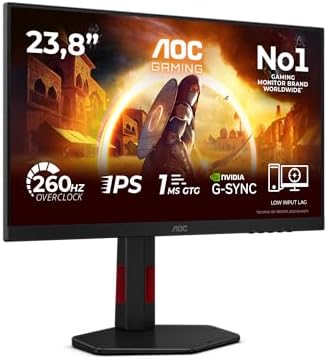
2. AOC 24G4ZR - best gaming monitor under £150

AOC 24G4ZR specifications
- Screen size: 23.8 inches
- Resolution: 1920x1080
- Panel: Fast IPS
- Refresh rate: 240 Hz native, 260 Hz overclocked
- Response time: 1 ms GtG
- Brightness: 300 nits
- Height adjustment: 130 mm
- Pivot: Yes
The AOC 24G4ZR is the best gaming monitor under £150, and it costs well under that at £89.98 on Amazon UK at the time of writing. AOC rates the 24G4ZR at 240 Hz native and 260 Hz overclocked on a 23.8-inch 1080p Fast IPS panel, with a 1 ms grey-to-grey response time and 300 nits brightness.
The stand is the surprise at this price. AOC specifies 130 mm of height adjustment plus tilt, swivel and a 90-degree pivot, which most sub-£100 monitors skip entirely. At 24 inches, 1080p gives a pixel density of about 92 pixels per inch, which is the standard esports size: the whole screen stays in view without moving the head.
The AOC 24G4ZR suits competitive players in Counter-Strike 2, Valorant and Fortnite, and anyone building an entry gaming PC with an RTX 3050, RTX 5060 or RX 6600 class card. For a cheap PC to pair with it, see best cheap gaming PC UK 2026.
AOC 24G4ZR - pros and cons
Where to buy
Check price
3. AOC Q27G42ZE - most refresh rate per pound at 1440p

AOC Q27G42ZE specifications
- Screen size: 27 inches
- Resolution: 2560x1440
- Panel: Fast IPS
- Refresh rate: 240 Hz native, 260 Hz overclocked
- Response time: 1 ms GtG
- Brightness: 300 nits
- HDMI inputs: 1
- DisplayPort inputs: 1
The AOC Q27G42ZE is the cheapest route to 1440p at 240 Hz, at £158.98 on Amazon UK at the time of writing. AOC rates the Q27G42ZE at 240 Hz native and 260 Hz overclocked on a 27-inch 2560 x 1440 Fast IPS panel, with 1 ms grey-to-grey and 300 nits. That is 60 Hz more than the LG UltraGear 27G610A for £14.41 less.
The savings show in the details. The Q27G42ZE has one HDMI 2.0 and one DisplayPort 1.4 input, against two HDMI inputs on the LG, and it lacks DisplayHDR certification. Owners who plan to connect a PC and a console at once will run out of HDMI ports.
The AOC Q27G42ZE suits PC-only buyers who play fast competitive games at 1440p and have an RTX 5070 or RX 9070 class card that can push frame rates past 200 fps in those titles.
AOC Q27G42ZE - pros and cons
Where to buy
Check price
4. Samsung Odyssey OLED G5 - cheapest 1440p OLED

Samsung Odyssey OLED G5 LS27FG502SUXXU specifications
- Screen size: 27 inches
- Resolution: 2560x1440
- Panel: QD-OLED
- Refresh rate: 180 Hz (DisplayPort)
- Refresh rate over HDMI: 144 Hz
- Response time: 0.03 ms GtG
- Typical brightness: 200 nits
- DCI-P3 coverage: 99 %
The Samsung Odyssey OLED G5 is the cheapest 1440p OLED gaming monitor on Amazon UK, at £324.95 at the time of writing. Samsung rates the Odyssey OLED G5 LS27FG502SUXXU at 180 Hz over DisplayPort and 144 Hz over HDMI, with a 0.03 ms response time, a 1,000,000:1 contrast ratio and 99% DCI-P3 colour coverage.
180 Hz is lower than any IPS pick in this guide, but OLED motion at 180 Hz looks cleaner than IPS at the same figure because each pixel switches almost instantly. Samsung's Glare Free coating cuts reflections, and the OLED Safeguard system shifts pixels and detects static logos and taskbars to reduce burn-in risk.
The Samsung Odyssey OLED G5 suits buyers who play atmospheric single-player games in a dimmer room and want OLED contrast for the lowest possible outlay.
Samsung Odyssey OLED G5 - pros and cons
Where to buy
Check price
5. ASUS ROG Strix OLED XG27AQDMES - best gaming monitor under £400

ASUS ROG Strix OLED XG27AQDMES specifications
- Screen size: 26.5 inches
- Resolution: 2560x1440
- Panel: QD-OLED
- Refresh rate: 240 Hz
- Response time: 0.03 ms GtG
- Brightness: 200 nits typical, 400 nits HDR peak
- HDMI 2.1 inputs: 2
- Warranty: 3 years including burn-in
The ASUS ROG Strix OLED XG27AQDMES is the best gaming monitor under £400, at £359.00 on Amazon UK at the time of writing. ASUS rates the XG27AQDMES at 240 Hz on a 26.5-inch 2560 x 1440 QD-OLED panel, with a 0.03 ms response time, a 1,500,000:1 contrast ratio and 99% DCI-P3 colour coverage.
Two details make the XG27AQDMES the safer OLED buy. ASUS backs it with a 3-year warranty that explicitly includes panel burn-in, and it has two HDMI 2.1 inputs alongside DisplayPort 1.4 with DSC, so a PS5 or Xbox Series X can run at 120 Hz while a PC stays connected. The stand adjusts 110 mm in height with tilt, swivel and pivot. Brightness is the limit: 200 nits typical and a 400 nit HDR peak suit a dim room better than a sunlit one.
The ASUS ROG Strix OLED XG27AQDMES suits buyers with an RTX 5070 Ti or RX 9070 XT class card who want the motion clarity and contrast of OLED without paying flagship prices.
ASUS ROG Strix OLED XG27AQDMES - pros and cons
Where to buy
Check price
Radar · 0-100 scores
- UltraGear 27G610A
- 24G4ZR
- ROG Strix OLED XG27AQDMES
- Q27G42ZE
Which budget monitor gives the most refresh rate per pound?
The AOC 24G4ZR gives the most refresh rate per pound, at 35p per Hz. Compare Electronic's price-per-Hz breakdown divides each Amazon UK price at the time of writing by the maximum advertised refresh rate, and by the native rate where the headline figure is an overclock.
| Monitor | Price | Refresh (Hz) | Price per Hz | Per native Hz |
|---|---|---|---|---|
| AOC 24G4ZR | £89.98 | 260 (240 native) | £0.35 | £0.37 |
| AOC Q27G42ZE | £158.98 | 260 (240 native) | £0.61 | £0.66 |
| LG UltraGear 27G610A | £173.39 | 200 | £0.87 | £0.87 |
| ASUS ROG Strix OLED XG27AQDMES | £359.00 | 240 | £1.50 | £1.50 |
| Samsung Odyssey OLED G5 | £324.95 | 180 | £1.81 | £1.81 |
Two patterns stand out. Moving from 1080p to 1440p roughly doubles the cost per Hz, from 35p to 61p, because a 1440p panel pushes 78% more pixels. Moving from IPS to OLED roughly doubles it again, to £1.50 on the ASUS. The ASUS XG27AQDMES is cheaper per Hz than the Samsung Odyssey OLED G5 despite the higher sticker price, because it adds 60 Hz for £34.05 more.
Which graphics card drives each monitor?
A 1080p 144 Hz monitor needs only an entry graphics card, while a 1440p 240 Hz monitor needs an RTX 5070 Ti or Radeon RX 9070 XT class card to make full use of it in demanding games. Compare Electronic's pairing table matches each resolution and refresh target to the graphics card tier that suits it.
| Target | Graphics card tier | Matching pick |
|---|---|---|
| 1080p / 144 Hz | RTX 3050, Radeon RX 6600, Arc B570 | Any 1080p pick; AOC 24G4ZR |
| 1080p / 240 Hz | RTX 5060, Radeon RX 9060 XT 8 GB | AOC 24G4ZR |
| 1440p / 144-180 Hz | RTX 5060 Ti 16 GB, Radeon RX 9060 XT 16 GB | Samsung Odyssey OLED G5 |
| 1440p / 200 Hz | RTX 5070, Radeon RX 9070 | LG UltraGear 27G610A |
| 1440p / 240 Hz | RTX 5070 Ti, Radeon RX 9070 XT | AOC Q27G42ZE, ASUS XG27AQDMES |
The tiers assume demanding recent games at high settings, with upscaling such as DLSS or FSR where available. Esports titles such as Counter-Strike 2 and Valorant are far lighter and reach high refresh rates on one tier down. A card that falls short of the target is not wasted: G-Sync Compatible and FreeSync keep motion smooth at any frame rate inside the monitor's variable refresh range. For complete systems at each tier, see best gaming PC UK 2026 and best gaming PC under £1,500.
Best budget gaming monitor UK 2026 spec sheet
| Spec | LG 27G610A | AOC 24G4ZR | AOC Q27G42ZE | ASUS XG27AQDMES |
|---|---|---|---|---|
| Size | 27 in | 23.8 in | 27 in | 26.5 in |
| Resolution | 2560x1440 | 1920x1080 | 2560x1440 | 2560x1440 |
| Panel | IPS | Fast IPS | Fast IPS | QD-OLED |
| Max refresh | 200 Hz | 260 Hz | 260 Hz | 240 Hz |
| Response | 1 ms | 1 ms | 1 ms | 0.03 ms |
| Brightness | 400 nits | 300 nits | 300 nits | 200 nits |
| Price (Sept 2026) | £173.39 | £89.98 | £158.98 | £359.00 |
The Samsung Odyssey OLED G5 sits outside the table: 27 inches, 2560 x 1440 QD-OLED, 180 Hz, 0.03 ms and 200 nits typical, at £324.95.
What does the extra £185.61 for OLED actually buy?
The £185.61 gap between the LG UltraGear 27G610A (£173.39) and the ASUS ROG Strix OLED XG27AQDMES (£359.00) buys contrast, motion clarity and 40 Hz, and costs brightness. Line by line:
- Contrast: 1,000:1 on the LG rises to 1,500,000:1 on the ASUS, the single largest visible difference in a dark room.
- Response time: 1 ms grey-to-grey falls to 0.03 ms, which removes the faint trailing that IPS shows behind fast objects.
- Refresh rate: 200 Hz rises to 240 Hz, a 20% increase.
- Console ports: HDMI 2.0 becomes two HDMI 2.1 inputs.
- Brightness: 400 nits typical falls to 200 nits typical, so the LG is the better screen in a bright room.
- Warranty: the ASUS carries a 3-year warranty that covers burn-in, which removes most of the risk of OLED on a desktop.
On top of any manufacturer warranty, the Consumer Rights Act 2015 gives UK buyers 30 days to reject a faulty monitor for a full refund, and Amazon UK's standard returns window applies to change-of-mind returns. Check for dead pixels and backlight bleed on arrival.
Who should skip a budget gaming monitor?
Buyers with an RTX 5080 or faster should skip this tier, because a card that powerful is built for 4K or 1440p at 360 Hz and above. The best 4K gaming monitor and best OLED gaming monitor guides cover that end. Three other groups should look elsewhere:
- Console-only players:the PS5 and Xbox Series X cap at 120 Hz, so a 240 Hz monitor's extra refresh rate goes unused. A TV often suits a console better.
- Sim racers and strategy players: a 34-inch ultrawide adds more than extra refresh rate does. See the best ultrawide monitor guide.
- Bright-room office users: the two OLEDs run at 200 nits typical and show static taskbars all day. An IPS pick is the safer choice.
Verdict: the best budget gaming monitor in the UK
The LG UltraGear 27G610A is the best budget gaming monitor in the UK in September 2026: 1440p, 200 Hz, DisplayHDR 400 and a full stand for £173.39 on Amazon UK. The AOC 24G4ZR is the best monitor under £150 at £89.98, the AOC Q27G42ZE gives the most 1440p refresh rate per pound at £158.98, and the ASUS ROG Strix OLED XG27AQDMES is the best monitor under £400 at £359.00. The Samsung Odyssey OLED G5 is the cheapest OLED at £324.95.
Frequently asked questions
What is the best budget gaming monitor in the UK?
The LG UltraGear 27G610A is the best budget gaming monitor in the UK in September 2026. It pairs a 27-inch 1440p IPS panel with a 200 Hz refresh rate, a 1 ms response time and VESA DisplayHDR 400, and it cost £173.39 on Amazon UK at the time of writing. That is a genuine 1440p high refresh monitor for under £200.
What is the best gaming monitor under £150?
The AOC 24G4ZR is the best gaming monitor under £150. The AOC 24G4ZR is a 23.8-inch 1080p Fast IPS monitor rated at 240 Hz native and 260 Hz overclocked, with a stand that adjusts 130 mm in height and pivots. It cost £89.98 on Amazon UK at the time of writing, which works out at under 35p per Hz of refresh rate.
What is the cheapest OLED gaming monitor worth buying?
The Samsung Odyssey OLED G5 LS27FG502SUXXU was the cheapest 1440p OLED gaming monitor on Amazon UK at £324.95 in September 2026. The Samsung Odyssey OLED G5 runs at 180 Hz over DisplayPort with a 0.03 ms response time. The ASUS ROG Strix OLED XG27AQDMES costs £359.00 and adds 240 Hz plus a 3-year warranty that covers burn-in.
Is 1080p or 1440p better for a budget gaming monitor?
1440p is the better choice for most budget buyers in 2026 because 27-inch 1440p monitors such as the AOC Q27G42ZE and LG UltraGear 27G610A now cost under £175. 1080p still suits 24-inch esports setups and entry graphics cards such as the RTX 3050 or RX 6600, where high frame rates matter more than sharpness.
What graphics card do I need for a 1440p 240 Hz monitor?
A 1440p 240 Hz monitor such as the ASUS ROG Strix OLED XG27AQDMES suits an RTX 5070 Ti or Radeon RX 9070 XT class graphics card for demanding games. Lighter esports titles reach high frame rates on an RTX 5060 Ti. Demanding recent games at high settings usually run well below 240 fps, and variable refresh rate keeps motion smooth in between.
Should I buy IPS or OLED on a budget?
IPS is the better budget buy for bright rooms and long desktop use, while OLED is the better buy for dark-room gaming and motion clarity. The LG UltraGear 27G610A IPS reaches 400 nits for £173.39. The ASUS ROG Strix OLED XG27AQDMES has a 1,500,000:1 contrast ratio and 0.03 ms response time for £359.00, with burn-in covered for 3 years.
Are budget gaming monitors good for PS5 and Xbox Series X?
Budget gaming monitors work well with PS5 and Xbox Series X, but the consoles cap at 120 Hz, so refresh rates above 120 Hz only help a PC. The ASUS ROG Strix OLED XG27AQDMES has two HDMI 2.1 ports, making it the most console-friendly pick here. For a living-room screen, a TV with HDMI 2.1 is usually the better console display.