
Do you need a capture card?
Not for a PS5, Xbox or one gaming PC: both consoles stream to Twitch and OBS captures PC games directly. Switch 2, two-PC and camera setups need one.
On this page
Do you need a capture card to stream?
No, not for most setups: a PS5 broadcasts to Twitch and YouTube from its own menu, an Xbox Series X|S streams to Twitch from the guide, and OBS Studio captures a game running on the same PC without extra hardware. A capture card is needed for a Nintendo Switch 2, a two-PC setup, a console stream with overlays and alerts, or an HDMI camera.
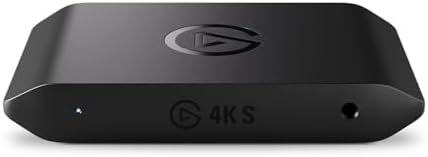
When a card is needed, the Elgato Game Capture 4K S at £149.99 on Amazon UK at the time of writing (October 2026) works with the PS5, Xbox Series X|S and Switch 2. The ranked shortlist is in Best capture cards UK 2026, and the purchase most new streamers need first is in Best USB microphone UK 2026.
| Situation | Capture card? | Why |
|---|---|---|
| Streaming from the PS5 or Xbox menu | No | Both consoles stream to Twitch built in |
| Streaming a game on the same PC | No | OBS Studio captures the game directly |
| Console into a PC for overlays and alerts | Yes | The PC needs the console's HDMI signal |
| Two PCs, Nintendo Switch 2 or an HDMI camera | Yes | HDMI has to reach a computer |
Can you stream from a PS5 or Xbox without a capture card?
Yes. Sony's support page says PS5 broadcasting needs a linked YouTube or Twitch account, then the create button, Broadcast and Go Live, with options for microphone audio, party audio and Sony's HD Camera. Xbox Series X|S streams to Twitch from Capture and share, then Live streaming, according to Xbox Wire, which adds webcam support and manual resolution and bitrate settings.
The limits are quality and branding. Elgato puts the PS5 at up to 1080p and 60 fps and the Xbox at 1080p and 30 fps, Twitch only, with about 6 megabits per second on Twitch, which can look blocky in fast games. Neither console adds on-screen graphics or follower alerts, and Twitch's 1440p Enhanced Broadcasting, open to Partners and Affiliates, works only from a PC, according to Elgato. A capture card fixes all three by sending the console's picture to OBS Studio on a PC. PS5 owners must switch HDCP off under Settings, System, HDMI first, as Elgato's setup guide notes.
Do you need a capture card to stream PC games?
No. OBS Studio's Game Capture source "directly captures the DirectX or OpenGL game you are playing", and OBS calls it "the most efficient way" to add a game, so a single gaming PC streams with free software and no extra hardware. A capture card only enters a PC setup with a second, dedicated streaming PC, which takes the gaming PC's HDMI output and does the encoding. A modern graphics card encodes the stream alongside the game, so one well-specified PC replaces the second machine; budgets for that PC are in How much should I spend on a gaming PC?
On one PC, the money is better spent on sound. The HyperX QuadCast 2 Frost costs £89.99 and the FIFINE K688 £56.49, both less than the 4K S. Headset microphones are compared in Gaming headset mic vs USB microphone.
Which setups need a capture card?
Four of the eight common setups need no capture card and cost nothing extra; the other four need one, from £66.45 for a camera to £199.99 for an internal card in a two-PC rig. Compare Electronic's decision table gives a suitable route for each, at Amazon UK prices on 6 October 2026.
| Setup | Capture card? | What to use | Extra cost |
|---|---|---|---|
| PS5, streaming from the console | No | Broadcast to Twitch or YouTube, up to 1080p60 | £0 |
| Xbox Series X|S, streaming from the console | No, for Twitch | Twitch only, up to 1080p30 | £0 |
| Console with overlays, alerts or Xbox to YouTube | Yes | Elgato Game Capture Neo | £92.37 |
| One gaming PC | No | OBS Studio Game Capture source | £0 |
| Two PCs: gaming PC plus streaming PC | Yes | Elgato 4K Pro (internal PCIe) | £199.99 |
| Nintendo Switch 2 | Yes | Elgato Game Capture 4K S | £149.99 |
| DSLR, mirrorless or camcorder | Yes, a camera capture device | Elgato Cam Link 4K | £66.45 |
| USB webcam | No | Plugs into the PC, or into an Xbox | £0 |
The Switch 2 row is the one most buyers miss. Elgato says a docked Switch 2 outputs up to 120 fps at 1080p or 1440p with HDR10, and Elgato describes the console's own streaming tools as limited. The price ladder shows what each step above the cheapest card buys.
| Card | Price | Capture | Passthrough | Extra over the Neo |
|---|---|---|---|---|
| Elgato Game Capture Neo | £92.37 | 1080p60 | 4K60 HDR | Baseline |
| Elgato Game Capture 4K S | £149.99 | 4K60, 1440p144, 1080p240 | 4K60 HDR, 1080p240 VRR | £57.62 |
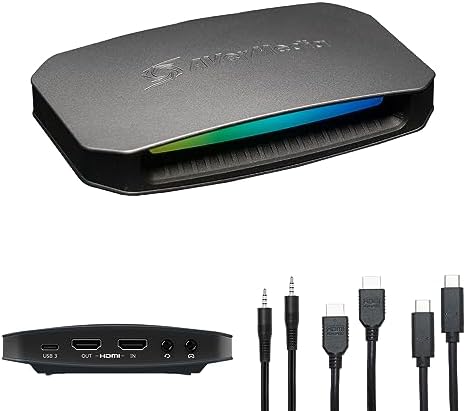
| AVerMedia Live Gamer ULTRA 2.1 (GC553G2) | £169.99 | 4K60 HDR | 4K144 VRR | £77.62 |
| Elgato 4K Pro (internal) | £199.99 | 4K60 HDR10 | 8K60 | £107.62 |
£57.62 over the Neo buys 4K and high frame rate capture, the step a Switch 2 at 120 fps needs. The AVerMedia adds £20.00 for 4K144 passthrough over HDMI 2.1, which matters only with a 4K 144 Hz display, and the internal 4K Pro suits a desktop streaming PC with a free PCIe slot.
Which capture card should you buy?
The Elgato Game Capture 4K S is the capture card to buy for a console, at £149.99 on Amazon UK at the time of writing (October 2026). Elgato rates it at 4K60, 1440p144 and 1080p240 capture over a USB-C UVC connection, with up to 4K60 HDR passthrough, and recommends it in place of the discontinued HD60 X.

Elgato Game Capture 4K S specifications (Elgato)
- Capture: up to 4K60, 1440p144 and 1080p240
- HDR capture: up to 1080p60, Windows only
- Passthrough: up to 4K60 HDR10, 1440p144 and 1080p240 with VRR
- Ports: HDMI 2.0 in and out, USB-C (USB 3.2 Gen 1, 5Gbps), 3.5 mm line-in
- Systems: Windows, Mac and iPad; works in OBS Studio, Elgato Studio and Meld Studio
- Size and weight: 112 x 72 x 17 mm, 90 g
Elgato quotes latency as low as 30 ms for playing through the preview window on capable setups, and the 3.5 mm line-in works with Elgato's Chat Link Pro to record party chat. The compromises are HDMI 2.0 passthrough, which stops 4K at 60 Hz, and HDR capture that is limited to 1080p60 on Windows.
Elgato Game Capture 4K S - pros and cons
Where to buy
Check price
Three alternatives cover other setups, at Amazon UK prices on 6 October 2026.
Also consider
Radar · 0-100 scores
- Elgato Game Capture 4K S
- Elgato Game Capture Neo
- AVerMedia GC553G2 Live Gamer ULTRA 2.1
- Elgato 4K Pro Capture Card
Verdict
A PS5, an Xbox or a single gaming PC streams without a capture card; a Switch 2, a two-PC setup or a console stream with overlays needs one. The Elgato Game Capture 4K S at £149.99 works with the PS5, Xbox Series X|S and Switch 2, and captures a Switch 2 at 120 fps. The full shortlist is in Best capture cards UK 2026.
Frequently asked questions
Can you stream on Twitch from a PS5 without a capture card?
Yes. The PS5 broadcasts to Twitch or YouTube from the create button once the account is linked, according to Sony, and Elgato puts the limit at 1080p and 60 fps. Sony's HD Camera adds a facecam. A capture card adds overlays, alerts and better encoding through a PC; the Elgato Game Capture 4K S costs £149.99 on Amazon UK at the time of writing (October 2026).
Can you stream to YouTube from an Xbox Series X|S?
Not with the console's built-in tools. Xbox Series X|S streams to Twitch from the Capture and share menu, according to Xbox Wire, and Elgato says YouTube and Kick are not supported and console streams stop at 1080p and 30 fps. Streaming Xbox gameplay to YouTube needs a capture card and a PC, such as the Elgato Game Capture Neo at £92.37.
Do you need a capture card to stream PC games?
No. OBS Studio's Game Capture source records a DirectX or OpenGL game running on the same PC, and OBS calls it the most efficient way to add a game. A capture card is needed only in a two-PC setup, where the Elgato 4K Pro internal card costs £199.99 on Amazon UK at the time of writing (October 2026).
Do you need a capture card for Nintendo Switch 2?
Yes, for a proper stream. Elgato describes the Switch 2's own streaming tools as limited, so a capture card and a computer are the route to Twitch or YouTube. Elgato says a docked Switch 2 outputs up to 120 fps at 1080p or 1440p with HDR10. The Elgato Game Capture 4K S captures 1440p at up to 144 fps and costs £149.99 on Amazon UK in October 2026.
Why does a PS5 show a black screen through a capture card?
HDCP copy protection is switched on. Elgato's setup guide says to connect the PS5 directly to a TV, open Settings, then System, then HDMI, and switch HDCP off before connecting a capture card, because HDCP blocks video capture. Capture cards such as the Elgato Game Capture 4K S accept unencrypted HDMI only.
Is the Elgato HD60 X still worth buying?
No. Elgato lists the HD60 X as discontinued and recommends the Game Capture 4K S in its place. On Amazon UK in October 2026 the HD60 X costs £136.00 and the Elgato Game Capture 4K S £149.99, so £13.99 more buys 4K capture at 60 fps instead of the HD60 X's 30 fps, plus 1440p144 capture.