

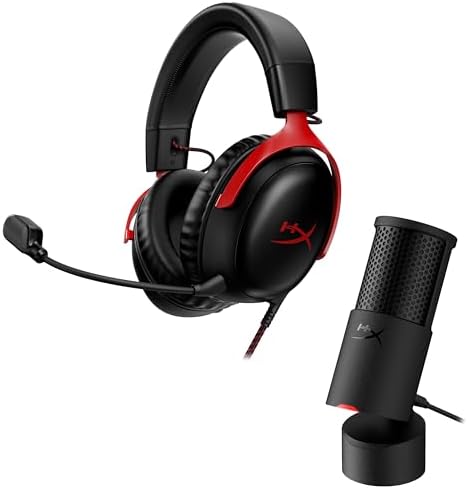
Boom mic or desk mic?
Gaming headset mic vs USB microphone: the £64 HyperX Cloud III against the £98 QuadCast 2 Frost on keyboard noise, Discord, PS5 and the full cost of a setup.
On this page
At a glance
A gaming headset mic is enough for Discord, Teams and in-game chat, and a USB microphone earns its place only for streaming, YouTube voiceovers, podcasts and remote interviews. The HyperX Cloud III has a 10 mm boom mic rated at 50 Hz to 17 kHz for £64.00 on Amazon UK at the time of writing (September 2026), while the HyperX QuadCast 2 Frost adds three 14 mm capsules, a 20 Hz to 20 kHz range and 24-bit/96 kHz recording for £98.00.
Distance decides more than the capsule. A boom mic sits a few centimetres from the mouth (2.5 cm in this comparison's sums), while a desk mic on its stand often sits 30 cm away, which costs about 21.6 dB of voice level against the keyboard and the room. Chat apps then squeeze both mics into 58 to 64 kbps. This comparison sets the HyperX Cloud III against the HyperX QuadCast 2 Frost and the HyperX Cloud III + SoloCast 2 bundle, then prices every setup from headset only to headset, mic, boom arm and foam cover.
Does a USB microphone sound better than a gaming headset mic?
Yes: a USB desk mic captures a wider, fuller voice than a headset boom mic, on paper and in independent reviews. The HyperX spec sheets show where the difference comes from:
- Capsule: the HyperX Cloud III uses one 10 mm electret condenser capsule; the HyperX QuadCast 2 Frost uses three 14 mm electret condenser capsules.
- Frequency response: 50 Hz to 17 kHz for the HyperX Cloud III mic (HyperX launch specifications, May 2023) against 20 Hz to 20 kHz for the HyperX QuadCast 2 Frost.
- Recording:HyperX lists 16-bit and 24-bit audio for the HyperX Cloud III's USB adapter and 24-bit/96 kHz for the HyperX QuadCast 2 Frost.
- Polar pattern: the HyperX Cloud III mic is uni-directional and noise-cancelling; the HyperX QuadCast 2 Frost switches between cardioid, omnidirectional, stereo and bidirectional.
TechRadar's November 2024 review of the HyperX QuadCast 2 found that "recordings are warm, and the cardioid mode boasts crystal-clear clarity", with no settings to change out of the box. SoundGuys takes the same line on headsets in general: an external mic "will almost always" sound better, because it is designed to reproduce a natural frequency response, while gaming headsets "fall short of dedicated microphones in terms of audio quality".

HyperX QuadCast 2 Frost specifications
- Capsules: three 14 mm electret condenser
- Polar patterns: cardioid, omnidirectional, stereo, bidirectional
- Recording: 24-bit / 96 kHz
- Frequency response: 20 Hz to 20 kHz
- Controls: tap-to-mute sensor; multifunction knob for gain, playback volume, monitoring volume and polar pattern
- Outputs: USB-C, 3.5 mm headphone jack; USB-C to USB-A adapter and 3 m cable in the box
- Mounting: removable shock mount with 3/8-inch and 5/8-inch threads, desk stand included
- Platforms (HyperX): PC, Mac, PS4, PS5, Nintendo Switch, Steam Deck
The HyperX QuadCast 2 Frost costs £98.00 on Amazon UK at the time of writing (September 2026), £26.99 below the £124.99 UK price TechRadar quoted in its November 2024 review. The Frost is a colourway of the standard HyperX QuadCast 2 with the same capsules and controls; the full-RGB HyperX QuadCast 2 S records at 32-bit/192 kHz, which Tom's Hardware calls "definitely overkill for a gaming mic". TechRadar's one caution is the pattern: "on settings other than cardioid, however, the mic is noticeably worse at cutting out background noise". The HyperX QuadCast 2 Frost suits streamers and creators who want one plug-in mic with every control on the body.
HyperX QuadCast 2 Frost vs HyperX Cloud III mic - pros and cons
Where to buy
Check price
How good is the HyperX Cloud III headset mic?
The HyperX Cloud III mic is good enough for game chat and work calls: RTINGS lists "very good mic performance" among the headset's strengths and says its detachable boom mic keeps a voice "clear and full-bodied, even with some noise in the background".
- RTINGS:rates the HyperX Cloud III's mic as very good overall and notes the USB adapter works with PCs and PlayStation, while Xbox connects through the analogue cable.
- SoundGuys:calls the mic "decent as far as gaming headsets go". Of 2,301 SoundGuys readers who rated its voice sample, 52% chose Good and 25% chose Perfect, a combined 77%.
- HyperX: the 10 mm capsule has an internal metal mesh pop filter, a -42 dBV sensitivity and an LED that lights when the mic is muted.

HyperX Cloud III (wired) specifications
- Mic: 10 mm electret condenser, uni-directional, noise-cancelling, detachable
- Mic frequency response: 50 Hz to 17 kHz; sensitivity -42 dBV
- Drivers: 53 mm dynamic, 10 Hz to 21 kHz
- Connections: 3.5 mm, plus a USB adapter with USB-C and USB-A plugs
- USB audio: 16-bit and 24-bit
- Platforms (HyperX): PC, PS5, PS4, Xbox Series X|S, Xbox One, Nintendo Switch, Mac, mobile
- Weight: 0.70 lb (about 318 g) with the mic
The HyperX Cloud III costs £64.00 on Amazon UK at the time of writing (September 2026), against a $99.99 US launch price. It is also a complete pair of headphones, which any desk mic still needs: a USB mic sitting near open speakers picks the game audio back up. The HyperX Cloud III suits players who chat more than they stream and anyone who plays on Xbox. The best gaming headset UK 2026 and best budget gaming headset UK 2026 guides rank the alternatives.
HyperX Cloud III mic vs HyperX QuadCast 2 Frost - pros and cons
Where to buy
Check price
Which picks up more keyboard and room noise, a headset mic or a USB mic?
A headset mic usually picks up less keyboard noise than a USB mic, because it sits several times closer to the mouth, not because its capsule is better. Shure explains the rule: every time the distance between mouth and mic doubles, the voice arrives 6 dB quieter (the inverse square law). The keyboard does not move, so a desk mic raises the room relative to the voice. Compare Electronic applied that rule to five common placements:
| Placement | Mouth to mic | Keyboard to mic | Voice level | Voice over keyboard |
|---|---|---|---|---|
| Headset boom mic | 2.5 cm | 40 cm | 0 dB (reference) | +24.1 dB |
| USB mic on a boom arm, close | 10 cm | 40 cm | -12.0 dB | +12.0 dB |
| USB mic on a boom arm, relaxed | 15 cm | 40 cm | -15.6 dB | +8.5 dB |
| USB mic on its desk stand | 30 cm | 25 cm | -21.6 dB | -1.6 dB |
| USB mic pushed back behind the keyboard | 45 cm | 20 cm | -25.1 dB | -7.0 dB |
A USB mic on its own stand, level with the keyboard, loses its voice advantage entirely; the same mic on a boom arm at 10 cm wins back 13.6 dB. SoundGuys makes the same point from the other side: a headset mic sits closer to the mouth than an external mic, so it can be better at cancelling out keyboard clicks. The polar pattern adds the rest:
- Cardioid: picks up the front and rejects the rear. The HyperX QuadCast 2 Frost should stay in cardioid for gaming, with the keyboard behind or below the capsule.
- Omnidirectional and stereo: hear the whole room, which TechRadar found noticeably worse at cutting background noise.
- Noise-cancelling boom: the HyperX Cloud III mic is uni-directional and noise-cancelling by design.
Loud switches defeat both. SoundGuys warns there is "only so much gaming headset mic hardware can do" with a loud keyboard, and suggests lowering input sensitivity in Discord or buying a quieter keyboard; the mechanical keyboard switches explainer covers the quieter options.
Do Discord and Teams compression narrow the gap?
Yes, a long way: chat apps send a voice at a small fraction of the data a USB mic records, and they add noise suppression of their own. Discord's Audio Bitrate FAQ sets voice channels to 64 kbps by default, allows 8 to 96 kbps without Server Boosts, and unlocks 128, 256 and 384 kbps at boost levels 1 to 3. Microsoft recommends 58 kbps for Teams audio, 76 kbps for best performance, and needs as little as 10 kbps. A 24-bit/48 kHz mono recording runs at 1,152 kbps (48,000 samples x 24 bits):
| Route | Audio bitrate | Share of 1,152 kbps |
|---|---|---|
| Discord voice channel, default | 64 kbps | 5.6% |
| Discord, highest without Server Boosts | 96 kbps | 8.3% |
| Discord, Server Boost level 3 | 384 kbps | 33.3% |
| Microsoft Teams, recommended | 58 kbps | 5.0% |
| Microsoft Teams, best performance | 76 kbps | 6.6% |
| Twitch stream audio, maximum | 160 kbps | 13.9% |
| Local recording, 24-bit/96 kHz (QuadCast 2) | 2,304 kbps | 200% |
Compressed voice stays intelligible but loses fine detail, and fine detail is where a 14 mm desk capsule pulls ahead of a 10 mm boom capsule. Discord also filters background noise with Krisp noise suppression, and Teams has its own noise suppression setting, which blunts the USB mic's advantage in a noisy room. The gap reappears where the voice is stored or broadcast at a higher rate: a local recording keeps the full 24-bit file, and Twitch's broadcasting guidelines allow AAC audio up to 160 kbps, 2.5 times Discord's default.
Radar · 0-100 scores
- HyperX Cloud III
- HyperX QuadCast 2 Frost
- HyperX Cloud III + SoloCast 2 bundle
When is a standalone USB microphone worth it?
A standalone USB mic is worth it when the voice is the product: streaming, YouTube, podcasts and remote interviews. For chat alone, the extra £98.00 buys little that teammates can hear.
- Streaming:viewers listen for hours at up to 160 kbps. The HyperX QuadCast 2 Frost's mute sensor and gain knob sit on the mic, where a streamer can reach them live.
- YouTube voiceovers: narration is recorded at 24-bit/96 kHz on the HyperX QuadCast 2 Frost and edited before compression, so capsule quality survives to the upload.
- Podcasts and remote interviews: a dynamic mic suits long conversations in untreated rooms. The Shure MV7+ costs £255.00 on Amazon UK at the time of writing (September 2026) and pairs a cardioid dynamic capsule with USB-C and XLR outputs, Auto Level Mode and a Real-time Denoiser; Shure ships it with a foam windscreen but no desk stand.
- Teams and Zoom work calls: a headset boom mic is enough, and it is the better choice in an open-plan office or a shared room.
The middle option is the HyperX Cloud III + SoloCast 2 bundle at £108.99, £44.99 more than the headset alone. HyperX gives the SoloCast 2 one 14 mm cardioid capsule, 24-bit/96 kHz recording, a tap-to-mute sensor, a foam pop filter and an internal shock mount. Tom's Hardware names it an alternative budget gaming mic but notes the stand "is kind of low, picks up a lot of desk movement" and that mute is the only control on the mic. HyperX lists the SoloCast 2 for PC only.

Where to buy
Check price
The full ranking of standalone mics, including the Shure MV7+ and Rode NT-USB+, is in the best USB microphone UK 2026 guide.
Does a USB microphone need a boom arm?
A USB microphone works on its own stand, but a boom arm is the best add-on for it, because the arm brings the mic to 10 to 15 cm from the mouth and lifts it off the desk that carries keyboard thumps. At 10 to 15 cm the voice arrives 12.0 to 15.6 dB below a boom mic, against 21.6 dB at 30 cm on a desk stand: the arm wins back 6.0 to 9.6 dB.
- Desk stands pass on vibration:Tom's Hardware found the Rode NT-USB+'s plastic stand "doesn't do much to dampen desktop noise", and the SoloCast 2's low stand picks up desk movement.
- Shock mounts help:the HyperX QuadCast 2 Frost's removable shock mount has spring-loaded pins, and TechRadar credits it with reducing vibrational noise. It takes 3/8-inch and 5/8-inch arm threads.
- Not too close: Shure notes directional mics add proximity effect up close, a bass lift that can make vocals boomy, so 10 cm is a sensible minimum.
- Plosives: TechRadar suggests angling the HyperX QuadCast 2 30 to 45 degrees and speaking slightly over the top; a YOUSHARES foam cover for QuadCast 2 costs £7.99.
The Aokeo AK-35 boom arm costs £18.50 and is a basic desk-clamp scissor arm. The Rode PSA1+ studio arm costs £85.00; Rode rates it for microphones from 94 g to 1.2 kg and damps its internal springs to stop mechanical noise. The how to hide desk cables guide covers tidying the USB lead once the arm is fitted.
Do USB microphones work on PS5 and Xbox?
USB microphones work on PS5 but not on Xbox. HyperX lists PS5, PS4, Nintendo Switch, Steam Deck, PC and Mac for the HyperX QuadCast 2, and Shure lists PS5 for the Shure MV7+ while stating it is "not compatible with Xbox".
- PS5:the HyperX QuadCast 2 Frost plugs into a front USB port and is chosen as the input in the PS5's sound settings, with a headset or earphones on the DualSense for game audio.
- Xbox Series X|S:the console does not accept standard USB microphones. Chat runs through a headset such as the HyperX Cloud III in the controller's 3.5 mm jack, which RTINGS confirms works over the analogue cable.
- Switch: HyperX lists Nintendo Switch for both the HyperX Cloud III and the HyperX QuadCast 2.
Console streamers also need a capture card to get gameplay into the PC; the best capture cards UK 2026 guide ranks them, and the best PS5 accessories UK 2026 guide covers the rest of the console desk.
USB or XLR microphone for gaming?
USB suits almost every gamer, because a USB mic carries its own preamp and converter and plugs straight into a PC or PS5. An XLR mic needs an audio interface, and Tom's Hardware notes XLR studio mics have no converter or built-in noise suppression.
- Entry XLR kit: a Shure SM58-LC (£103.00), a Focusrite Scarlett Solo 3rd Gen (£77.00) and a Stagg 3 m XLR cable (£5.00) total £185.00 on Amazon UK at the time of writing (September 2026), £87.00 more than the HyperX QuadCast 2 Frost.
- Hybrid: the Shure MV7+ has USB-C and XLR on the same body, so it starts on USB and moves to an interface later.
- Console use: the USB route is the one HyperX and Shure list for PS5.
What does a headset-only setup cost against a USB mic setup?
A headset-only setup costs £64.00, a sensible streaming setup with the HyperX QuadCast 2 Frost, a foam cover and a budget arm costs £188.49, and a podcast kit with the Shure MV7+ and Rode PSA1+ costs £404.00. Every setup keeps the HyperX Cloud III, because a desk mic still needs headphones. Compare Electronic added the Amazon UK prices at the time of writing (September 2026):
| Setup | Parts | Total | Extra over headset | Extra per hour |
|---|---|---|---|---|
| 1. Headset only | HyperX Cloud III £64.00 | £64.00 | - | - |
| 2. Headset and entry USB mic | HyperX Cloud III + SoloCast 2 bundle £108.99 | £108.99 | £44.99 | 2.9p |
| 3. Headset and QuadCast 2 on its stand | Cloud III £64.00 + QuadCast 2 Frost £98.00 | £162.00 | £98.00 | 6.3p |
| 4. Setup 3 on a budget arm | Setup 3 + foam cover £7.99 + Aokeo AK-35 £18.50 | £188.49 | £124.49 | 8.0p |
| 5. Setup 3 on a studio arm | Setup 3 + foam cover £7.99 + Rode PSA1+ £85.00 | £254.99 | £190.99 | 12.2p |
| 6. Podcast and interview kit | Cloud III £64.00 + Shure MV7+ £255.00 + Rode PSA1+ £85.00 | £404.00 | £340.00 | 21.8p |
The bundle is the cheapest step at 2.9p per hour, and the budget-arm streaming setup costs 8.0p per hour of use. The arm matters more than the price of the mic: setup 4 costs £26.49 more than setup 3 and, from the placement table above, turns a -1.6 dB voice disadvantage on the desk into a 12.0 dB advantage at 10 cm.
Who needs a headset mic, and who needs a USB microphone?
Players who only chat need the headset mic; streamers, creators and podcasters need a USB microphone and an arm. Compare Electronic's matching of buyer to setup:
| Buyer | Main use | Setup | Cost |
|---|---|---|---|
| Casual online player | Discord and party chat with friends | HyperX Cloud III | £64.00 |
| Xbox player | Party and game chat | HyperX Cloud III on the controller's 3.5 mm jack | £64.00 |
| Home worker who games | Teams calls by day, Discord at night | HyperX Cloud III, or the Cloud III + SoloCast 2 bundle | £64.00 or £108.99 |
| New streamer on PC or PS5 | Twitch or YouTube Live | Cloud III + QuadCast 2 Frost + foam cover + Aokeo AK-35 | £188.49 |
| YouTube voiceover creator | Recorded narration | Cloud III + QuadCast 2 Frost + foam cover + Rode PSA1+ | £254.99 |
| Podcaster or remote interviewer | Long recorded conversations | Cloud III + Shure MV7+ + Rode PSA1+ | £404.00 |
| Shared room or clicky keyboard | Chat without the room | HyperX Cloud III boom mic, or a mic on an arm at 10 cm | From £64.00 |
Who should skip a USB microphone, and what should UK buyers check?
Xbox players and anyone who only uses voice chat should skip a USB microphone: the Xbox Series X|S ignores it, and Discord's 64 kbps default hides most of what the extra £98.00 buys.
- Shared rooms: a desk mic 30 cm away hears flatmates and family 21.6 dB louder relative to the voice than a boom mic does; the HyperX Cloud III is the better tool there.
- Ports: HyperX includes a USB-C to USB-A adapter with the HyperX QuadCast 2 Frost. Shure ships the Shure MV7+ with a 3 m USB-C to USB-C cable only, so older PCs without USB-C need an adapter.
- Rights: the Consumer Rights Act 2015 gives a 30-day right to reject a faulty mic, headset or arm for a full refund from the retailer.
Verdict
The HyperX Cloud III at £64.00 is all most players need: RTINGS rates its boom mic very good, it works on PS5 and Xbox, and its closeness to the mouth beats a desk mic on keyboard noise. The HyperX QuadCast 2 Frost at £98.00 is the upgrade for streaming, voiceovers and podcasts, with 20 Hz to 20 kHz, 24-bit/96 kHz and every control on the body, but it belongs on a boom arm at 10 to 15 cm: the full setup with a foam cover and an Aokeo AK-35 costs £188.49 with the headset. The HyperX Cloud III + SoloCast 2 bundle at £108.99 is the cheapest way to own both.
Frequently asked questions
Is a USB microphone better than a gaming headset mic?
A USB microphone records a fuller voice than a gaming headset mic, but the gap shrinks in chat apps. The HyperX QuadCast 2 Frost covers 20 Hz to 20 kHz at 24-bit/96 kHz for £98.00 on Amazon UK at the time of writing (September 2026), against 50 Hz to 17 kHz for the HyperX Cloud III's boom mic. Discord then sends both at 64 kbps by default.
Is the HyperX QuadCast 2 worth it over a headset mic?
The HyperX QuadCast 2 Frost is worth it for streaming, YouTube voiceovers and podcasts, not for Discord or party chat alone. It costs £98.00 on Amazon UK at the time of writing (September 2026) and adds three 14 mm capsules, four polar patterns, a gain knob and a headphone jack. A full desk setup with a foam cover and a budget boom arm costs £124.49 on top of the headset.
Does a USB microphone pick up more keyboard noise than a headset mic?
Usually yes, because a desk mic sits further from the mouth. By the inverse square law, a mic 30 cm away hears the voice about 21.6 dB quieter than a boom mic at 2.5 cm, while the keyboard stays roughly as loud. A USB mic on a boom arm 10 cm from the mouth, set to cardioid, recovers most of that gap.
Does a USB microphone need a boom arm?
A USB microphone works on its own stand, but a boom arm improves it more than any other add-on. The arm lifts the mic off the desk that carries keyboard thumps and brings it to 10 to 15 cm from the mouth. The Aokeo AK-35 costs £18.50 and the Rode PSA1+ costs £85.00 on Amazon UK at the time of writing (September 2026).
Does the HyperX QuadCast 2 work on PS5 and Xbox?
The HyperX QuadCast 2 works on PS5, and HyperX also lists PC, Mac, PS4, Nintendo Switch and Steam Deck. HyperX does not list Xbox, and Xbox Series X|S consoles do not accept standard USB microphones. Xbox players should chat through a headset such as the HyperX Cloud III plugged into the controller's 3.5 mm jack.
How far should a USB microphone be from the mouth?
A USB microphone works best 10 to 15 cm from the mouth for gaming and calls. Shure explains that level falls 6 dB each time the distance doubles, so a mic at 10 cm hears the voice 9.5 dB louder than one at 30 cm. Much closer than 10 cm, directional mics add proximity effect, a bass boost that makes voices boomy.
Can people on Discord hear the difference between a headset mic and a USB mic?
Less than the spec sheets suggest. Discord sends voice at 64 kbps by default, about 5.6% of the 1,152 kbps in a 24-bit/48 kHz mono recording, and Microsoft recommends 58 kbps for Teams audio. A clean headset mic such as the HyperX Cloud III, which RTINGS credits with very good mic performance, holds up well at those bitrates.
Should gamers buy a USB or XLR microphone?
USB suits almost every gamer, because the preamp and converter are inside the mic. An XLR setup needs an audio interface: a Shure SM58-LC, a Focusrite Scarlett Solo 3rd Gen and a 3 m cable cost £185.00 together on Amazon UK in September 2026, against £98.00 for the HyperX QuadCast 2 Frost. The £255.00 Shure MV7+ offers both outputs.