

Everything a gaming PC needs
A gaming PC setup checklist for UK buyers: monitor, keyboard, mouse, headset, Windows, internet and power, with Amazon UK prices and the steps people forget.
On this page
At a glance
A gaming PC setup needs eight things besides the PC itself: a monitor, a display cable, a keyboard, a mouse, a mouse pad, a headset with a microphone, a surge-protected extension lead and an internet connection. A Windows 11 licence is the ninth item for any PC that ships without one. On Amazon UK at the time of writing (October 2026), Compare Electronic's picks for everything except the PC cost £229.87 for a 1080p setup and £320.89 for a 1440p setup built around the Computek Ryzen 5 5500 RTX 5060 tower at £797.99.
The checklist below names a pick and a minimum specification for each item. The first-hour checklist further down covers the setup steps that most often go wrong after unboxing, starting with which port the monitor cable goes into.
What do you need for a gaming PC setup?
A gaming PC setup needs a monitor, input devices, audio, power and a network connection, because almost every prebuilt gaming PC on Amazon UK ships as a tower on its own. Compare Electronic's checklist gives the minimum specification for each item and the cheapest pick that meets it, at Amazon UK prices on 3 October 2026.
| Item | Why it matters | Minimum spec | Pick | Price |
|---|---|---|---|---|
| Monitor | Prebuilt towers ship without a screen. | 144 Hz or faster; 1080p for an RTX 3050, 1440p for an RTX 5060 | AOC 24G4ZR | £89.98 |
| Display cable | Unlocks the monitor's full refresh rate. | DisplayPort 1.4 or HDMI 2.1; usually in the monitor box | Check the monitor box first | £0 |
| Keyboard | Most towers ship without one. | UK ISO layout (£ on Shift+3) | Royal Kludge RK61 | £53.99 |
| Mouse | Aim depends on a sensor without acceleration. | Optical gaming sensor, 1,000 Hz polling | Logitech G305 LIGHTSPEED | £27.99 |
| Mouse pad | A desk surface makes tracking inconsistent. | Cloth, rubber base, 300 mm wide or more | SteelSeries QcK Heavy M | £17.43 |
| Headset with mic | Online games run on voice chat. | Wired 3.5 mm or USB, cardioid or noise-cancelling mic | Razer BlackShark V2 X | £39.99 |
| Surge-protected lead | A PC and monitor need two sockets at once. | Surge protection, 4 sockets or more | Masterplug 6-way surge lead | £12.49 |
| Internet connection | Online games need a steady link. | Ethernet cable, or Powerline if the router is far away | TP-Link TL-PA7017 kit | £44 (if needed) |
| Windows 11 licence | Unactivated Windows is watermarked. | Included with every prebuilt in this guide | Windows 11 Home | £119 (if missing) |
Optional extras come after the essentials: a controller for racing and sports games, desktop speakers, a webcam and a desk and chair that suit long sessions. The chair question is covered in Gaming chair vs office chair, and tidying the cables behind a new setup in How to hide desk cables.
How much does a full gaming PC setup cost in the UK?
A full gaming PC setup costs £898.87 for 1080p gaming and £1,118.88 for 1440p gaming on Amazon UK at the time of writing (October 2026). The monitor, peripherals and power lead make up 25.6% of the 1080p total and 28.7% of the 1440p total, so a buyer with £800 in total should look at a £550 to £650 PC, not an £800 one.
| Item | Product | Amazon UK price |
|---|---|---|
| PC | Veno Scorp Titan 4 (Ryzen 5 5600, RTX 3050 6GB) | £669.00 |
| Monitor | AOC 24G4ZR, 24in 1080p 240 Hz | £89.98 |
| Keyboard | Logitech G213 Prodigy, UK layout | £34.99 |
| Mouse | SteelSeries Rival 3 Gen 2 | £29.99 |
| Headset | SteelSeries Arctis Nova 1 | £44.99 |
| Mouse pad | SteelSeries QcK Heavy M | £17.43 |
| Power | Masterplug 6-way surge lead | £12.49 |
| Total | £898.87 |
| Item | Product | Amazon UK price |
|---|---|---|
| PC | Computek Ryzen 5 5500 RTX 5060 | £797.99 |
| Monitor | LG UltraGear 27G610A, 27in 1440p 200 Hz | £169.00 |
| Keyboard | Royal Kludge RK61, UK layout, wireless | £53.99 |
| Mouse | Logitech G305 LIGHTSPEED, wireless | £27.99 |
| Headset | Razer BlackShark V2 X | £39.99 |
| Mouse pad | SteelSeries QcK Heavy M | £17.43 |
| Power | Masterplug 6-way surge lead | £12.49 |
| Total | £1,118.88 |
A bundle is the one-order alternative. The Vibox Ryzen 5 5500 RTX 5060 bundle costs £1,049.95 with a 23-inch monitor, keyboard and mouse, £68.93 less than the 1440p setup above but with a smaller screen and unbranded peripherals. The trade-offs are priced in Best gaming PC bundle UK 2026.
Which gaming PC should a setup start with?
The Computek Ryzen 5 5500 RTX 5060 tower is the best PC to build a setup around in October 2026: £797.99 on Amazon UK, with the fastest graphics card Compare Electronic found under £800. Tom's Hardware's GPU hierarchy averages the RTX 5060 at 88.5 fps at 1080p and 59.8 fps at 1440p across its 11-game suite. The full shortlist is in Best gaming PC under £800 UK.

Computek Gaming PC (Ryzen 5 5500, RTX 5060) specifications
- Processor: Ryzen 5 5500 (6 cores, 12 threads)
- Graphics: RTX 5060, 8 GB
- Memory: 16 GB DDR4
- Storage: 256 GB SSD + 1 TB
- Wi-Fi: Yes
- Operating system: Windows 11
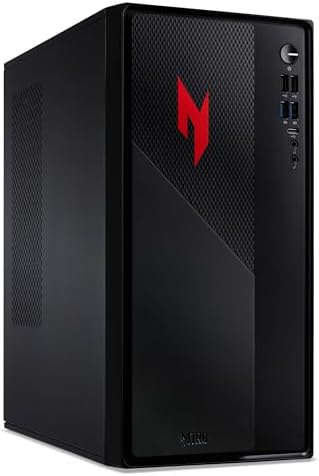
Two alternatives change the setup. The Veno Scorp Titan 4 (Ryzen 5 5600, RTX 3050 6GB) at £669 suits a 1080p esports setup on a tighter budget. The Acer Nitro N20 (RTX 5060) at £779.99 is a compact 15-litre case for a small desk, using the laptop version of the RTX 5060. Which games each tier runs is covered in What games can a budget gaming PC run?
Computek RTX 5060 tower as a setup base - pros and cons
Where to buy
Check price
Radar · 0-100 scores
- Gaming PC Tower (Ryzen 5 5500, RTX 5060)
- Titan 4 Gaming PC (Ryzen 5 5600, RTX 3050 6GB)
- Nitro N20 (Core i5-13420H, RTX 5060)
What monitor do you need for a gaming PC?
A gaming PC needs a monitor of at least 144 Hz, at a resolution the graphics card can drive: 1080p for an RTX 3050 or an integrated Radeon chip, 1440p for an RTX 5060 or faster. The AOC 24G4ZR costs £89.98 on Amazon UK at the time of writing (October 2026) for a 23.8-inch 1080p Fast IPS panel at 240 Hz. The LG UltraGear 27G610A costs £169 for a 27-inch 1440p IPS panel at 200 Hz with a height-adjustable stand and DisplayHDR 400.
The monitor is the item buyers most often under-spend on. A 60 Hz office screen caps an RTX 5060 at 60 frames per second on screen, however many frames the PC renders. Size, panel type and resolution are compared in How to choose a gaming monitor, and the cheapest good panels are ranked in Best budget gaming monitor UK 2026.
Which keyboard and mouse should a gaming PC setup have?
A gaming PC setup should have a UK-layout keyboard and a mouse with a dedicated gaming sensor, and neither needs to cost more than £55. The Royal Kludge RK61 at £53.99 is a 60% mechanical keyboard with hot-swappable switches, a UK ISO layout, Bluetooth and 2.4 GHz wireless and a 13-hour rated battery. The Logitech G213 Prodigy at £34.99 is the full-size membrane alternative with a number pad and 60 ml spill resistance.
The Logitech G305 LIGHTSPEED costs £27.99 for a 99 g wireless mouse with Logitech's HERO sensor, 12,000 DPI and a 250-hour rating on one AA battery. The wired SteelSeries Rival 3 Gen 2 at £29.99 weighs 77 g. Keyboards with faster Hall effect switches are ranked in Best budget gaming keyboard UK 2026.
Do you need a gaming headset for a PC?
Yes for online multiplayer, because team games such as Valorant, Fortnite and Counter-Strike 2 depend on voice chat and a desk microphone or speakers alone pick up echo. The Razer BlackShark V2 X costs £39.99 with 50 mm drivers, a 12 Hz to 28 kHz rated frequency response and a cardioid microphone that rejects sound from behind. The SteelSeries Arctis Nova 1 at £44.99 adds memory foam cushions and a noise-cancelling microphone.
Both are wired, which suits a desk PC: no charging and no wireless lag. Wireless picks are in Best budget gaming headset UK 2026.
Should a gaming PC use Wi-Fi or Ethernet?
Ethernet is the better connection for a gaming PC because a cable avoids the interference and latency spikes that Wi-Fi suffers through walls. When the router sits in another room, a Powerline kit carries the connection through the mains wiring instead. The TP-Link TL-PA7017 kit costs £44 for two HomePlug AV2 adapters rated at 1,000 Mbps, each with one gigabit Ethernet port.
Wi-Fi is fine for most players with a modern router a room or two away; the Computek RTX 5060 tower has Wi-Fi built in. Homes with dead spots should compare the options in Wi-Fi extender vs mesh vs new router before buying anything.
Do you need to buy Windows for a gaming PC?
Only when the PC ships without a licence. Every prebuilt gaming PC in Compare Electronic's guides lists Windows 11 on its Amazon UK listing, so the cost is already in the price. A self-built PC or a tower sold without an operating system needs Windows 11 Home, which costs £119 as a digital licence on Amazon UK at the time of writing (October 2026). Unactivated Windows 11 still runs games but shows a watermark and locks personalisation settings. The full build-or-buy maths is in Build vs buy a gaming PC UK 2026.
What do people forget when setting up a gaming PC?
The most common mistake is plugging the monitor into the motherboard instead of the graphics card. On a PC with an AMD Ryzen 5 5500, which has no integrated graphics, the motherboard ports give no picture at all; on other PCs they bypass the graphics card entirely. Compare Electronic's first-hour checklist puts that step and nine others in the order to do them.
| # | Step | What to do |
|---|---|---|
| 1 | Check inside the case | Many system builders pack foam around the graphics card for delivery. Remove the side panel and take it out before switching on. |
| 2 | Switch on the power supply | The rocker switch on the back of the power supply ships in the off (O) position on many PCs. |
| 3 | Plug the monitor into the graphics card | Use the low, horizontal row of ports on the graphics card, not the ports beside the USB sockets on the motherboard. |
| 4 | Fit the Wi-Fi antennas | PCs with motherboard Wi-Fi ship with screw-on antennas in the accessory box. Without them, signal drops sharply. |
| 5 | Activate and update Windows | Check Settings, System, Activation, then run Windows Update until no updates remain. |
| 6 | Update the graphics driver | Install the NVIDIA app for GeForce cards or AMD Software: Adrenalin Edition for Radeon cards, and install the latest driver. |
| 7 | Set the monitor refresh rate | Windows often defaults to 60 Hz. Set the highest rate in Settings, System, Display, Advanced display. |
| 8 | Check the memory speed | Task Manager, Performance, Memory shows the speed. If it reads below the advertised figure, enable the XMP profile (DOCP or A-XMP on some AMD boards) in the BIOS. |
| 9 | Plan game storage | Install the most played games on the SSD, not a hard drive. Large shooters need well over 100GB each. |
| 10 | Keep the box for 30 days | The Consumer Rights Act 2015 gives 30 days to reject a faulty PC for a full refund, and a return is far easier in the original packaging. |
The refresh rate step matters more than it looks. A 240 Hz monitor left at Windows' 60 Hz default shows a quarter of the frames it can display, and nothing on screen warns the buyer.
Verdict
A complete gaming PC setup in the UK costs £898.87 for 1080p and £1,118.88 for 1440p at Amazon UK prices on 3 October 2026. The Computek Ryzen 5 5500 RTX 5060 tower is the PC to build around, the LG UltraGear 27G610A is the monitor that suits it, and the Royal Kludge RK61, Logitech G305 and Razer BlackShark V2 X cover input and audio for £121.97 together. Budget about a quarter of the total for everything except the tower, then work through the first-hour checklist before the first game.
For cheaper towers, see Best budget gaming PC UK 2026; for a first PC bought by a parent, see Best first gaming PC for a teenager.
Frequently asked questions
What do you need for a gaming PC setup?
A gaming PC setup needs a monitor, a keyboard, a mouse, a headset with a microphone, a mouse pad, an internet connection and a surge-protected extension lead, plus a Windows 11 licence if the PC ships without one. On Amazon UK at the time of writing (October 2026), those extras cost £229.87 for a 1080p setup and £320.89 for a 1440p setup.
How much does a full gaming PC setup cost in the UK?
A full gaming PC setup costs £898.87 for 1080p and £1,118.88 for 1440p on Amazon UK at the time of writing (October 2026), using Compare Electronic's picks. The 1080p setup pairs the £669 Veno Scorp Titan 4 RTX 3050 with a 240 Hz AOC 24G4ZR. The 1440p setup pairs the £797.99 Computek RTX 5060 with the LG UltraGear 27G610A.
Does a prebuilt gaming PC come with a monitor?
No, most prebuilt gaming PCs on Amazon UK ship as a tower only, with no monitor, keyboard or mouse. Bundles such as the Vibox Ryzen 5 5500 RTX 5060 bundle at £1,049.95 add a monitor and peripherals. Buyers of a tower such as the Computek RTX 5060 at £797.99 should budget at least £229.87 more for the rest of the setup.
Where do you plug the monitor into a gaming PC?
Plug the monitor into the graphics card, never the motherboard. The graphics card ports sit low on the back of the case, usually in a horizontal row. On a PC with an AMD Ryzen 5 5500, which has no integrated graphics, the motherboard video ports give no picture at all. On other PCs they bypass the graphics card and cut frame rates sharply.
Should a gaming PC use Wi-Fi or Ethernet?
Ethernet is better than Wi-Fi for a gaming PC because a cable gives lower, steadier latency in online games. When the router is in another room, a Powerline kit such as the TP-Link TL-PA7017 at £44 runs a wired connection through the home's mains wiring. Wi-Fi works for most games if the PC sits close to a modern router.
Do you need to buy Windows for a gaming PC?
Only if the PC ships without it. Every prebuilt gaming PC Compare Electronic recommends lists Windows 11 in the Amazon UK listing. A PC without a licence needs Windows 11 Home, which costs £119 as a digital licence on Amazon UK at the time of writing (October 2026). Unactivated Windows shows a watermark and locks personalisation settings.
What do people forget when setting up a gaming PC?
The most common misses are plugging the monitor into the motherboard instead of the graphics card, leaving the monitor at 60 Hz in Windows display settings, skipping the graphics driver update and leaving transit foam inside the case. Each one costs performance or causes faults. Compare Electronic's first-hour checklist covers all ten steps in order.