
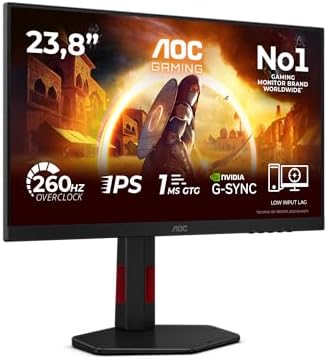

1080p or 1440p?
1080p vs 1440p gaming monitor: 78% more pixels for about 30% fewer frames. The AOC 24G4ZR, LG 27G610A and AOC Q27G42ZE compared, plus 144 Hz vs 240 Hz and 4K.
On this page
At a glance
1440p is the better gaming resolution for a 27-inch monitor and a graphics card from the RX 9060 XT 16GB or RTX 5060 Ti 16GB upwards; 1080p is the better resolution for a 24-inch monitor, an RTX 3050 or RTX 5060, and esports at 240 Hz. 1440p draws 78% more pixels and costs about 30% of the frame rate. The LG UltraGear 27G610A at £169 is the 1440p pick and the AOC 24G4ZR at £89.98 the 1080p pick, on Amazon UK at the time of writing (October 2026).
Both monitors are picks in Best budget gaming monitor UK 2026, and the full checklist of panel, HDR and ports is in How to choose a gaming monitor. This guide settles the resolution question first, because it decides the size, the refresh rate and the graphics card.
What is the difference between 1080p and 1440p?
1440p has 3,686,400 pixels and 1080p has 2,073,600, so a 1440p monitor shows 77.8% more pixels. 1080p (Full HD) is 1920 x 1080 and 1440p (QHD) is 2560 x 1440; both are 16:9. The graphics card has to render every one of those pixels each frame, which is why frame rates fall at 1440p.
| Measure | 1080p | 1440p | 4K |
|---|---|---|---|
| Resolution | 1920 x 1080 | 2560 x 1440 | 3840 x 2160 |
| Total pixels | 2,073,600 | 3,686,400 | 8,294,400 |
| Pixels vs 1080p | 1x | 1.78x | 4x |
| Usual size | 24-inch | 27-inch | 27 to 32-inch |
| RTX 5060 average (Tom's Hardware) | 88.5 fps | 59.8 fps | 21.8 fps |
Does 1080p look bad on a 27-inch monitor?
1080p looks soft on a 27-inch monitor, at 81.6 pixels per inch. Pixel density is the diagonal pixel count divided by the screen diagonal, and at a desk distance of 60 to 80 cm about 90 to 110 pixels per inch looks sharp without scaling. Compare Electronic calculated the common sizes:
| Screen | Resolution | Pixels per inch | Verdict |
|---|---|---|---|
| 23.8-inch (AOC 24G4ZR) | 1920 x 1080 | 92.6 | Sharp enough for esports |
| 24-inch | 1920 x 1080 | 91.8 | Sharp enough for esports |
| 27-inch | 1920 x 1080 | 81.6 | Soft text; avoid |
| 27-inch (LG 27G610A) | 2560 x 1440 | 108.8 | The sweet spot for a desk |
| 32-inch | 2560 x 1440 | 91.8 | Same density as 24-inch 1080p |
| 27-inch | 3840 x 2160 | 163.2 | Needs Windows scaling |
| 32-inch | 3840 x 2160 | 137.7 | Sharp at any desk distance |
A 27-inch 1440p screen is 33% denser than a 27-inch 1080p screen and 18% denser than the 23.8-inch AOC 24G4ZR. The table also shows why 1080p and 24 inches belong together: moving the same resolution from 23.8 to 27 inches drops density by 11 pixels per inch.
Which resolution suits which graphics card?
A graphics card that averages 60 fps or more at 1440p suits a 1440p monitor; anything slower belongs on 1080p. Compare Electronic matched each card to a resolution using Tom's Hardware's GPU hierarchy (updated 24 June 2026), an 11-game average at ultra settings on a Ryzen 7 9800X3D:
| Graphics card | 1080p | 1440p | 4K | Lost at 1440p | Best resolution |
|---|---|---|---|---|---|
| RTX 3050 | 44.6 fps | 29.8 fps | 12.6 fps | 33.2% | 1080p |
| RTX 5060 | 88.5 fps | 59.8 fps | 21.8 fps | 32.4% | 1080p, or 1440p with DLSS |
| RX 9060 XT 16GB | 98.3 fps | 67.3 fps | 35.2 fps | 31.5% | 1440p |
| RTX 5060 Ti 16GB | 105.2 fps | 73.4 fps | 40.2 fps | 30.2% | 1440p |
| RTX 5070 | 132.6 fps | 96.4 fps | 54.3 fps | 27.3% | 1440p at 200 to 240 Hz |
| RTX 5070 Ti | 155.4 fps | 116.8 fps | 68.6 fps | 24.8% | 1440p 240 Hz, or 4K |
Moving from 1080p to 1440p costs 25% to 33% of the frame rate in Tom's Hardware's averages, and the faster the card, the smaller the loss. The RTX 5060 sits on the line: 59.8 fps at 1440p is playable, and DLSS lifts it, but its 8 GB of video memory forces lower textures in some new games. The two budget cards are compared in RTX 5060 vs RX 9060 XT, and per-game figures are in What games can a budget gaming PC run?
Is 144Hz or 240Hz better for gaming?
240 Hz is better than 144 Hz only when the PC renders well over 144 frames per second, which is common in esports games and rare in demanding single-player games. A frame lasts 16.7 ms at 60 Hz, 6.9 ms at 144 Hz, 5.0 ms at 200 Hz and 4.2 ms at 240 Hz. The jump from 60 to 144 Hz cuts 9.7 ms per frame; the jump from 144 to 240 Hz cuts 2.8 ms.
- At 1080p, buy 240 Hz.The AOC 24G4ZR runs at 240 Hz native for £89.98, and an RTX 5060 can fill it: TechSpot measured 484 fps in Counter-Strike 2 at 1080p Medium and Tom's Hardware 255.5 fps in Apex Legends at 1080p Very High.
- At 1440p, 200 Hz is enough for most cards.The RTX 5060 drops to 193.6 fps in Apex Legends at 1440p, under the LG UltraGear 27G610A's 200 Hz ceiling.
- Variable refresh fills the gaps. All four picks support FreeSync or G-Sync Compatible mode, which keeps motion smooth when the frame rate falls below the refresh rate.
Is 1080p or 1440p better for esports and single-player games?
1080p is better for esports and 1440p is better for single-player games. Competitive shooters reward frame rate and low latency, and a 24-inch 1080p screen keeps the whole image in view without head movement. Story games reward sharpness and atmosphere, where 60 to 100 fps is smooth enough.
The RTX 5060 shows the split. Tom's Hardware measured it at 114.8 fps in Marvel Rivals at 1080p High and 80.3 fps at 1440p, and at 91.4 fps in Fortnite at 1080p High and 65.5 fps at 1440p. TechSpot measured 100 fps in Cyberpunk 2077: Phantom Liberty at 1080p High and 66 fps at 1440p High. For Cyberpunk, 66 fps on a sharper 27-inch screen is the better experience; for Apex Legends, 255.5 fps at 1080p is the better result.
1080p vs 1440p vs 4K: which should you buy?
Buy 1440p for most gaming PCs, 1080p for entry cards and esports, and 4K only with an RTX 5070 Ti or faster. 4K has 2.25 times the pixels of 1440p and four times the pixels of 1080p. Tom's Hardware averages the RTX 5070 at 54.3 fps at 4K against 96.4 fps at 1440p, and the RTX 5060 at 21.8 fps at 4K.
A 32-inch 4K monitor reaches 137.7 pixels per inch, sharp at any desk distance without the heavy scaling a 27-inch 4K panel needs, and suits buyers who also edit photos or video. Picks are in Best 4K gaming monitor UK 2026.
Radar · 0-100 scores
- UltraGear 27G610A
- 24G4ZR
- Q27G42ZE
- Lenovo Legion 27Q-10
LG UltraGear 27G610A - best 1440p gaming monitor for the money
The LG UltraGear 27G610A is the 1440p monitor to buy, at £169 on Amazon UK at the time of writing (October 2026). LG rates it at 200 Hz and 1 ms grey-to-grey on a 27-inch 2560 x 1440 IPS panel, with 400 nits, 99% sRGB and VESA DisplayHDR 400.

LG UltraGear 27G610A specifications
- Panel: 27-inch IPS, 2560x1440
- Refresh rate: 200 Hz
- Response time: 1 ms GtG
- Brightness: 400 nits
- HDR: DisplayHDR 400
- sRGB coverage: 99 %
- Pixel density: 108.8 pixels per inch
The LG UltraGear 27G610A costs £79.02 more than the AOC 24G4ZR for 77.8% more pixels and a 3.2-inch larger screen. Its 200 Hz ceiling is 40 Hz below the AOC Q27G42ZE and Lenovo Legion 27Q-10, which matters little for an RX 9060 XT 16GB or RTX 5060 Ti 16GB averaging 67 to 73 fps at 1440p ultra. It is the best overall pick in Best budget gaming monitor UK 2026.
LG UltraGear 27G610A - pros and cons
Where to buy
Check price
AOC 24G4ZR - best 1080p gaming monitor
The AOC 24G4ZR is the 1080p monitor to buy, at £89.98 on Amazon UK at the time of writing (October 2026). AOC rates it at 240 Hz native and 260 Hz overclocked on a 23.8-inch Fast IPS panel, with 1 ms grey-to-grey, 300 nits and a stand with 130 mm of height adjustment and pivot.

The AOC 24G4ZR suits an RTX 3050 or RTX 5060 gaming PC and any buyer who plays Counter-Strike 2, Valorant or Apex Legends first. With the cheapest RTX 5060 tower, a keyboard, a mouse and a headset, it makes up the £1,011.94 build-your-own setup Compare Electronic priced against ready-made bundles. Black Friday targets for those PCs are in Gaming PC Black Friday deals UK 2026.
AOC 24G4ZR - pros and cons
Where to buy
Check price
AOC Q27G42ZE vs Lenovo Legion 27Q-10: which 1440p 240 Hz monitor?
The AOC Q27G42ZE is the cheaper 1440p 240 Hz monitor at £198.95, and the Lenovo Legion 27Q-10 is the better one for a PC and a console at £209.99, both on Amazon UK at the time of writing (October 2026). Both use 27-inch 2560 x 1440 IPS panels at 240 Hz native.

AOC rates the Q27G42ZE at 1 ms and 300 nits with a 260 Hz overclock, but it has one HDMI 2.0 and one DisplayPort 1.4 input and no DisplayHDR certification.
Where to buy
Check price

Lenovo rates the Legion 27Q-10 at 0.5 ms, 300 nits and 99% sRGB, with two HDMI 2.1 ports, one DisplayPort, a height, swivel and pivot stand and a 3-year warranty. The £11.04 premium over the AOC buys the second HDMI port and the longer warranty. Either monitor suits an RTX 5070 or faster, which averages 96.4 fps or more at 1440p and well past 200 fps in esports games.
AOC Q27G42ZE and Lenovo Legion 27Q-10 - pros and cons
Where to buy
Check price
How much more does a 1440p gaming monitor cost?
A 1440p gaming monitor costs £79.02 to £120.01 more than the 1080p AOC 24G4ZR on Amazon UK in October 2026, but almost the same per pixel. Compare Electronic divided each price by the native refresh rate and by the pixel count:
| Monitor | Resolution | Price | Native refresh | £ per Hz | £ per megapixel |
|---|---|---|---|---|---|
| AOC 24G4ZR | 1080p | £89.98 | 240 Hz | £0.37 | £43.39 |
| LG UltraGear 27G610A | 1440p | £169 | 200 Hz | £0.85 | £45.84 |
| AOC Q27G42ZE | 1440p | £198.95 | 240 Hz | £0.83 | £53.97 |
| Lenovo Legion 27Q-10 | 1440p | £209.99 | 240 Hz | £0.87 | £56.96 |
Per megapixel, the LG UltraGear 27G610A costs only £2.45 more than the AOC 24G4ZR, so 1440p itself is no longer a premium. Per hertz, 1080p is less than half the price, which is the real case for 1080p in 2026: the cheapest way to 240 Hz. Prices also move quickly. The Lenovo Legion 27Q-10 cost £149.00 on Amazon UK on 29 September 2026, £60.99 less than today.
Who should still buy a 1080p gaming monitor?
Three buyers should still buy 1080p: an esports player who wants 240 fps, an owner of an RTX 3050 or similar card that averages under 45 fps at 1080p ultra, and a buyer with under £100 to spend. The AOC 24G4ZR covers all three at £89.98.
Everyone else with a 2025 or 2026 mid-range card should buy 1440p, and the LG UltraGear 27G610A brings it in at £169. Buyers who would rather spend on contrast than pixels should read IPS vs VA vs OLED.
Verdict
1440p is the right resolution for most gaming PCs in 2026, and the LG UltraGear 27G610A at £169 is the monitor to buy: 108.8 pixels per inch, 200 Hz and DisplayHDR 400 for a card from the RX 9060 XT 16GB upwards. 1080p is right for esports and entry graphics cards, and the AOC 24G4ZR at £89.98 is the cheapest 240 Hz screen worth buying. RTX 5070 owners should step up to the AOC Q27G42ZE or Lenovo Legion 27Q-10 at 1440p 240 Hz. The full shortlist is in Best budget gaming monitor UK 2026.
Frequently asked questions
Is 1080p or 1440p better for gaming?
1440p is better for gaming on a 27-inch monitor with an RX 9060 XT 16GB, RTX 5060 Ti 16GB or faster card. 1080p is better on a 24-inch monitor with an RTX 3050 or RTX 5060, and for esports at 240 Hz. The LG UltraGear 27G610A costs £169 and the AOC 24G4ZR £89.98 on Amazon UK in October 2026.
Is 1440p worth it over 1080p?
1440p is worth it for buyers with a graphics card that averages 60 fps or more at 1440p and a 27-inch screen. A 27-inch 1440p monitor has 108.8 pixels per inch against 81.6 for 27-inch 1080p, so text and distant detail look sharper. The cost is about 30% of frame rate: Tom's Hardware averages the RTX 5060 at 88.5 fps at 1080p and 59.8 fps at 1440p.
Is 144Hz or 240Hz better for gaming?
240 Hz is better only when the PC produces well over 144 frames per second, which is common in esports games and rare in demanding single-player games. A frame lasts 6.9 ms at 144 Hz and 4.2 ms at 240 Hz. Budget 240 Hz monitors such as the AOC 24G4ZR at £89.98 on Amazon UK now cost so little that 240 Hz is the sensible default at 1080p.
What graphics card do I need for 1440p gaming?
A graphics card that averages at least 60 fps at 1440p suits 1440p gaming. In Tom's Hardware's 2026 GPU hierarchy, the RX 9060 XT 16GB averages 67.3 fps, the RTX 5060 Ti 16GB 73.4 fps and the RTX 5070 96.4 fps at 1440p ultra. The RTX 5060 manages 59.8 fps and needs DLSS in demanding games, and the RTX 3050 averages 29.8 fps.
Should I buy 1080p, 1440p or 4K for gaming?
Buy 1440p for most gaming PCs, 1080p for entry graphics cards and esports, and 4K only with an RTX 5070 Ti, RTX 5080 or faster. 4K has 2.25 times the pixels of 1440p. Tom's Hardware averages the RTX 5070 at 96.4 fps at 1440p and 54.3 fps at 4K, and the RTX 5080 at 77.4 fps at 4K, all at ultra settings.
Does 1080p look bad on a 27-inch monitor?
1080p looks soft on a 27-inch monitor. Stretching 1920 x 1080 pixels across 27 inches gives 81.6 pixels per inch, so text edges and fine detail look blocky at a 60 to 80 cm desk distance. The same resolution on a 23.8-inch panel such as the AOC 24G4ZR gives 92.6 pixels per inch, which is why 1080p suits 24-inch monitors and 1440p suits 27-inch ones.
Is 1080p better for competitive gaming?
Yes. 1080p is better for competitive gaming because the same graphics card renders more frames, and a 24-inch screen keeps the whole view in sight. Tom's Hardware measured the RTX 5060 at 255.5 fps in Apex Legends at 1080p Very High and 193.6 fps at 1440p. Only the 1080p figure fills the 240 Hz of a monitor such as the AOC 24G4ZR.