

1080p or 1440p at 240Hz?
Compare Full HD and QHD at 240Hz for esports, image detail and GPU load. See verified UK monitor examples and choose the resolution your PC can drive.
On this page
At a glance
If you want a compact esports display and your PC needs every frame, 1080p can be a sensible choice. If you want a sharper 27-inch desktop and can sustain high frame rates at QHD, 1440p is the more versatile resolution. At the same refresh rate, the monitor updates at the same cadence; resolution changes sharpness and GPU load, not the 240Hz interval.
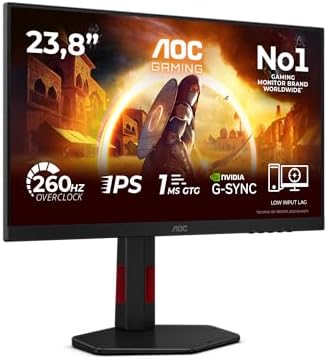
For UK price context, AOC 24G4ZR is Full HD and rated up to 260Hz; it was £127.97 on Amazon UK on 27 October 2026. Z-Edge's 27-inch 1440p 240Hz IPS was £199.99. Lenovo Legion 27Q-10 offers another 27-inch QHD 240Hz IPS option at £139.99 in the same verified snapshot. The AOC is a nearby real example, not a 240Hz model, so check the exact specification before purchase.
See whether 240Hz is enough for competitive games, our 4K monitor guide, and monitor buying advice for related trade-offs.
How much sharper is 1440p than 1080p?
Full HD is 1920 by 1080, or 2,073,600 pixels. QHD is 2560 by 1440, or 3,686,400 pixels. QHD therefore has 1,612,800 more pixels per frame, 77.8% more than Full HD. At 27 inches, QHD packs about 109 pixels per inch, while Full HD packs about 82. At 24 inches, Full HD is around 92 pixels per inch, one reason the smaller esports format looks more coherent than 27-inch Full HD.
These figures describe resolution and pixel density, not a guarantee that every viewer will notice the difference equally. Viewing distance, eyesight, game art and operating-system scaling all change the experience. QHD makes small text and distant details cleaner on a 27-inch screen. Full HD can look adequate when sitting farther away or using a 24-inch panel, and its lower GPU workload can be useful in fast multiplayer games.
Refresh interval is identical at a matched refresh rate: 1,000 divided by 240 is 4.17 milliseconds. A 240Hz 1080p display and a 240Hz 1440p display each schedule a refresh every 4.17ms. Actual motion performance also depends on pixel response, overdrive, frame pacing and input latency. Do not expect resolution alone to change the display's refresh interval.
What does each resolution ask of your PC?
Rendering QHD requires the GPU to shade roughly 78% more pixels than Full HD for each frame. A graphics card may deliver fewer frames at QHD when the GPU is the bottleneck, though the reduction varies by title and settings. In CPU-limited esports games, the gap may be smaller. Check benchmark results from the exact games you play, ideally with your CPU and graphics card combination.
At 240Hz, a game needs to produce 240 frames per second to give the monitor a new frame on each refresh. Many competitive players use reduced effects and settings to raise frame rates, but image quality may change. Adaptive sync helps when frame output fluctuates within the display's supported range. A stable 180fps can feel smoother than a poorly paced average that sometimes reaches 240fps.
Consider the monitor's physical size too. A 24-inch Full HD panel leaves more of the screen inside a competitive player's central field of view and may fit a shallow desk. A 27-inch QHD screen is better for mixed work and games, but requires more desk depth. Measure the stand and distance, and check the monitor's aspect ratio and adjustable height.
Radar · 0-100 scores
- Z-Edge 27 Inch 1440p 240Hz Gaming Monitor
- 24G4ZR
- Lenovo Legion 27Q-10
Which real monitors show the trade-off?
Z-Edge's 27-inch 1440p gaming monitor is an IPS model rated at 240Hz and 1ms response. It was £199.99 in the verified Amazon UK snapshot dated 27 October 2026. Its QHD resolution is useful for detail and general desktop use. At this price, check independent reviews for contrast, brightness, response tuning and stand quality; listed millisecond response figures are not directly comparable across brands.
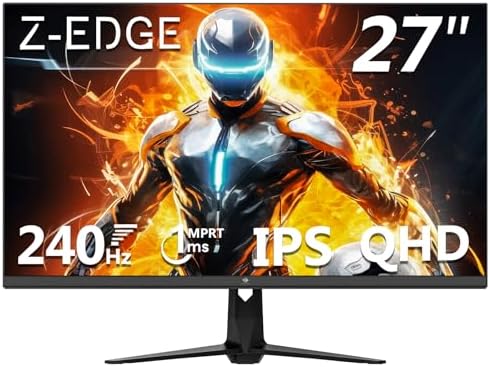
Z-Edge 27-inch 240Hz specifications
- Size: 27 inches
- Resolution: 2560 x 1440
- Panel: IPS
- Refresh rate: 240Hz
- Response time: 1ms advertised
Z-Edge QHD 240Hz
Where to buy
Check price
AOC 24G4ZR is a 24-inch Full HD Fast IPS monitor rated at up to 260Hz. Its snapshot price was £127.97. It is not exactly 240Hz, but represents the compact Full HD high-refresh tier. A nearby exact 240Hz comparison is Lenovo Legion 27Q-10: 27-inch QHD IPS listed at £139.99. That Lenovo illustrates how QHD can be affordable, so Full HD is not automatically the lower-priced option.

AOC 24G4ZR specifications
- Size: 24 inches
- Resolution: 1920 x 1080
- Panel: Fast IPS
- Refresh rate: up to 260Hz
- Adaptive sync support listed by AOC
Where to buy
Check price
AOC's manufacturer specification lists the 24G4ZR as Full HD 260Hz. Z-Edge's listing identifies its QHD resolution and 240Hz. The specs establish the modes; independent testing is needed to compare motion response.
Should you choose 1080p or 1440p?
| Mode | Pixels per frame | Refresh interval |
|---|---|---|
| 1080p at 240Hz | 2.07 million | 4.17ms |
| 1440p at 240Hz | 3.69 million | 4.17ms |
| 1440p vs 1080p | 78% more pixels | Same refresh interval |
Set graphics settings and frame-rate targets for games you actually play. Check the monitor's supported refresh modes over its included connections, and confirm return policy if you are unsure about size or text clarity. Treat the AOC 260Hz product as an adjacent Full HD tier, not a precise 240Hz comparison. For the QHD models, see the PC monitor shortlist.

Lenovo Legion 27Q-10 specifications
- Size: 27 inches
- Resolution: 2560 x 1440
- Panel: IPS
- Refresh rate: 240Hz
Lenovo Legion 27Q-10
Where to buy
Check price
Frequently asked questions
Is 1080p or 1440p better at 240Hz?
1440p gives a sharper image and more desktop space; 1080p is easier for a graphics card to render at very high frame rates. At 27 inches, QHD usually looks notably sharper than Full HD. Choose based on your PC's game performance, screen size and whether clarity or competitive frame rate matters more.
Can a 1080p monitor run at 240Hz?
Yes. Many Full HD gaming monitors support 240Hz or higher, though the exact supported mode depends on the model and connection. The AOC 24G4ZR in this comparison is a 24-inch Full HD IPS screen rated up to 260Hz, rather than exactly 240Hz. Check the monitor's manual for supported resolution, refresh and cable combinations.
Can my GPU run 1440p at 240Hz?
It depends on the game and settings. Esports titles may reach high frame rates at QHD on a capable PC, while demanding games can remain well below 240fps. Check independent benchmarks for your graphics card and CPU at 2560 by 1440. Upscaling or reduced settings can help, but neither guarantees a stable 240fps.
Is 1440p worth it over 1080p for gaming?
For a 27-inch monitor, QHD is often worth considering because 2560 by 1440 contains 78% more pixels than 1920 by 1080 and looks sharper at the same size. Full HD can still be a good esports choice on a 24-inch screen or a less powerful PC. Match resolution to the viewing distance and frame rate you want.
Does 1440p lower FPS compared with 1080p?
Usually, yes, if the graphics card is the limiting part: 1440p renders about 78% more pixels per frame than 1080p. The actual frame-rate drop varies by game, settings and hardware. CPU limits can reduce the difference in competitive titles. Use benchmarks from the games you play rather than assuming one fixed percentage.
Is 1080p 240Hz good for competitive gaming?
It can be. A 24-inch Full HD high-refresh monitor is a familiar esports format, and lower pixel count can help reach high frame rates. It is less crisp for desktop text and immersive games than a 27-inch QHD screen. If your PC can sustain high frame rates at QHD, a 1440p high-refresh model offers a more flexible image.