
Switches explained
Mechanical keyboard switches explained: linear vs tactile vs clicky vs magnetic Hall Effect, how they feel and sound, and which switch type is best for you.
On this page
At a glance
A mechanical keyboard switch is the mechanism under each keycap, and its type decides how the board feels, sounds and performs. There are three traditional families, linear, tactile and clicky, plus a newer analog type, magnetic or Hall Effect. Linear suits fast gaming, tactile suits typing, clicky is loud and fun, and Hall Effect adds adjustable actuation for competitive play. The Keychron Q1 HE shows the Hall Effect type, and the Keychron V6 Max shows a traditional tactile board.
The two things every switch is rated on
Before the families, two numbers describe any switch. Actuation force, measured in grams, is how hard you press to register a key, with most switches between 45 g and 60 g. Actuation distance, measured in millimetres, is how far the key travels before it registers, typically around 2 mm on traditional switches. Magnetic switches let you change that distance in software, which is their headline trick.
Linear switches
Linear switches move straight down with no bump and no click, a smooth, consistent keystroke from top to bottom. That smoothness and the quiet sound make them the competitive-gaming default, because fast repeated presses are uninterrupted by a tactile bump. The classic example is the Cherry MX Red at 45 g. The trade-off is that touch typists get no physical feedback telling them a key has registered, so some bottom out harder than they need to.
Tactile switches
Tactile switches add a noticeable bump at the actuation point, so you feel the moment a key registers without having to bottom out. That feedback makes them the typing favourite and a strong all-rounder for mixed work and play. The classic example is the Cherry MX Brown. They are quieter than clicky switches but a touch louder and slower-feeling than linears for rapid gaming presses. The Keychron V6 Max below ships tactile switches.
Clicky switches
Clicky switches add an audible click on top of the tactile bump, produced by a separate click mechanism. They are satisfying and fun for solo typing, and the classic example is the Cherry MX Blue. The downside is volume: in a shared office or on a voice or video call, clicky switches are the loudest option and tend to annoy everyone within earshot. Pick clicky only if you have the room to yourself.
Magnetic / Hall Effect switches
Magnetic switches, also called Hall Effect switches, are the newest type and work differently. Instead of a physical contact that registers at a fixed point, a sensor reads the position of a magnet continuously as the key moves. That unlocks two features no traditional switch has: adjustable actuation, where you set how far to press for each key in software, and rapid trigger, which resets the key the instant you start releasing it for faster repeated presses. They are the modern competitive-gaming choice, which is why boards like the Keychron Q1 HE use them.
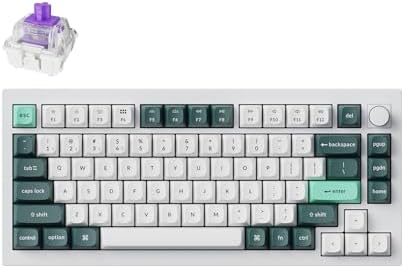
Hall Effect board: Keychron Q1 HE

Keychron Q1 HE specifications
- Switch type: —
- Layout: 75%
- Wireless: Yes
- Polling rate: 8000 Hz
- Hot-swappable: Yes
- Keycaps: PBT · ABS
The Keychron Q1 HE shows what Hall Effect switches bring. Because the board reads key position continuously, you can set a shallow actuation for twitch gaming and a deeper one for typing, and rapid trigger gives the fastest repeated presses of any switch type. It is a gasket-mounted aluminium 75% board, so it types well too. For a competitive gamer, this is the switch type to want.
Keychron Q1 HE - pros and cons
Where to buy
Check price
Tactile board: Keychron V6 Max

Keychron V6 Max specifications
- Switch type: Tactile
- Layout: 100%
- Wireless: Yes
- Hot-swappable: Yes
- Keycaps: PBT · ABS
The Keychron V6 Max shows a traditional tactile board. Its switches give a clear bump at the actuation point that touch typists feel on every key, which makes it a comfortable all-rounder for work and casual gaming. It is a full-size gasket-mounted board with hot-swap sockets, so if you decide you prefer linear or clicky later, you can change the switches without buying a new keyboard. For a typing-led buyer, tactile is the safe starting point.
Keychron V6 Max - pros and cons
Where to buy
Check price
Radar · 0-100 scores
- Keychron Q1 HE
- Keychron V6 Max
Mechanical keyboard switch types at a glance
| Trait | Linear | Tactile | Clicky | Magnetic |
|---|---|---|---|---|
| Feel | Smooth, no bump | Bump at actuation | Bump + click | Smooth, adjustable |
| Sound | Quiet | Moderate | Loud | Quiet |
| Best for | Fast gaming | Typing, all-round | Solo typing | Competitive gaming |
| Classic example | Cherry MX Red | Cherry MX Brown | Cherry MX Blue | Gateron / Keychron HE |
| Adjustable actuation | No | No | No | Yes |
| Office friendly | Yes | Yes | No | Yes |
Which switch should you buy
Competitive gaming: linear or magnetic
For fast, repeated presses, a linear switch is the proven default, and a magnetic Hall Effect switch with rapid trigger is the modern upgrade. If you play competitive shooters, the adjustable actuation on a board like the Keychron Q1 HE is worth the premium.
Typing and mixed use: tactile
For typing and a do-everything board, tactile switches give the feedback touch typists want without the noise of clicky. The Keychron V6 Max is a good tactile starting point. The full typing ranking is in Best mechanical keyboard for typing UK 2026.
When in doubt, buy hot-swap
If you cannot decide, buy a hot-swappable board. Hot-swap sockets let you pull and replace switches by hand, so you can try linear, tactile or clicky on the same keyboard without soldering. Every board in our wireless keyboard ranking is hot-swappable.
Verdict
Linear switches are smooth and quiet for fast gaming, tactile switches add a bump that typists love, clicky switches add an audible click that suits solo use, and magnetic Hall Effect switches add adjustable actuation for competitive play. There is no single best switch, only the best switch for how you use the board. The Keychron Q1 HE shows the magnetic type and the Keychron V6 Max shows a tactile board; a hot-swap keyboard lets you try others without committing.
Frequently asked questions
What is the difference between linear, tactile and clicky switches?
Linear switches move smoothly with no bump and are quiet, suiting fast gaming. Tactile switches add a bump at the actuation point that typists feel. Clicky switches add an audible click on top of the bump, which is satisfying but loud and a poor fit for shared spaces.
Which switch type is best for gaming?
Linear switches are the proven gaming default for fast, uninterrupted repeated presses, and magnetic Hall Effect switches are the modern upgrade, adding adjustable actuation and rapid trigger. The Keychron Q1 HE uses Hall Effect switches built for competitive play.
What are Hall Effect or magnetic switches?
Hall Effect switches use a sensor that reads a magnet's position continuously as the key moves, rather than a fixed contact point. That lets you set actuation depth per key in software and use rapid trigger, which resets the key the instant you release it. They are the modern gaming switch.
Which switch is best for typing?
Tactile switches are the typing favourite because the bump at the actuation point gives feedback on every press. Cherry MX Brown is the classic tactile example. Linear switches are smoother and quieter for a shared office. A hot-swap board lets you try both on the same keyboard.
Are clicky switches too loud for an office?
Yes, usually. Clicky switches such as Cherry MX Blue add an audible click that is the loudest switch type and tends to annoy colleagues or carry on calls. For shared spaces, choose tactile or linear switches, which give a good feel without the noise.