
Everything a new TV needs
What a new TV needs in the UK: TV licence, aerial or Freely, HDMI 2.1 cables, a VESA bracket, surge lead and soundbar, with Amazon UK prices and setup steps.
On this page
At a glance
A new TV needs five things besides the set itself: a TV licence, a source of live channels (an aerial or Freely over broadband), an HDMI cable for each device, a surge-protected extension lead and a place to put it, either the supplied stand or a VESA wall bracket. On Amazon UK at the time of writing (October 2026), the essentials cost £198.60 in year one, of which £180 is the licence. A wall bracket, an indoor aerial and the Sony HT-S400 soundbar take the total to £449.52.
The checklist below gives the minimum specification and a priced pick for each item. The first-hour checklist further down covers the settings that most new TVs ship with wrong, starting with the picture mode.
What do I need when buying a new TV?
A new TV needs a licence, a channel source, cables, power and a mount, because the box contains only the TV, a stand, a remote and a mains lead. Compare Electronic's checklist gives the minimum specification for each item and the pick that meets it, at Amazon UK prices on 3 October 2026.
| Item | Why it matters | Minimum spec | Pick | Price |
|---|---|---|---|---|
| TV licence | Required for live TV on any channel and for BBC iPlayer. | One licence per address, any screen size | TV Licensing, paid online | £180 a year |
| Channels | A TV without Freely needs an aerial signal for Freeview. | Freely over 10 Mbps broadband, or a rooftop or indoor aerial | One For All SV9215 | £31.95 (if needed) |
| HDMI cable | Consoles and set-top boxes rarely ship with a long enough lead. | Ultra High Speed HDMI 2.1 for 4K 120 Hz consoles | UGREEN HDMI 2.1 Cable (2 m) | £6.11 |
| Wall bracket | The supplied stand needs a unit wider than its feet. | Matches the TV's VESA pattern and weight | One For All WM4421 | £18.98 (if wall mounting) |
| Surge-protected lead | A TV, soundbar, console and router need four sockets. | Surge protection, 4 sockets or more | Masterplug 6-way surge lead | £12.49 |
| Soundbar | Slim TVs have small speakers with little bass. | HDMI ARC or eARC connection | Sony HT-S400 | £199.99 (optional) |
| Streaming stick | Older smart TVs lose app updates. | 4K and HDR10+ with the UK catch-up apps | Fire TV Stick 4K Select | £21.99 (older TVs only) |
Size comes before any of this. A TV that is too large for the room forces a wall mount higher than eye level, and one that is too small wastes the 4K resolution. The viewing distance maths is in What size TV do I need?
How much does it cost to set up a new TV?
Setting up a new TV costs £198.60 to £449.52 in year one on top of the TV itself, at Amazon UK prices on 3 October 2026. The £180 TV licence is 90.6% of the minimum setup, so the hardware extras cost only £18.60 for a household that streams live channels over Freely and keeps the supplied stand.
| Item | Product | Cost |
|---|---|---|
| TV licence | Colour TV licence, 12 months | £180.00 |
| HDMI cable | UGREEN HDMI 2.1 Cable (2 m) | £6.11 |
| Power | Masterplug 6-way surge lead | £12.49 |
| Total on top of the TV | £198.60 |
| Item | Product | Cost |
|---|---|---|
| TV licence | Colour TV licence, 12 months | £180.00 |
| Aerial | One For All SV9215 indoor aerial | £31.95 |
| HDMI cable | UGREEN HDMI 2.1 Cable (2 m) | £6.11 |
| Wall bracket | One For All WM4421 tilt bracket | £18.98 |
| Power | Masterplug 6-way surge lead | £12.49 |
| Soundbar | Sony HT-S400 | £199.99 |
| Total on top of the TV | £449.52 |
The middle option, a wall-mounted TV with an aerial but no soundbar, costs £249.53. Paired with the £445 Hisense 55E78QTUK PRO, the full wall-mounted setup comes to £894.52, so a buyer with £900 in total has room for a good 55-inch TV and every extra on this list. Buyers who already pay for a licence can take £180 off every figure.
Do I need a TV licence for a new TV?
Yes, if the TV will show live TV on any channel or anything on BBC iPlayer. The colour TV licence costs £180 a year from 1 April 2026, according to gov.uk, and the rule covers every device, from a 32-inch TV to a phone. Screen size makes no difference to the price.
A TV used only for Netflix, Disney+, Prime Video, YouTube and on-demand programmes on ITVX, Channel 4 or My5 does not need a licence. Live channels on those same apps do. Most households that buy a new TV already hold a licence for the address, so the new TV is covered without any action.
Does a new TV need an aerial, or is Freely enough?
A new TV with Freely needs no aerial for the main UK channels, because Freely streams BBC, ITV, Channel 4 and Channel 5 live channels over broadband. Freely recommends a connection of at least 10 Mbps. The Hisense 55E78QTUK PRO carries Freely in its VIDAA software. A TV without Freely in its specification needs an aerial for live Freeview channels.
Homes with slow broadband, or buyers who want every Freeview channel, still need an aerial. A rooftop aerial is the strongest option; where the signal is good, the One For All SV9215 indoor aerial costs £31.95 with up to 41 dB of gain and a 5G filter, rated by One For All. Indoor aerial picks are ranked in Best indoor TV aerial UK 2026.
What cables do I need for a new TV?
A new TV needs three kinds of cable: the mains lead in the box, a coaxial lead from the aerial socket if it uses an aerial, and one HDMI cable per device. Consoles need the right HDMI cable: a PS5 and an Xbox Series X output up to 4K at 120 Hz over HDMI 2.1, and only a cable certified as Ultra High Speed HDMI carries the full 48 Gbps that HDMI 2.1 allows, according to the HDMI Licensing Administrator.
The UGREEN HDMI 2.1 Cable (2 m) costs £6.11 on Amazon UK at the time of writing (October 2026) and is listed by UGREEN as certified for 4K at up to 240 Hz and eARC. Two metres covers a console on a TV unit; a wall-mounted TV with the console below may need 3 m. Plug consoles into the TV's HDMI 2.1 ports, which are labelled 4K 120 Hz or 144 Hz on the back panel, and the soundbar into the port marked ARC or eARC. Which TVs carry how many HDMI 2.1 ports is covered in Best TV for PS5 and Xbox Series X.
Which TV should a new setup start with?
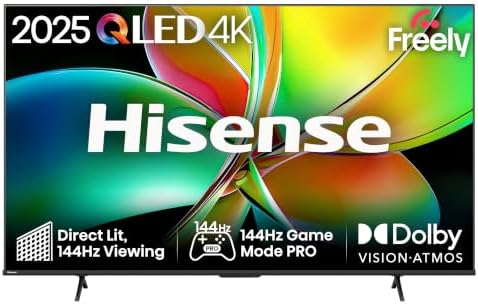
The Hisense 55E78QTUK PRO is the TV to build a setup around in October 2026: £445 on Amazon UK for a 55-inch 4K QLED with a 144 Hz panel, VRR, HDMI 2.1, Dolby Vision, HDR10+, Dolby Atmos and Freely. Freely removes the aerial from the checklist and the 144 Hz panel suits a PS5. The full shortlist is in Best budget 55 inch TV UK 2026.

Hisense 55E78QTUK PRO specifications
- Screen: 55 inch QLED, 3840x2160
- Refresh rate: 144 Hz
- VRR: Yes
- HDMI 2.1: Yes
- Dolby Vision: Yes
- Smart platform: VIDAA with Freely
Two alternatives change the setup. The TCL 55V6D costs £299 for a 2026 55-inch 4K set with HDR10+, Dolby Atmos, VRR and ALLM at 60 Hz and Fire TV built in; its 60 Hz panel caps a PS5 at 60 frames per second. The Hisense 65E78QTUK PRO at £595 is the same 144 Hz QLED at 65 inches for rooms where the sofa sits 2.7 m or more from the screen. Every price band is compared in Which TV should I buy in the UK?
Hisense 55E78QTUK PRO as a setup base - pros and cons
Where to buy
Check price
Radar · 0-100 scores
- 55E78QTUK PRO 55" QLED
- 55V6D 4K Fire TV
- 65E78QTUK PRO 65" QLED
What wall bracket does a new TV need?
A new TV needs a wall bracket that matches its VESA pattern and is rated above its weight. The VESA pattern is the spacing of the four screw holes on the back of the TV, listed in the manual: small TVs and monitors use 75 x 75 or 100 x 100 mm, and most TVs from about 31 inches use 200 x 200 mm or larger, according to bracket maker Vogel's.
The One For All WM4421 costs £18.98 on Amazon UK at the time of writing (October 2026) for a tilting bracket rated by One For All for 32 to 65 inch screens, VESA 200 x 200 to 400 x 400 mm and up to 100 kg, with 15 degrees of tilt. Vogel's puts the screen centre at seated eye level, about 100 to 110 cm from the floor for a 55-inch TV viewed from a sofa. Plasterboard walls need cavity fixings rated for the load, and the supplied stand remains the zero-cost option.
Do I need a soundbar for a new TV?
A soundbar is not essential, but it is the single biggest upgrade to a slim TV, whose speakers have little room for bass. The Sony HT-S400 costs £199.99 on Amazon UK at the time of writing (October 2026). Sony rates it at 330 W in total, 200 W from the 2.1-channel bar and 130 W from a wireless subwoofer, with HDMI ARC, an optical input, Bluetooth 5.0 and Dolby Digital decoding.
The Sony HT-S400 bar is 900 mm wide, narrower than the 121.8 cm screen width of a 55-inch TV, so it sits under the panel without overhanging. It does not decode Dolby Atmos; buyers who want height effects need a dearer Atmos bar. One HDMI cable to the TV's ARC or eARC port carries the sound and lets the TV remote set the volume.
Does a new TV need a streaming stick?
A new smart TV does not need a streaming stick, because it carries BBC iPlayer, ITVX, Netflix and the other main apps already. A stick earns its place on an older TV whose apps have stopped updating, or on a TV moved to a second room. The Fire TV Stick 4K Select costs £21.99 and the Roku Streaming Stick Plus (2025) £39.90 on Amazon UK at the time of writing (October 2026). Both output 4K at 60 fps with HDR10+, and the Roku adds AirPlay. The full comparison is in Best streaming stick UK 2026.
Power is the other check. The Masterplug 6-way surge lead at £12.49 has six switched sockets on a 2 m cable, a surge indicator and 370 joules of surge protection, rated by Masterplug, which covers a TV, soundbar, subwoofer, console, router and stick from one wall socket.
What should you do when setting up a new TV?
The most important step is changing the picture mode, because many TVs leave the shop in Vivid or Standard. Filmmaker Mode, defined by the UHD Alliance, switches off motion smoothing and other processing and keeps the original colour, aspect ratio and frame rate. Compare Electronic's first-hour checklist puts that step and nine others in order.
| # | Step | What to do |
|---|---|---|
| 1 | Remove the protective film | Peel any film from the screen edges and bezel before mounting; it is far harder to reach once the TV is on the wall. |
| 2 | Connect to the internet and update | Join Wi-Fi or plug in Ethernet, then install the latest firmware from the settings menu before changing anything else. |
| 3 | Run a full channel retune | Choose a full or automatic retune, not a manual add, so the TV finds every Freeview multiplex. Repeat it whenever channels go missing. |
| 4 | Change the picture mode | Switch from Vivid, Dynamic or Standard to Filmmaker Mode or Cinema. Vivid pushes brightness and colour well beyond what the programme makers intended. |
| 5 | Turn off motion smoothing for films | Samsung calls it Auto Motion Plus, LG TruMotion and Sony Motionflow. Filmmaker Mode switches it off automatically; leave it on only for sport if the look suits. |
| 6 | Set up the console input | Plug the PS5 or Xbox into an HDMI 2.1 port and turn on the TV's enhanced HDMI format for that input (Input Signal Plus on Samsung, HDMI Ultra HD Deep Colour on LG). |
| 7 | Turn on game mode and VRR | Enable game mode or ALLM on the TV, then on a PS5 open Settings, Screen and Video, Video Output and set VRR and 120 Hz Output to Automatic. |
| 8 | Link the soundbar | Connect the soundbar to the ARC or eARC port, turn on HDMI-CEC so one remote controls both, and set TV speakers to off. |
| 9 | Register the TV | Register the serial number on the manufacturer's site so warranty claims and firmware notices are linked to the set. Keep the receipt with it. |
| 10 | Recycle the old TV | Under the WEEE Regulations 2013 the retailer must take the old TV back free when selling a new one, like for like. Keep the new box for 30 days in case of a fault. |
The console steps matter more than they look. A PS5 on a 144 Hz Hisense 55E78QTUK PRO runs at 60 Hz until the TV input and the console are both set for 120 Hz, and nothing on screen warns the player. The retailer take-back rule also has a detail: under gov.uk guidance, retailers in the Distributor Takeback Scheme can meet the duty through council recycling centres instead of their own shops.
Verdict
A new TV in the UK needs a £180 TV licence, a channel source, an HDMI cable, a surge-protected lead and a stand or bracket, which comes to £198.60 in year one at Amazon UK prices on 3 October 2026. The full wall-mounted setup with an aerial and the Sony HT-S400 costs £449.52. The Hisense 55E78QTUK PRO is the TV that trims the list most, because Freely removes the aerial and HDMI 2.1 at 144 Hz suits a console. Buy the cable and lead with the TV, then work through the first-hour checklist before the first film.
For the right screen size, see What size TV do I need?; for every budget, see Which TV should I buy in the UK?
Frequently asked questions
What do I need for a new TV?
A new TV needs a TV licence for live TV or BBC iPlayer, a source of channels (an aerial or Freely over broadband), an HDMI cable for each device, a surge-protected extension lead and either the supplied stand or a VESA wall bracket. On Amazon UK at the time of writing (October 2026), the essentials cost £198.60 in year one, including the £180 licence.
What cables do I need for a new TV?
A new TV needs the mains lead in the box, a coaxial aerial cable if it uses Freeview through an aerial, and one HDMI cable per device. A PS5 or Xbox Series X needs an Ultra High Speed HDMI 2.1 cable for 4K at 120 Hz. The UGREEN HDMI 2.1 Cable (2 m) costs £6.11 on Amazon UK at the time of writing (October 2026).
Do I need a TV licence for a new TV?
A TV licence is needed to watch or record live TV on any channel, or to use BBC iPlayer, on any device. It costs £180 a year from 1 April 2026, whatever the screen size. A new TV used only for Netflix, Disney+, Prime Video, YouTube or non-BBC on-demand programmes does not need one.
Does a new smart TV need an aerial?
Not always. A smart TV with Freely streams BBC, ITV, Channel 4 and Channel 5 live channels over broadband, and Freely recommends a connection of at least 10 Mbps. A TV without Freely, or a home with slow broadband, needs an aerial for Freeview. The One For All SV9215 indoor aerial costs £31.95 on Amazon UK (October 2026).
Do I need a soundbar for a new TV?
A soundbar is optional but worth it, because thin TVs have small speakers with little bass. The Sony HT-S400 costs £199.99 on Amazon UK at the time of writing (October 2026) for a 2.1-channel bar with a wireless subwoofer and 330 W of total output, rated by Sony. It connects to the TV's HDMI ARC or eARC port with one cable.
What settings should I change on a new TV?
Change the picture mode from Vivid or Dynamic to Filmmaker Mode or Cinema, turn off motion smoothing for films, and turn on game mode and VRR for a PS5 or Xbox Series X. Then run a full channel retune, install the latest firmware and register the TV with the manufacturer. Compare Electronic's first-hour checklist lists the steps in order.
What happens to my old TV when I buy a new one?
UK retailers must take an old TV back free when they sell a new one, on a like-for-like basis, under the WEEE Regulations 2013. Retailers in the Distributor Takeback Scheme meet that duty through council recycling centres instead of their own stores. Collection from the home is a separate service, so check the retailer's terms when ordering.