

Our mouse picks
Best gaming mice UK 2026: Razer Viper V4 Pro, Logitech G Pro X Superlight 2 and Razer Basilisk V3 Pro 35K, ranked on weight, sensor and polling rate.
On this page
At a glance
The Razer Viper V4 Pro is the best gaming mouse Compare Electronic tracks in the UK in August 2026 at £144.88. The Viper V4 Pro is a symmetric wireless mouse that weighs 49 g, ships the Razer Focus Pro 30K sensor scaling to 50,000 DPI, polls at 8 kHz, and lasts 180 hours per charge. The Logitech G PRO X2 SUPERSTRIKE at £159 adds inductive switches with tunable actuation. The Razer DeathAdder V4 Pro at £127.55 is the right ergonomic pick at just 56 g.
Grip style decides the mouse, not the brand
The single biggest mistake when buying a gaming mouse is picking by spec sheet instead of grip. Every shortlist on this page is competitive, the differences are how the shell sits in your hand. Three grip styles cover almost every player:
- Fingertip grip: The mouse sits under your fingertips with the palm not touching the shell. Best served by symmetric ultralight mice 50 g and under. The Viper V4 Pro and DeathAdder V4 Pro both fit here. Aim is controlled by finger movement, micro-adjustments are quick, and your wrist barely moves.
- Claw grip: Fingertips arched, palm touching the back of the shell only. Works well with symmetric mice between 50 and 70 g. Most CS2 players land somewhere in this zone. The Viper V4 Pro is the popular claw-grip flagship.
- Palm grip: Whole hand on the shell, palm flush. Demands an ergonomic right-hand shape and a thumb rest. The DeathAdder V4 Pro is built for this, and at 56 g it no longer asks you to accept a heavy shell to get the ergonomic shape.
Trace the outline of your hand against your monitor. If your fingers naturally arch, you are a claw or fingertip player. If your palm flattens, you are a palm player. Buy the shell that matches.
The three numbers that actually matter
- Weight in grams: Below 60 g is featherweight territory, 60 to 80 g is the competitive sweet spot, above 100 g is palm-grip ergonomic. The jump from 90 g to 50 g feels enormous in the first hour. The jump from 50 g to 35 g is real but smaller. Most pros land in the 49 to 70 g band.
- Polling rate in Hz: 1,000 Hz polling means the mouse reports its position 1,000 times per second. 4 kHz and 8 kHz polling halve and quarter the input lag. The catch: 8 kHz needs a CPU and game engine that keeps up. Below an RTX 5060 / Ryzen 5 7600, 4 kHz is the sensible setting. The Viper V4 Pro, DeathAdder V4 Pro, and G PRO X2 SUPERSTRIKE all poll at 8 kHz on the standard receiver.
- Sensor DPI ceiling: 26,000 DPI was a marketing number in 2022. 30,000 to 50,000 DPI in 2026 is the same marketing number. Nobody plays at 30 K DPI. What matters is the underlying sensor lineage. Razer Focus Pro 30K, Logitech HERO 2, and Pixart PMW3950 are the three sensors competitive players trust. Anything advertised as a generic "high-precision optical sensor" without a brand name is doing creative marketing.
1. Razer Viper V4 Pro - best overall

Razer Viper V4 Pro specifications
- Weight: 49 g
- Shape: symmetrical
- Sensor: Razer Focus Pro 50K Optical Sensor Gen-3
- Max DPI: 50000
- Polling rate: 8000 Hz
- Max IPS: 930
- Battery: 180 hours
- Connection: Wireless
- Buttons: 8
The Razer Viper V4 Pro is the mouse pros pick when nothing on the spec sheet is allowed to slow them down. 49 g puts it in the same featherweight tier as the Superstrike while retaining a slightly fuller shape that suits claw grip a touch better. The Focus Pro 30K sensor is paired with Razer's HyperSpeed 2.4 GHz wireless and tops out at 8 kHz polling on the included dongle, which is genuinely a measurable improvement over 1 kHz in 360-Hz monitors and modern engines.
Battery life is the under-stated win. 180 hours per charge means a tournament weekend on one cable. The optical mouse switches feel quick rather than soft, the scroll wheel has enough tactile detent for weapon switching without accidental scrolls, and the PTFE feet glide cleanly on both hard and soft pads. You pay the flagship price; you get a mouse with no compromise the spec sheet can find.
Razer Viper V4 Pro - pros and cons
Where to buy
Check price
2. Logitech G PRO X2 SUPERSTRIKE - best adjustable actuation

Logitech G PRO X2 SUPERSTRIKE specifications
- Weight: 60 g
- Shape: Symmetric ambidextrous
- Sensor: HERO 2
- Max DPI: 44,000
- Polling rate: Up to 8 kHz with PowerPlay
- Max IPS: 888
- Battery: 95 hours
- Connection: Logitech Lightspeed 2.4 GHz
The G PRO X2 SUPERSTRIKE is Logitech's answer to the Viper V4 Pro, and it is the newest flagship in the catalogue. The headline is the switches: Logitech HITS are inductive rather than mechanical or optical, so there is no physical contact to wear out and you can tune actuation depth in G HUB the way you would on a Hall-effect keyboard. The HERO 2 sensor tracks at 44,000 DPI and 888 IPS.
At 61 g it is 12 g heavier than the Viper V4 Pro and 5 g heavier than the DeathAdder V4 Pro, which is the price of the adjustable switch mechanism. In exchange you get 8 kHz polling on the standard dongle, which the outgoing Superlight 2 could only reach with the PowerPlay mat as a paired accessory, and a 90-hour battery that comfortably clears a competitive week.
Pick this over the Viper if you want to tune actuation and prefer Logitech's symmetric shell, which a serious majority of CS2 and Valorant pros have competed on for years. Pick the Viper if raw weight is the only thing that matters to you.
Logitech G PRO X2 SUPERSTRIKE - pros and cons
Where to buy
Check price
3. Razer DeathAdder V4 Pro - best ergonomic

Razer DeathAdder V4 Pro specifications
- Weight: 56 g
- Shape: ergonomic
- Sensor: Razer Focus Pro 45K
- Max DPI: 45000
- Max IPS: 900
- Polling rate: 8000 Hz
- Switches: Razer Optical Gen-4
- Battery: 150 hours
- Connection: Wireless
The DeathAdder is the best-selling gaming mouse shape ever made, and the V4 Pro is the version that finally makes it competitive on weight. 56 g in a sculpted right-hand shell is the headline: palm grippers get a thumb rest and a pinky rest where the Viper gives them neither, without the 100 g-plus penalty that ergonomic shapes used to carry.
The internals are flagship-grade. The Focus Pro 45K sensor tracks at 45,000 DPI and 900 IPS, ahead of the 30K in the Viper V4 Pro on paper, Gen-4 optical switches remove the double-click failure mode entirely, and 8 kHz polling comes on the standard dongle. The 150-hour battery is the longest of the three flagships here.
Pick this over the Viper V4 Pro if you palm or claw grip and want the extra support, and over the Superstrike if 56 g against 61 g matters more than tunable actuation. The one real limitation is the shape: it is right-hand only, so left-handers are locked out.
Razer DeathAdder V4 Pro - pros and cons
Where to buy
Check price
Radar · 0-100 scores
- Razer Viper V4 Pro
- Logitech G PRO X SUPERLIGHT 2 wireless gaming mouse
- DeathAdder V4 Pro
Best gaming mice UK 2026 spec sheet
| Spec | Viper V4 Pro | PRO X2 Superstrike | DeathAdder V4 Pro |
|---|---|---|---|
| Live price | £149 | £110 | £137 |
| Weight | 49 g | 60 g | 56 g |
| Shape | Symmetric | Symmetric | Right-hand ergonomic |
| Sensor | Razer Focus Pro 50K Optical Sensor Gen-3 | HERO 2 | Razer Focus Pro 45K |
| Max DPI | 50000 | 44,000 | 45000 |
| Polling rate | 8000 Hz | 2 kHz (8 kHz with PowerPlay) | 8000 Hz |
| Battery | 180 hours | 95 hours | 150 hours |
| Buttons | 8 | 5 | — |
| Bluetooth | No | No | Yes |
DPI is not sensitivity, eDPI is
DPI counts how many sensor reports the mouse sends per inch of physical movement. Sensitivity is a multiplier the game applies on top. The actual on-screen turn speed is eDPI: DPI multiplied by in-game sensitivity. A pro running 800 DPI at 0.5 sensitivity in Valorant has the same eDPI as another pro at 1,600 DPI and 0.25 sensitivity. The mouse ceiling does not change that calculation.
The reason a 30,000 DPI sensor still matters is fidelity at the DPI you actually use. Modern sensors track cleanly across the full range. Older sensors smeared the lower DPI settings, which is why a 2018 mouse at 800 DPI feels notchier than a 2026 mouse at 800 DPI even though both should report 800 ticks per inch. Buy the sensor generation, not the marketing number.
Wireless versus wired in 2026
The wireless-equals-lag argument died around 2020. Razer HyperSpeed, Logitech Lightspeed, and the equivalent implementations from SteelSeries and others all match a wired USB connection on every public latency measurement most communities trust. The Viper V4 Pro and DeathAdder V4 Pro are both routinely measured below 1 ms end-to-end on the included dongles. Wired mice still exist for under-£50 builds where the wireless tax is not worth it, but every flagship since 2022 has been wireless-first.
What still matters: keep the USB receiver on a 1 metre extension cable on the desk in line of sight of the mouse, not plugged into the back of the PC. 2.4 GHz signal is line-of-sight friendly and degrades fast through a tower chassis. The extension is in the box of every shortlist pick here.
Mistakes to avoid when buying a gaming mouse
- Buying for the spec sheet: A 50,000 DPI ceiling does not make you a better aimer than a 26,000 DPI ceiling. Almost everyone plays between 400 and 1,600 DPI. The numbers above that are marketing.
- Ignoring the shape: A 35 g featherweight in a palm grip is uncomfortable after twenty minutes. A 112 g ergonomic in a fingertip grip is exhausting after an hour. Trace your hand, pick the shell first, then argue about polling.
- Cheap optical switch knockoffs: Optical mouse switches do not develop the double-click drift that mechanical switches eventually do. But sub-£40 wireless mice that advertise "optical switches" without naming the part number often use cheap Huano or generic switches that fail within a year. Look for Omron or named Razer / Logitech optical assemblies.
- Skipping the mousepad: The best mouse on a cheap, sticky desk mat plays worse than a £30 mouse on a properly broken-in cloth pad. Glide consistency matters more than DPI ceiling for most aim styles.
Verdict
The Razer Viper V4 Pro at £144.88 is the best gaming mouse Compare Electronic tracks in the UK in August 2026. The Viper V4 Pro is a 49 g symmetric wireless mouse that ships the Razer Focus Pro 30K sensor with a 50,000 DPI ceiling, 8 kHz polling on the standard dongle, optical mouse switches, and a 180-hour battery. The Logitech G PRO X2 SUPERSTRIKE at £159 is the right pick if you want to tune actuation depth in software and prefer the Logitech shell. The Razer DeathAdder V4 Pro at £127.55 is the right pick for palm and claw grippers who want a sculpted right-hand shape at a weight that no longer costs them anything.
To pair the mouse with the right pad, see Best gaming mouse and mouse pad UK 2026. For the keyboard that completes the desk, see Best gaming keyboard UK 2026. The headset half of the setup is at Best gaming headset UK 2026.
Frequently asked questions
What is the best gaming mouse in the UK in 2026?
The Razer Viper V4 Pro at £144.88 is the best gaming mouse Compare Electronic tracks in the UK in August 2026. The Viper V4 Pro is a 49 g symmetric wireless mouse with the Razer Focus Pro 30K sensor scaling to 50,000 DPI, 8 kHz polling on the standard dongle, optical mouse switches, and a 180-hour battery.
What is the lightest gaming mouse worth buying?
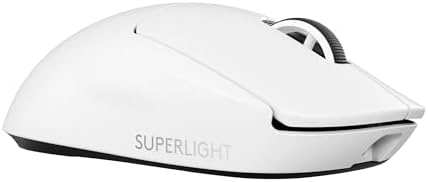
The Logitech G Pro X Superlight 2 at £104 is the lightest credible competitive gaming mouse at 35 g. The Superlight 2 ships the HERO 2 sensor, optical mouse switches, a 90-hour battery, and the symmetric shape most CS2 and Valorant pros compete with. Lighter mice exist on the market but most sacrifice build quality, sensor lineage, or battery.
Is 8 kHz polling actually noticeable?
On a 240 Hz or higher monitor with a modern CPU and a tuned game engine, 8 kHz polling reduces input lag by a measurable 0.5-1 ms over 1 kHz. On a 144 Hz monitor or older hardware the difference is below the noise floor of human perception. Competitive players running 360 Hz or 480 Hz monitors benefit most; everyone else can leave it at 1 or 2 kHz.
Should I pick a symmetric or ergonomic gaming mouse?
Pick by grip style, not by brand. Fingertip and claw grippers want a 50-70 g symmetric shape like the Razer Viper V4 Pro or Logitech Superlight 2. Palm grippers want a sculpted right-hand ergonomic shape with a thumb rest like the Razer Basilisk V3 Pro. Tracing your hand on a sheet of paper tells you which group you fall into.
Does a high DPI count make a mouse better for gaming?
No. Almost every competitive player runs between 400 and 1,600 DPI regardless of the mouse's ceiling. A 50,000 DPI ceiling is a marketing number. What matters is the sensor generation: Razer Focus Pro 30K, Logitech HERO 2, and Pixart PMW3950 all track cleanly at low DPI settings. Skip the DPI count and read the sensor model.
Is wireless gaming mouse latency still a problem?
No. Razer HyperSpeed and Logitech Lightspeed both measure below 1 ms end to end on every public latency test, which matches a wired USB connection. The Viper V4 Pro and Superlight 2 are routinely measured at parity with their wired equivalents. The one rule: keep the 2.4 GHz receiver on the desk in line of sight of the mouse, not plugged into the back of the PC.