Home/Compare/Graphics Cards/ASUS Prime GeForce RTX 5080 OC
ASUS

ASUS Prime GeForce RTX 5080 OC

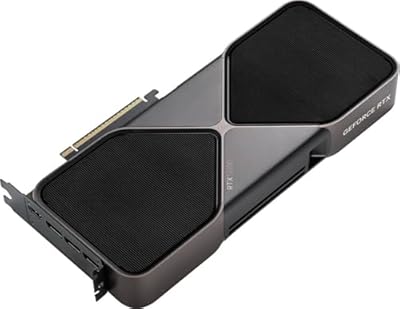
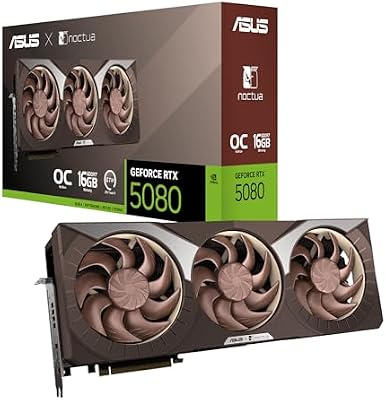
ASUS's Prime take on the RTX 5080, with 16GB of GDDR7, DLSS 4 multi-frame generation, vapor chamber cooling, and a compact 2.5-slot SFF-ready design.

In stock16GB GDDR7DLSS 4 with multi-frame genVapor chamber coolingSFF-ready 2.5-slot2685 MHz OC mode
ASUS Prime GeForce RTX 5080 OC
16GB GDDR7DLSS 4 with multi-frame genVapor chamber coolingSFF-ready 2.5-slot2685 MHz OC modeWatch review
Compare prices

Affiliate links, your price stays the same. How we check prices →

Our verdict

ASUS's value 5080 with vapor chamber cooling and SFF-ready compact design, hitting the high-1440p and 4K sweet spot at sensible pricing.

75/100
vs. other £1100 to £1500 current-gen 4K GPUs
Scored within its class as a current-gen high-end 4K Nvidia card, not against the RTX 5090 flagship or sub-£800 mid-range GPUs.
Best price found
£1,114
30-day low £1,114 · Average £1,223
See £1,114 deal at Amazon Uk

What we think

Swipe or tap to explore what we like, what to watch for, and who it's for

How it performs & what it pairs with

Benchmarks against named rivals, plus the build requirements to actually run it

Benchmarks
4K ultra settings, DLSS Quality where applicable
Cyberpunk 2077 (4K ultra, RT off)
ASUS Prime RTX 5080 OC
116 fps avg
RTX 5090
156 fps avg
RTX 4080 SUPER
97 fps avg
Cyberpunk 2077 (4K ultra, RT ultra, DLSS Quality)
ASUS Prime RTX 5080 OC
81 fps avg
RTX 5090
115 fps avg
RTX 4080 SUPER
62 fps avg
Alan Wake 2 (4K high, RT on, DLSS Quality)
ASUS Prime RTX 5080 OC
85 fps avg
RTX 5090
112 fps avg
RTX 4080 SUPER
68 fps avg
Test bench

Tested with a Ryzen 7 9800X3D, 32GB DDR5-6000, Windows 11 24H2 on a 1000W PSU. OC mode BIOS, latest driver at time of testing.

Build compatibility
What your PC needs
Power supply
850W is the official recommendation and the realistic floor. With a high-end CPU, step up to 1000W for headroom against transient power spikes.
Case clearance
Compact 2.5-slot Prime design fits virtually any mid-tower, mATX, and most ITX cases. Genuinely SFF-friendly at this performance tier.
Motherboard slot
PCIe 5.0 x16 slot, fully backward compatible with PCIe 4.0 boards. No noticeable performance difference at this card's bandwidth between PCIe versions.
!
12V-2x6 connector
Uses the updated 12V-2x6 power connector. Use a native cable from a modern ATX 3.0 or 3.1 PSU rather than an adapter, and seat it fully home without sharp bends.
CPU pairing
Pair with a Ryzen 7 9800X3D, Ryzen 9 7950X, Core i9 14900K or better. Older CPUs will bottleneck the card noticeably at 1440p and below.

Performance breakdown

Scored relative to the class, not against flagship models

vs. other £1100 to £1500 current-gen 4K GPUs
75/100
Best in class scored 95
Class average 80
Lowest in class 65
4K rasterisation90 / 100
Excellent native 4K performance, second only to RTX 5090
Ray tracing94 / 100
Outstanding RT thanks to 4th-gen cores and DLSS 4 multi-frame gen
Form factor92 / 100
Compact 2.5-slot SFF-friendly design, rare at this performance tier
Value within tier86 / 100
Cheapest ASUS 5080 variant with vapor chamber and premium cooling

Watch it in action

Powered byYouTube

Who this is right for

Picture yourself in these scenarios. How well does this fit?

Compact 4K builder
Building or upgrading a mid-tower, mATX, or ITX PC at 4K. The compact 2.5-slot Prime design fits where bulkier triple-fan flagship partner cards won't.
Excellent fit
Value-focused 4K gamer
Wants the 5080 chip at the lowest sensible ASUS partner card price. The Prime variant delivers identical gaming performance to TUF Gaming and ROG Strix for less.
Excellent fit
Multitasking creator
Uses the card for gaming plus 3D rendering or video work. The 16GB VRAM and DLSS 4 features handle creator workloads well, though 5090's 32GB is better for serious pro work.
Good fit
RGB showpiece builder
Building a showpiece PC where lighting is part of the visual identity. Prime is functional rather than premium aesthetically. ROG Strix or Noctua variants are better fits.
Look elsewhere

What every spec actually means

Numbers translated into real-world impact

vram_gb16

Plenty for 4K gaming today, even with ray tracing and heavy texture packs enabled. Behind the 5090's 32GB for serious creator workloads, but ample for almost all gaming scenarios.

tdp_w360

Substantial power draw, so a quality 850W PSU is the minimum recommendation. Older or weaker power supplies will trip protection circuits under heavy load, especially with a power-hungry CPU.

memory_typeGDDR7

Latest memory generation at 30 Gbps, significantly faster than the GDDR6X used in the previous 4000 series. Helps with bandwidth-hungry scenarios and 4K texture loads.

dlss_version4

Supports the latest Nvidia upscaling and frame generation stack, including multi-frame generation exclusive to the 50 series. Biggest reason to choose Blackwell at this tier.

boost_clock_mhz2685

OC mode factory boost clock, comfortably above reference 5080 specs. Combined with the vapor chamber cooling, the card holds boost clocks consistently higher than budget partner cards.

memory_bandwidth_gbps960

Vast bandwidth thanks to 30 Gbps GDDR7 on a 256-bit bus. Comfortable for 4K gaming with heavy textures, where slower-memory cards start to bottleneck.

Complete specifications

Verified across manufacturer datasheets and retailer spec tables

All specs
slots
2.5
2 to 3.5 slots typical, this is compact at 2.5
tdp w
360
300 to 575W class range, this is mid at 360
ai tops
1801
·
vram gb
16
16 to 32GB at this tier, this is at the low end at 16
gpu chip
GB203
·
zero rpm
true
·
dual bios
true
·
cuda cores
10752
·
hdmi count
1
1 to 2 typical, this has 1
memory type
GDDR7
GDDR6X or GDDR7 in class, this is GDDR7
architecture
Blackwell
·
dlss version
4
DLSS 3 or 4 in class, this is DLSS 4
hdmi version
2.1
HDMI 2.1 standard across class
pcie version
5.0
PCIe 4.0 or 5.0 in class, this is 5.0
release year
2025
·
tensor cores
336
·
base clock mhz
2295
·
lithography nm
4
4nm or 5nm typical, this is 4nm
memory bus bit
256
256 to 512-bit at this tier, this is 256-bit
boost clock mhz
2685
2400 to 2800 MHz typical, this is high at 2685
power connectors
1x 16-pin
12VHPWR or 12V-2x6 standard at this tier
displayport count
3
2 to 3 typical, this has 3
memory speed gbps
30
20 to 30 Gbps class range, this is at the top at 30
ray tracing cores
84
·
displayport version
2.1b
DP 1.4a or 2.1 in class, this is 2.1b
factory overclocked
true
·
psu recommendation w
850
850 to 1200W typical, this is 850
memory bandwidth gbps
960
700 to 1800 GB/s class range, this is 960
ray tracing generation
4th Gen
3rd or 4th gen, this is 4th Gen

Common questions

The things people ask before buying this product

Is the Prime 5080 worth buying over the TUF or ROG Strix variants?

For most buyers, yes. The Prime delivers vapor chamber cooling and identical gaming performance to pricier variants for less money. TUF and ROG Strix justify their premiums mainly through aesthetics and acoustics.

Will the Prime 5080 fit in an ITX case?

Likely yes. The compact 2.5-slot design is SFF-friendly, fitting most modern ITX cases that accept dual-slot or 2.5-slot GPUs. Check exact dimensions against your specific case before buying.

Is the RTX 5080 worth buying over the RTX 5090?

Yes for most gamers. The 5080 delivers excellent 4K gaming with the same DLSS 4 features at roughly half the 5090's price. The 5090's extra performance is only justified for serious 4K maximalists or creators.

What PSU do I need for the Prime 5080 OC?

Nvidia recommends 850W and that's the realistic floor for the 5080. With a power-hungry CPU like a Ryzen 9 or Core i9, step up to a quality 1000W unit for transient spike headroom.

Compare Electronic editors
Independent graphics cards comparison since 2025
Every product is scored against its own product class, not against flagship models. Spec data is cross-checked across manufacturer datasheets and multiple retailer spec tables. Prices are verified daily. We never rank by affiliate commission.
Read our methodology