ASUS
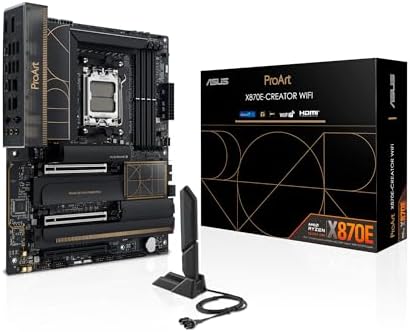
ASUS ProArt X870E-CREATOR WIFI
The ASUS ProArt X870E-CREATOR WIFI lands as a solid mid-range motherboard, built around X870E.
63/100
X870EAM516+2+2ATXDDR5ProCool II power connectors
£460best price at Amazon
In stock at 1 retailer
We may earn a commission on purchases via this link. It never affects our scores or rankings.
Independent score · no sponsored placement
Price checked across retailers daily
Why we rate it
- Front USB-C header
- BIOS flashback
- Above-average m.2 pcie 5.0 slots
- Above-average usb4 / thunderbolt 4
- Below-average pcie 4.0 x16 slots
Score profile
Scored against the motherboards classWhere the ASUS ProArt X870E-CREATOR WIFI wins and loses
Full specification
Grouped · supported features marked in blueSpecifications
Platform
SocketAM5
ChipsetX870E
Form factorATX
Supported CPU generationsAMD Ryzen 9000, 8000 and 7000 Series
Memory
RAM typeDDR5
Power delivery
VRM phases16
CPU power connectorsProCool II power connectors
Expansion slots
PCIe 5.0 x16 slots1
PCIe 4.0 x16 slots0
M.2 slots (total)4
M.2 PCIe 5.0 slots2
M.2 PCIe 4.0 slots2
Rear I/O
USB4 / Thunderbolt 42
USB 3.2 Gen 2x2 (20 Gb/s)1
Internal headers
Front USB-C headerYes
Front USB-C generationUSB 20Gbps
Networking
Ethernet10
Ethernet ports2
Wi-FiWiFi 7
Features
BIOS flashbackYes
More specs
M2 slots0
Watch it in action
Powered by
Head to head
Highlighted cell = better in that rowASUS ProArt X870E-CREATOR WIFI vs ASUS ASUS ROG Maximus Z790 Formula
ASUS ProArt X870E-CREATOR WIFIASUS ROG Maximus Z790 Formula
| ASUSASUS ProArt X870E-CREATOR WIFIThis page | ASUSASUS ROG Maximus Z790 Formula | |
|---|---|---|
| Overall score | 63 /100 | 67 /100Better |
| Chipset | X870E | Z790 |
| Socket | AM5 | LGA 1700 |
| Form factor | ATX | ATX |
| RAM slots | — | 4 |
| M2 slots total | 4 | 5Better |
Who it's for
Is the ASUS ProArt X870E-CREATOR WIFI right for you?
Buy it if
Buyers on a budget
Anyone who needs a dependable motherboard for the essentials without overspending.
Skip it if
Skip it if
You need flagship-tier performance, in which case a higher-tier motherboard is the better call.
Performance builder
Chasing frames and headroom in a high-end rig.
good
Mainstream builder
Wants strong value in a balanced build.
good
Budget builder
Stretching every pound in an entry rig.
okay
Common questions
Before you buy
Is the ASUS ProArt X870E-CREATOR WIFI worth it?
It depends on what you need. It scores 63/100 against other motherboards, a solid mid-range result where the class average is around 51.
What stands out on the ASUS ProArt X870E-CREATOR WIFI?
Its front usb-c header stands out, a genuinely useful feature if your setup calls for it.
How does it compare to the ASUS ROG Crosshair X870E Hero?
The ASUS ROG Crosshair X870E Hero scores 65/100 versus this one at 63/100, so it is the step up on the spec sheet.
You might also consider


