ASUS
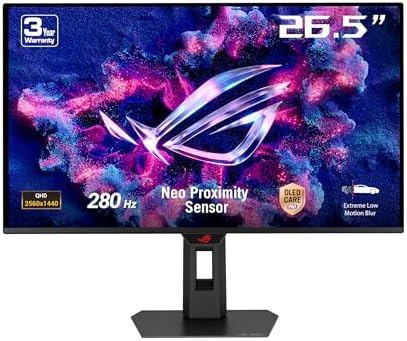
ASUS ROG Strix OLED XG27ACDMS gaming monitor ― 27-inch
A solid mid-range 1440p monitor for anyone building a living-room setup, leading with 280 Hz.
58/100
280 HzQD-OLED0.03 msDisplayHDR 4002560 x 144016:9
£389best price at Amazon
In stock at 1 retailer
We may earn a commission on purchases via this link. It never affects our scores or rankings.
Independent score · no sponsored placement
Price checked across retailers daily
Why we rate it
- G-Sync
- Above-average refresh rate
- Above-average peak brightness
- No freesync
- Below-average hdmi ports
Score profile
Scored against the 1440p monitors classWhere the ASUS ROG Strix OLED XG27ACDMS gaming monitor ― 27-inch wins and loses
Full specification
Grouped · supported features marked in blueSpecifications
Display
Size27 "
Resolution2560
Aspect ratio16
Panel typeQD-OLED
Refresh rate280 Hz
Response time0.03 ms
Peak brightness1000 nits
Colour depth10
DCI-P3 coverage99
HDR and contrast
HDR certificationDisplayHDR 400
Contrast ratio1500000
Ports
HDMI ports1
HDMI version2.1
DisplayPort1
DisplayPort version1.4
USB-C1
USB-C Power Delivery15 W
Gaming features
G-SyncYes
More specs
Weight6.1 kg
USB c ports1
Color depth bit10
Dci p3 coverage99 %
Watch it in action
Powered by
Head to head
Highlighted cell = better in that rowASUS ROG Strix OLED XG27ACDMS gaming monitor ― 27-inch vs LG LG UltraGear 27GS95QE 27" 1440p OLED
ASUS ROG Strix OLED XG27ACDMS gaming monitor ― 27-inchLG UltraGear 27GS95QE 27" 1440p OLED
| ASUSASUS ROG Strix OLED XG27ACDMS gaming monitor ― 27-inchThis page | LGLG UltraGear 27GS95QE 27" 1440p OLED | |
|---|---|---|
| Overall score | 58 /100 | 59 /100Better |
| Refresh | 280 HzBetter | 240 Hz |
| Size | 27 " | 26.5 " |
| Panel type | QD-OLED | WOLED |
| Response | 0.03 ms | 0.03 ms |
| HDR certified | DisplayHDR 400 | VESA DisplayHDR True Black 400 |
| Peak | 1000 nits | 1300 nitsBetter |
Who it's for
Is the ASUS ROG Strix OLED XG27ACDMS gaming monitor ― 27-inch right for you?
Buy it if
Buyers on a budget
Anyone who needs a dependable 1440p monitor for the essentials without overspending.
Skip it if
Skip it if
You need freesync, in which case a higher-tier 1440p monitor is the better call.
Home cinema viewer
Wants the best picture for films and gaming nights.
good
Everyday watcher
Mixed TV, streaming and the odd console session.
good
Budget upgrader
Replacing an older set without overspending.
good
Common questions
Before you buy
Is the ASUS ROG Strix OLED XG27ACDMS gaming monitor ― 27-inch worth it?
It depends on what you need. It scores 58/100 against other 1440p monitors, a solid mid-range result where the class average is around 51.
What stands out on the ASUS ROG Strix OLED XG27ACDMS gaming monitor ― 27-inch?
Its g-sync stands out, a genuinely useful feature if your setup calls for it.
How does it compare to the ASUS ROG Swift OLED PG27AQDM 27" 1440p OLED?
The ASUS ROG Swift OLED PG27AQDM 27" 1440p OLED scores 59/100 versus this one at 58/100, so it is the step up on the spec sheet.
You might also consider