

Best keyboards for coding
The best programming keyboard depends on shortcuts, navigation and layout. Compare Keychron UK boards by coding workflow, navigation access and number entry.
On this page
At a glance
Keychron K10 HE is the full-size pick for programmers who use a numpad and want adjustable magnetic switches. Q1 Max is the compact wireless alternative; V6 Max retains a traditional full-size layout with conventional mechanical switches. No keyboard makes code better by itself. The useful criteria are UK layout, comfortable switch feel, arrow and navigation access, and whether programmable layers save repeated keystrokes.
For a broader shortlist, see best mechanical keyboard for typing uk 2026. The related mechanical keyboard switches explained guide covers the adjacent decision. Consult the manufacturer product specification before selecting a specific switch or regional layout.
| Keychron K10 HE | £149.99 on Amazon UK at the time of writing (October 2026) |
| Keychron Q1 Max | £169.99 on Amazon UK at the time of writing (October 2026) |
| Keychron V6 Max | £114.99 on Amazon UK at the time of writing (October 2026) |
| Keychron K10 HE | £149.99 on Amazon UK at the time of writing (October 2026) |
| Keychron Q1 Max | £169.99 on Amazon UK at the time of writing (October 2026) |
| Keychron V6 Max | £114.99 on Amazon UK at the time of writing (October 2026) |
Manufacturer specifications: Keychron K10 HE; Keychron Q1 Max; Keychron V6 Max.
Which option fits each use?
Programming gives navigation keys more importance than gaming-focused buying guides suggest. Arrow, Home, End, Page Up and Page Down can move through code without a mouse; a numpad helps with numeric data but is not essential for most coding. Compact layouts tighten navigation access or use layers. Choose the arrangement that reduces repeated reaches in the editor and terminal, not simply the smallest keyboard.
A useful final check is to write down the five actions repeated most often in a normal coding session: moving through a line, navigating files, entering numbers, switching applications and triggering editor commands. Then map each action to a dedicated key, a shortcut or a software layer on the shortlisted layout. This small audit separates a genuine layout need from a feature that sounds attractive but would rarely be used. It also helps compare a full-size board against a 75% model without assuming that more keys are always better.
| Situation | Best fit | Reason |
|---|---|---|
| Code navigation | Dedicated arrows | Less layer switching |
| Numeric datasets | Full-size | Numpad remains available |
| Small desk | 75% | Smaller horizontal footprint |
| Repeated commands | Programmable layer | Useful only when configured |
Radar · 0-100 scores
- Keychron K10 HE
- Keychron Q1 Max
- Keychron V6 Max
What trade-offs matter?
Keychron K10 HE is full-size, UK layout and uses Hall effect magnetic switches; Q1 Max is a 75% wireless board; V6 Max keeps a conventional 100% arrangement. QMK programmability can remap keys, but setup takes time and may behave differently across operating systems. Preserve familiar UK ISO symbols and shortcuts before investing in a programmable layer.
Do not treat extra keys as an automatic productivity gain. A shortcut is useful only when it is easy to remember and remains available on the computers used for work. Before remapping, note which editor commands are repeated enough to justify a layer and keep standard UK symbols accessible. This keeps a custom board predictable when switching projects or devices.
Noise and maintenance can matter on shared desks. Linear switches tend to move without a tactile bump, tactile switches provide a bump, and clicky switches add audible feedback; the exact sound varies by board and switch. A programmer who joins calls or shares a room should consider the working environment alongside key feel, and should verify which switch variant is actually listed.
Navigation access is the first coding-specific test. A dedicated arrow cluster lets a programmer move through a line without holding a modifier, while Home and End move to line boundaries in many editors. Compact 75% boards retain arrows but bring the navigation cluster closer to the main block; some smaller layouts put more actions behind a function layer. Test the exact key map against the editor shortcuts used most often.
The number pad is a role-dependent advantage. It can speed repeated entry of numeric values, identifiers or spreadsheet data, but most source code is written from the alphanumeric block and punctuation keys. If numerical entry is occasional, a full-size board may devote desk width to keys that are rarely touched. If daily tasks include data cleansing, finance or CAD shortcuts, the direct keypad can justify that footprint.
UK ISO matters for programming because punctuation and symbol positions are part of the typing routine. The ISO Enter key and shorter left Shift differ from ANSI, and symbols such as backslash, pipe and quotation marks can sit in different places. A US layout may still be usable, but the printed legends and operating-system mapping must agree. Confirm the selected UK variant on the listing rather than inferring it from a product-family photo.
Keychron K10 HE combines a full-size layout with Hall effect switches and configurable actuation. That feature is useful only if the programmer wants adjustable key behaviour or also plays games that benefit from it. Keychron V6 Max keeps conventional mechanical switches while retaining the number pad and offers QMK remapping. Remapping can place a frequent command on an easier key, but it requires configuration and may not transfer automatically to every computer.
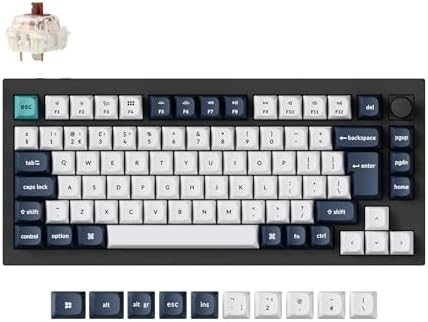
The Q1 Max makes a different trade: it uses a 75% layout to save horizontal desk space while retaining a function row and arrow keys. The closer navigation and reduced key separation can take adjustment, especially for users who rely on dedicated Home, End or Page keys. Its smaller footprint can let the mouse sit closer to the body, but the benefit depends on the desk and the amount of mouse use during coding.
Price helps separate the feature sets. At the time of writing (October 2026), Keychron K10 HE is £149.99 on Amazon UK, V6 Max is £114.99 and Q1 Max is £169.99, with listings checked on 27 October. K10 HE is £35 more than V6 Max; Q1 Max is £20 above K10 HE despite its smaller layout. That comparison makes clear that price is not a simple measure of keyboard size: switch technology, case construction and wireless features also affect the position.
Switch feel is personal and should be considered separately from layout. Conventional mechanical boards offer fixed actuation with a choice of linear, tactile or clicky switch variants, while Hall effect boards may allow actuation settings to be changed in software. A lighter trigger is not automatically more comfortable during long coding sessions. The useful choice is the one that remains predictable across typing, shortcuts and any other regular task.
Finally, consider how the keyboard will be used across devices. Wireless modes can make a board easier to share between a desktop and laptop, while a wired connection avoids charging and receiver management. QMK or VIA remapping can be powerful, but check operating-system support and whether the configured layout can be reproduced on a work machine. A simple board with familiar keys may be more efficient than a programmable one that requires frequent maintenance.
Keyboard size, switch technology and key height are separate choices. A smaller footprint does not automatically mean low-profile switches, and a magnetic switch does not determine the layout. Check each feature against a normal working day. Confirm the UK ISO variant and whether the manufacturer’s configuration software supports the operating system used.
What should you buy?
Keychron K10 HE is the full-size pick for programmers who use a numpad and want adjustable magnetic switches. Q1 Max is the compact wireless alternative; V6 Max retains a traditional full-size layout with conventional mechanical switches. No keyboard makes code better by itself. The useful criteria are UK layout, comfortable switch feel, arrow and navigation access, and whether programmable layers save repeated keystrokes. The Keychron K10 HE costs £149.99 on Amazon UK at the time of writing (October 2026), checked on 27 October 2026.

Keychron K10 HE specifications
- Layout: 100%
- Switches: Hall Effect Magnetic
- Connection: Wireless
- Key material: PBT
- Polling rate: 1000
Keychron Q1 Max and Keychron V6 Max offer the alternatives. Their distinct layouts or switch designs matter more than a headline feature that will not be used.
Keychron K10 HE - strengths and limits
Where to buy
Check price
Verdict
Keychron K10 HE is the full-size pick for programmers who use a numpad and want adjustable magnetic switches. Q1 Max is the compact wireless alternative; V6 Max retains a traditional full-size layout with conventional mechanical switches. No keyboard makes code better by itself. The useful criteria are UK layout, comfortable switch feel, arrow and navigation access, and whether programmable layers save repeated keystrokes. Make the choice from the keys used most often, desk dimensions and exact regional layout. Compare the wider buying guide and the related explainer.
For another useful comparison, read full-size mechanical keyboard guide.
Frequently asked questions
What is the best keyboard layout for programming?
A full-size layout suits programmers who use a number pad and prefer separate arrow and navigation keys. Keychron K10 HE and Keychron V6 Max both keep that arrangement, while Keychron Q1 Max uses a smaller 75% layout with arrows and a function row. Choose by daily shortcuts and desk space.
Is a full-size keyboard better for coding?
A full-size keyboard is better for coding when its dedicated arrows, navigation block or number pad are used regularly. It takes more horizontal desk space and can place the mouse farther away. Programmers who rarely enter numbers may prefer a 75% layout such as Keychron Q1 Max.
Do programmers need a mechanical keyboard?
Programmers do not need a mechanical keyboard to write code. Mechanical switches offer distinct feel choices and can be replaced on compatible hot-swap boards, but a membrane keyboard can also provide the required keys. Prioritise comfortable key feel, reliable UK layout and access to the shortcuts used in the editor.
Is a UK ISO layout important for programming?
UK ISO is important when the programmer wants printed key legends to match the operating-system layout. Enter, left Shift and punctuation positions differ from ANSI keyboards, which affects symbols used in code. Confirm that the exact product listing is the UK ISO variant before ordering.
Are Hall effect switches useful for programming?
Hall effect switches are not necessary for programming. Keychron K10 HE offers adjustable magnetic actuation, which can be useful for gaming or users who want to tune key response. Conventional switches on Keychron V6 Max provide a fixed, familiar press and may be simpler for office typing.
Should a programmer choose a wireless keyboard?
Choose wireless when moving between computers or keeping the desk clear matters; choose wired when avoiding charging and receiver setup is more useful. Keychron K10 HE, Q1 Max and V6 Max provide wireless connection options, but check the exact mode and operating-system compatibility for the intended computer.