

Gaming mouse on a Mac?
Yes, a gaming mouse can work with a Mac, but its software may be limited. Compare Bluetooth, USB receivers, macOS support and office alternatives.
On this page
At a glance
Yes, a compatible gaming mouse can work with a Mac. Razer Basilisk V3 X HyperSpeed offers Bluetooth for basic pointing, while Logitech G PRO X SUPERLIGHT 2 uses a USB receiver. Advanced remapping depends on exact software and device support. For office-first Mac use, Logitech MX Master 3S is the more relevant alternative because Logitech provides Mac configuration through Logi Options+.
See the wider mouse buying guide and the related mouse explainer. The manufacturer’s Razer Basilisk V3 X connection and mode specifications provides the cited specifications. A separate gaming mouse and pad guide covers desk setup.
Which option fits each use?
Bluetooth avoids occupying a USB port, which is useful on a MacBook with USB-C ports. A 2.4 GHz receiver may need an adapter or dock. Logitech supports MX Master 3S configuration through Logi Options+ on macOS. Razer now offers Synapse for Mac for supported Apple-silicon systems, but exact operating-system and device compatibility must be checked rather than assumed. Check Razer’s current Mac software requirements and the supported-device list before relying on advanced settings. Logitech provides Logi Options+ for Mac configuration.
| Situation | Pick | Decision reason |
|---|---|---|
| Mac office workflow | MX Master 3S | Bluetooth + Logi Options+ |
| Gaming cursor use | G PRO X SUPERLIGHT 2 | LIGHTSPEED receiver |
| Bluetooth convenience | Basilisk V3 X | Basic pairing supported |
| Advanced Razer settings | Check the exact model | Mac support is device-specific |
Radar · 0-100 scores
- Razer Basilisk V3 X HyperSpeed
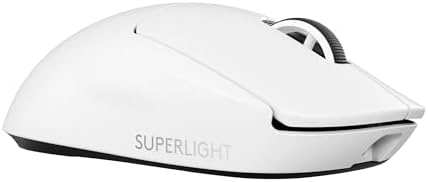
- Logitech G PRO X SUPERLIGHT 2 wireless gaming mouse
- Razer Viper V3 Pro
What should you compare before buying?
Razer Basilisk V3 X supports both Bluetooth and 2.4 GHz, so it can pair with a Mac without its receiver. Logitech G PRO X SUPERLIGHT 2 wireless uses LIGHTSPEED and is listed for Mac, while MX Master 3S has Bluetooth and Mac-compatible Logi Options+. Check software support before relying on remapped buttons or profiles.
Do not treat DPI, polling rate and weight as interchangeable measures. DPI is the number of counts reported per inch; polling rate is how often the mouse reports updates; weight affects physical handling. Shape, grip and surface friction alter the experience as well. Choose a stable configuration that suits the game or task instead of buying the largest number on a spec sheet.
Why is Mac software support more useful than a gaming sensor?
For ordinary Mac work, software that configures the required controls matters more than the highest sensor ceiling. Logitech states that Logi Options+ supports MX Master 3S on macOS and provides pointer and button configuration. Its sensor can be set up to 8,000 DPI, but most buyers should tune the pointer to comfortable travel rather than use the maximum. A mouse can pair successfully while advanced configuration remains unavailable. That distinction matters for a thumb wheel, gestures or application-specific shortcuts. Check the current operating-system requirement and exact device support before buying for one specialised command. A generic claim of Mac compatibility may describe basic pointer operation rather than every feature shown in Windows screenshots.
Should a MacBook connect over Bluetooth or a receiver?
Bluetooth is the simplest starting point when a MacBook has limited USB ports and the mouse supports it. Logitech lists Bluetooth and Logi Bolt connectivity for MX Master 3S, while Razer Basilisk V3 X offers Bluetooth and HyperSpeed modes. The gaming Logitech G PRO X SUPERLIGHT 2 uses a LIGHTSPEED receiver rather than Bluetooth. These are different receiver systems and should not be treated as interchangeable. A USB-A receiver may need an adapter on a USB-C MacBook or a suitable dock. Include that adapter in both the cost and the travel kit. A receiver can be useful for a stable fixed desk, but a recommendation that ignores the Mac's physical ports leaves an important part of the purchase unresolved.
What should you buy?
Yes, a compatible gaming mouse can work with a Mac. Razer Basilisk V3 X HyperSpeed offers Bluetooth for basic pointing, while Logitech G PRO X SUPERLIGHT 2 uses a USB receiver. Advanced remapping depends on exact software and device support. For office-first Mac use, Logitech MX Master 3S is the more relevant alternative because Logitech provides Mac configuration through Logi Options+. Logitech MX Master 3S costs £67.99 on Amazon UK at the time of writing (October 2026), checked on 27 October 2026.
Amazon UK listing prices at the time of writing (October 2026), checked on 27 October 2026. These figures refer to the exact linked configurations.
| Mouse | Amazon UK price | Specifications |
|---|---|---|
| Razer Basilisk V3 X HyperSpeed | £64.99 | Manufacturer |
| Logitech G PRO X SUPERLIGHT 2 wireless gaming mouse | £105.79 | Manufacturer |
| Razer Viper V3 Pro | £113.00 | Manufacturer |

Razer Basilisk V3 X HyperSpeed specifications
- Connectivity: Bluetooth or HyperSpeed wireless
- Battery: 1 x AA
- Right-handed shell
- Bluetooth claim: up to 535 hours
- HyperSpeed claim: up to 285 hours
Logitech G PRO X SUPERLIGHT 2 wireless gaming mouse and Razer Viper V3 Pro are the alternatives. Compare the exact hand fit, connection mode and software support before ordering.
Razer Basilisk V3 X HyperSpeed - strengths and limits
Where to buy
Check price
Verdict
Yes, a compatible gaming mouse can work with a Mac. Razer Basilisk V3 X HyperSpeed offers Bluetooth for basic pointing, while Logitech G PRO X SUPERLIGHT 2 uses a USB receiver. Advanced remapping depends on exact software and device support. For office-first Mac use, Logitech MX Master 3S is the more relevant alternative because Logitech provides Mac configuration through Logi Options+. Pick by grip, connection and repeated task, then verify exact configuration and price on Amazon UK. Continue with the wider buying guide, the related question and the mouse-weight explainer.
Frequently asked questions
Can a gaming mouse work with a Mac?
Yes. A gaming mouse can provide basic pointing on a Mac through Bluetooth or a supported USB receiver, but advanced lighting, profiles and button assignments depend on model-specific software support. This shortlist uses Razer Basilisk V3 X HyperSpeed as the Bluetooth-first option; check its exact configuration support before relying on custom features.
Does Razer Synapse work on Apple Silicon Macs?
Razer provides Synapse 4 for Mac on Apple Silicon, but that does not guarantee support for every Razer peripheral or macOS version. Check Razer's current device compatibility list for the exact mouse and the Mac's operating-system release. Basic pointer input may work even when a specific custom control is not supported.
Can Razer Basilisk V3 X HyperSpeed connect to a Mac without a receiver?
Yes. Basilisk V3 X HyperSpeed supports Bluetooth as well as Razer HyperSpeed wireless. Bluetooth can provide basic pointer input without occupying a receiver port, while the dedicated receiver is a separate connection option. Confirm that any required button profiles or lighting settings are supported in the Mac software before purchase.
Will mouse buttons work on a Mac without gaming software?
The main clicks and pointer movement can work through a supported connection without the gaming configuration app. Custom button assignments, profiles and lighting may require software that recognises the exact model and macOS version. Buyers who need a side button for a work shortcut should verify that assignment before relying on it.
Is Logitech MX Master 3S a better Mac mouse for office work?
MX Master 3S is a productivity alternative with a thumb wheel and configurable controls, and Logitech Options+ supports macOS configuration. That makes it a closer match for office scrolling than an esports-shaped gaming mouse. It is still a right-handed productivity design, so confirm the contour and supported shortcuts suit the actual desk routine.
What should I check before buying a mouse for a MacBook?
Check the exact mouse model in the manufacturer's Mac software compatibility list, the Mac's available ports, and whether Bluetooth or the receiver will be used. Then confirm support for the macOS version and any required button mappings. A general brand statement or compatibility with a different model is not enough to prove full feature support.