
Is low-profile worth it?
Low-profile keyboards reduce key height. Compare Razer Ornata V3's hybrid switches with Keychron Q1 Max and AULA F75 for UK typing, gaming and desk fit.
On this page
At a glance
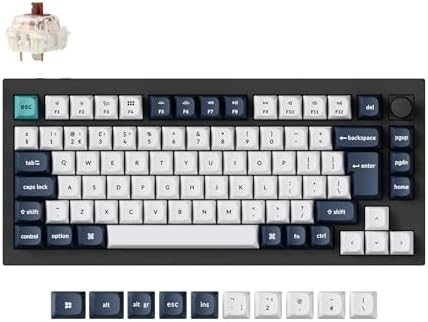
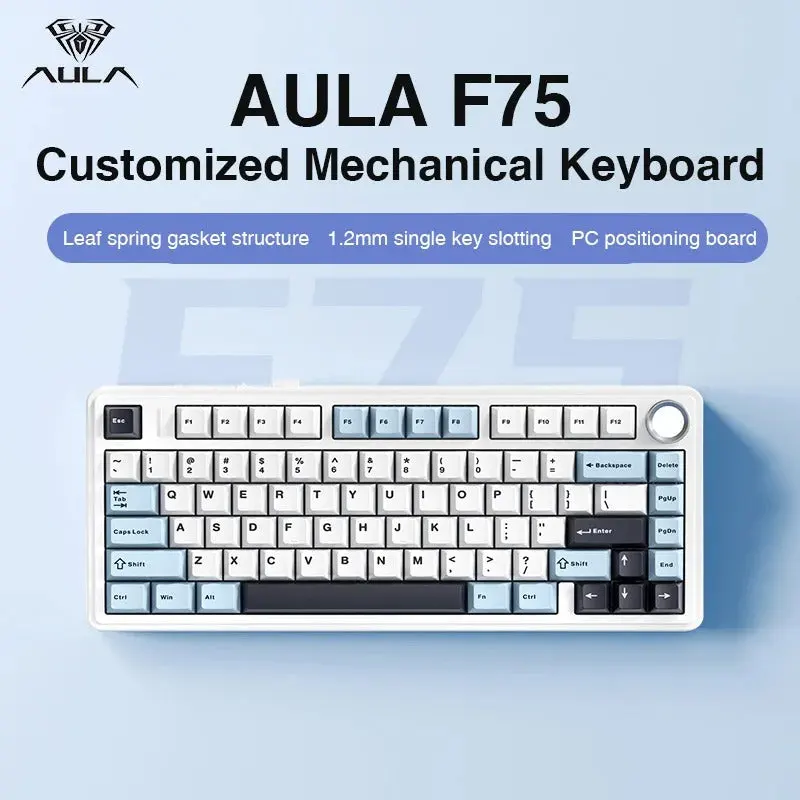
A low-profile keyboard is worth considering when a flatter key position matters more than standard-height switches and keycaps. It is not an automatic ergonomic upgrade: desk height, wrist angle and chair position determine comfort. Razer Ornata V3 is a low-profile mecha-membrane keyboard, not a conventional mechanical board; Q1 Max and AULA F75 are standard-height 75% mechanical alternatives.
For a broader shortlist, see best gaming keyboard uk 2026. The related mechanical keyboard switches explained guide covers the adjacent decision. Consult the manufacturer product specification before selecting a specific switch or regional layout.
| Razer Ornata V3 (UK layout) | £50.99 on Amazon UK at the time of writing (October 2026) |
| Keychron Q1 Max | £169.99 on Amazon UK at the time of writing (October 2026) |
| EPOMAKER AULA F75 | £61.19 on Amazon UK at the time of writing (October 2026) |
Manufacturer specifications: Razer Ornata V3 (UK layout); Keychron Q1 Max; EPOMAKER AULA F75.
Which option fits each use?
The useful measure is the keyboard’s front height and the hand’s angle while typing, not the low-profile label alone. A tall desk can still put wrists high above a low-profile board. A wrist rest can change posture but should not force the wrist to bend. Check the manufacturer’s dimensions and try to match the key feel to the board already used comfortably.
| Situation | Best fit | Reason |
|---|---|---|
| Flatter key profile | Ornata V3 | Mecha-membrane switches |
| Standard mechanical feel | Q1 Max / AULA F75 | Conventional-height designs |
| Desk fit | Measure front height | Low-profile alone is not enough |
| Switch customisation | Check exact board | Compatibility differs |
Radar · 0-100 scores
- Razer Ornata V3 (UK layout)
- Keychron Q1 Max
- EPOMAKER AULA F75
What trade-offs matter?
Razer describes Ornata V3 as a low-profile mecha-membrane keyboard with a UK QWERTY layout. That hybrid switch design differs from the mechanical switches in Keychron Q1 Max and AULA F75. Low-profile can feel closer to laptop keys and reduce key height, but it may also mean less switch choice and fewer compatible replacement keycaps. Decide from feel and fit, rather than assuming low travel prevents strain.
Low-profile describes the height and travel geometry of the keyboard, not a guarantee of better wrist posture. Desk height, chair position and the board’s front edge all affect the angle at which the hands approach the keys. Measure the front height and check whether the board has feet that raise its rear; a flatter switch can still sit in a case that feels tall on a particular desk.
Keycap and switch choices may also be narrower than on a standard-height mechanical board. Some low-profile designs use proprietary stems or switch formats, which can limit replacement parts. Buyers who value customisation should check compatible keycaps and switches before choosing a model. Buyers who mainly want laptop-like reach should compare the physical layout and key spacing, rather than relying on the low-profile label alone.
Keyboard size, switch technology and key height are separate choices. A smaller footprint does not automatically mean low-profile switches, and a magnetic switch does not determine the layout. Check each feature against a normal working day. Confirm the UK ISO variant and whether the manufacturer’s configuration software supports the operating system used.
What should you buy?
A low-profile keyboard is worth considering when a flatter key position matters more than standard-height switches and keycaps. It is not an automatic ergonomic upgrade: desk height, wrist angle and chair position determine comfort. Razer Ornata V3 is a low-profile mecha-membrane keyboard, not a conventional mechanical board; Q1 Max and AULA F75 are standard-height 75% mechanical alternatives. The Razer Ornata V3 costs £50.99 on Amazon UK at the time of writing (October 2026), checked on 27 October 2026.

Razer Ornata V3 (UK layout) specifications
- Layout: See listing
- Switches: Razer Mecha-Membrane
- Connection: Wired or not listed
- Key material: Not stated
- Polling rate: 1000
Keychron Q1 Max and EPOMAKER AULA F75 offer the alternatives. Their distinct layouts or switch designs matter more than a headline feature that will not be used.
Razer Ornata V3 (UK layout) - strengths and limits
Where to buy
Check price
Verdict
A low-profile keyboard is worth considering when a flatter key position matters more than standard-height switches and keycaps. It is not an automatic ergonomic upgrade: desk height, wrist angle and chair position determine comfort. Razer Ornata V3 is a low-profile mecha-membrane keyboard, not a conventional mechanical board; Q1 Max and AULA F75 are standard-height 75% mechanical alternatives. Make the choice from the keys used most often, desk dimensions and exact regional layout. Compare the wider buying guide and the related explainer.
For another useful comparison, read mechanical keyboard typing guide.
Frequently asked questions
Does a low-profile keyboard improve ergonomics?
Low-profile keys reduce keyboard height, but the label alone does not guarantee a more neutral wrist angle. Desk height, chair position, case shape and the board’s front edge also affect posture. Measure the exact keyboard height and consider how the hands sit above the desk before treating a flatter design as an ergonomic fix.
Are low-profile keyboards good for typing?
Low-profile keyboards can suit typists who prefer shorter key height and a feel closer to laptop keys. Switch travel and layout differ by model, so try to compare the physical design rather than relying on the category name. Razer Ornata V3 is a low-profile mecha-membrane option; Keychron Q1 Max and EPOMAKER AULA F75 are standard-height mechanical alternatives.
Is the Razer Ornata V3 a mechanical keyboard?
Razer Ornata V3 uses mecha-membrane switches, according to Razer, rather than conventional individual mechanical switches. Its low-profile design may appeal to users who want flatter keys, but the switch feel and replacement options differ from Keychron Q1 Max or EPOMAKER AULA F75. Check the exact UK layout variant before purchase.
Can I replace low-profile keyboard keycaps?
Sometimes, but compatibility depends on the switch stem, keycap profile and keyboard layout. Some low-profile boards use proprietary switch or cap formats that limit replacements. Check the manufacturer’s compatible parts list for the exact model before buying a keycap set; standard-height caps should not be assumed to fit.
How should I compare keyboard height?
Compare the manufacturer’s front-edge height and the board’s rear height with its feet both folded and raised. Those measurements describe the surface the hands approach, while key travel describes switch movement. A wrist rest can change the approach angle, but it should not force the wrist into a bent position.
Who should buy a low-profile keyboard?
A low-profile keyboard suits someone who prefers a flatter key position or laptop-like reach and has confirmed that its switch feel and key layout work for them. It is less suitable for buyers who require broad switch and keycap customisation without checking compatibility. Compare Razer Ornata V3 with standard-height Keychron Q1 Max and EPOMAKER AULA F75.