
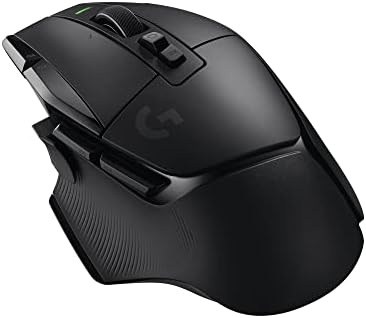

Best mice for large hands
Large hands need a mouse shape that supports the grip, not simply the highest DPI. Compare ergonomic and symmetrical gaming mice by size and button reach.
On this page
At a glance
Razer DeathAdder V3 Pro is the ergonomic large-hand pick, while Logitech G502 X LIGHTSPEED and Razer Basilisk V3 X offer broader control-focused alternatives. A mouse that feels too small can force a claw grip when the user wants palm support. Compare width, length, height and button reach together; a longer shell is not automatically a better fit.
See the wider mouse buying guide and the related mouse explainer. The manufacturer’s Razer DeathAdder V3 Pro specifications provides the cited specifications. A separate gaming mouse and pad guide covers desk setup.
Which option fits each use?
Large hands do not all use the same grip. Palm grip usually benefits from more shell support, while claw and fingertip grips leave more of the palm clear. Check where the hump sits and whether the thumb reaches side controls without stretching. A right-handed ergonomic profile can feel supportive but is unsuitable for left-hand use. Weight also changes handling, so do not equate a larger shell with a heavy mouse.
| Situation | Pick | Decision reason |
|---|---|---|
| Palm grip support | DeathAdder V3 Pro | Ergonomic right-hand shell |
| More controls | G502 X LIGHTSPEED | 13 listed buttons |
| Bluetooth + 2.4 GHz | Basilisk V3 X | Two wireless modes |
| Fit check | Hump + width | Length alone can mislead |
Radar · 0-100 scores
- Razer DeathAdder V3 Pro
- G502 X LIGHTSPEED
- Razer Basilisk V3 X HyperSpeed
What should you compare before buying?
Razer lists DeathAdder V3 Pro as a wireless ergonomic mouse weighing about 63 g in its current product listing. Logitech G502 X LIGHTSPEED weighs 102 g in the published specification and includes a larger control set; Basilisk V3 X HyperSpeed is a right-hand ergonomic option with Bluetooth and 2.4 GHz. These models differ by more than size. Choose the shell first, then decide whether buttons and connection modes justify the extra weight.
Do not treat DPI, polling rate and weight as interchangeable measures. DPI is the number of counts reported per inch; polling rate is how often the mouse reports updates; weight affects physical handling. Shape, grip and surface friction alter the experience as well. Choose a stable configuration that suits the game or task instead of buying the largest number on a spec sheet.
What does large-hand support actually require?
Large-hand support means the shell carries the intended grip without forcing the fingers to curl or the thumb to reach awkwardly. Razer gives DeathAdder V3 Pro dimensions of 128 x 68 x 44 mm. The 44 mm hump is part of the fit argument, not simply the 128 mm length. A person using palm grip may value that support, while a fingertip user with the same hand size may prefer less contact. Measure the hand and compare the current mouse before ordering. If the existing shell already feels comfortable, a replacement with a very different hump is a greater gamble than a small change in weight. Manufacturer dimensions can explain likely differences, but cannot prove personal comfort.
Should a large hand choose an ergonomic or symmetrical shell?
Choose the shape that supports the current grip, not a shape merely labelled ergonomic. Razer positions DeathAdder V3 Pro as a right-handed ergonomic design and quotes 63 g for the black version. A tilted or contoured shell changes where the thumb and ring finger rest. That can be useful for palm support, but some claw-grip players prefer a centred hump and straighter sides. A left-handed buyer should rule out a right-hand contour before considering its other features. There is no sound basis for claiming that the larger shell will prevent strain. Desk height, elbow position and the amount of movement during a day are separate factors that a mouse specification does not measure.
How much extra weight do additional controls add?
The trade can be substantial. Razer's 63 g DeathAdder V3 Pro and Logitech's 102 g G502 X LIGHTSPEED differ by 39 g, or about 62% of the Razer's mass. That comparison does not make the heavier mouse worse: the Logitech offers a different control layout and scrolling features. It does show why a large-hand buyer should not assume every supportive mouse will move similarly. For low-sensitivity shooters, repeated lifting may make the lighter shell attractive. For strategy games or desk work, readily reached controls can matter more. Keep this as an explicit choice between handling and controls rather than describing the most feature-rich model as a universal upgrade.
Which buttons should a larger thumb be able to reach?
The important buttons are the ones that can be pressed without breaking the grip. Logitech markets G502 X LIGHTSPEED around its configurable controls, but total control count is not a count of equally accessible thumb buttons. Scroll directions, wheel actions and profile controls may contribute to a headline figure. Before assigning several game actions, identify where the thumb naturally rests and whether an extra trigger obstructs it. A larger hand can still find a small forward button awkward. Put a rarely used command on the least accessible control and reserve the most natural position for a repeated action. This approach is more useful than assuming 13 listed controls are automatically better than six.
Does a large mouse need a high DPI setting?
No. Physical shell size and sensor sensitivity are independent. Razer specifies a Focus Pro 30K sensor for DeathAdder V3 Pro, but a player can use a modest DPI stage regardless of hand size. Higher DPI makes the pointer travel further for the same physical movement; it does not make the buttons easier to reach. Players with enough desk space may prefer broad forearm movements, while other users favour shorter movements. Keep the existing sensitivity when evaluating a new shape so that only one important variable changes. After the grip feels familiar, tune sensitivity if necessary. A maximum sensor figure is not evidence that a large-hand user needs a higher setting.
Which wireless mode suits a large-hand work and gaming desk?
Use the mode required by the task, then compare battery claims on that basis. Razer lists both Bluetooth and HyperSpeed connectivity for Basilisk V3 X, while DeathAdder V3 Pro is centred on its gaming receiver. Bluetooth can simplify a laptop connection, especially when USB ports are limited, but it is not the same operating mode as a dedicated 2.4 GHz gaming receiver. The Basilisk's up-to-535-hour claim belongs to Bluetooth; its HyperSpeed claim is up to 285 hours. Those figures should never be presented as interchangeable gaming endurance. A buyer who alternates between office work and games may value mode switching more than the lighter weight of a specialised esports model.
When is a lighter large-hand mouse better value?
Choose the lighter model when the extra controls are unlikely to be used and the shell already supports the intended grip. At the same physical acceleration, the simple force relationship favours 63 g over 102 g, but it cannot predict a player's accuracy. The purchase decision should use the verified prices below alongside shape, connection and actual commands used. Write down the three mouse actions repeated most often during a session. If they are only primary click, secondary click and scrolling, a large control cluster may add complexity without helping. If they include frequent macros or application shortcuts, the larger control-focused option can justify its weight. The correct upgrade solves a daily inconvenience rather than winning a specification comparison.
What should you buy?
Razer DeathAdder V3 Pro is the ergonomic large-hand pick, while Logitech G502 X LIGHTSPEED and Razer Basilisk V3 X offer broader control-focused alternatives. A mouse that feels too small can force a claw grip when the user wants palm support. Compare width, length, height and button reach together; a longer shell is not automatically a better fit. Razer DeathAdder V3 Pro costs £69.97 on Amazon UK at the time of writing (October 2026), checked on 27 October 2026.
Amazon UK listing prices at the time of writing (October 2026), checked on 27 October 2026. These figures refer to the exact linked configurations.
| Mouse | Amazon UK price | Specifications |
|---|---|---|
| Razer DeathAdder V3 Pro | £69.97 | Manufacturer |
| G502 X LIGHTSPEED | £79.77 | Manufacturer |
| Razer Basilisk V3 X HyperSpeed | £64.99 | Manufacturer |

Razer DeathAdder V3 Pro specifications
- Right-handed ergonomic design
- Dimensions: 128 x 68 x 44 mm
- Weight: 63 g, black version
- Sensor: Razer Focus Pro 30K
- Battery: up to 90 hours at the stated settings
G502 X LIGHTSPEED and Razer Basilisk V3 X HyperSpeed are the alternatives. Compare the exact hand fit, connection mode and software support before ordering.
Razer DeathAdder V3 Pro - strengths and limits
Where to buy
Check price
Verdict
Razer DeathAdder V3 Pro is the ergonomic large-hand pick, while Logitech G502 X LIGHTSPEED and Razer Basilisk V3 X offer broader control-focused alternatives. A mouse that feels too small can force a claw grip when the user wants palm support. Compare width, length, height and button reach together; a longer shell is not automatically a better fit. Pick by grip, connection and repeated task, then verify exact configuration and price on Amazon UK. Continue with the wider buying guide, the related question and the mouse-weight explainer.
Frequently asked questions
What mouse dimensions should large hands compare first?
Start with the full shell dimensions and the way the hand contacts the buttons. Razer specifies DeathAdder V3 Pro at 128 x 68 x 44 mm and 63 g for the black version. Those figures help compare it with a current mouse, but they do not define a universal minimum for large hands or establish personal comfort.
Is the Razer DeathAdder V3 Pro shaped for palm grip?
Razer describes DeathAdder V3 Pro as a right-handed ergonomic design with a 44 mm height. That contour and height can be relevant to users who want more palm support than a low, symmetrical shell provides. The dimension alone cannot prove a comfortable fit, so compare the grip with a mouse already used comfortably.
Does a large hand need a heavier gaming mouse?
No. Hand size does not create a requirement for extra mouse weight. DeathAdder V3 Pro is listed at 63 g in black, while Logitech G502 X LIGHTSPEED is listed in this comparison at 102 g and adds programmable controls. A larger hand should prioritise shell dimensions and button reach, then choose a mass that feels manageable.
Can a large thumb reach the side buttons on a gaming mouse?
Side-button reach depends on the shell contour and where the thumb rests, not only on mouse length. Logitech G502 X LIGHTSPEED offers 13 controls, but that count does not show whether each button is easy to reach. Compare button position against the intended grip and avoid changing the grip just to activate a control.
Should large hands use a higher DPI setting?
Hand size does not determine the correct DPI setting. DPI changes cursor travel for a given movement, while mouse shape determines how the hand holds and moves the shell. A player with a large hand can use a low or high sensitivity depending on the game, pad and preferred movement distance; fit should be assessed separately.
Is an ergonomic mouse better than a symmetrical mouse for large hands?
Neither shape is automatically better for large hands. DeathAdder V3 Pro has a right-handed ergonomic contour, while a symmetrical shell has a centred outline but may place controls differently. Compare the width at the fingers, hump support, thumb position and button reach with the intended hand. A category name cannot substitute for checking those details.