
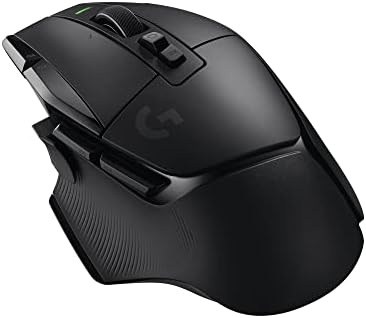

Are extra buttons useful?
Extra mouse buttons help only when the task benefits from them. Compare Logitech G502 and Razer Basilisk models by controls, weight and connection.
On this page
At a glance
More mouse buttons help when they replace repeated keyboard shortcuts or game actions that are awkward to reach. Logitech G502 HERO lists 11 buttons, G502 X LIGHTSPEED 13 and Razer Basilisk V4 Pro 14. Button count is not a comfort or precision score. A few reachable controls can be more useful than a crowded shell whose buttons are hard to distinguish.
See the wider mouse buying guide and the related mouse explainer. The manufacturer’s Logitech G502 HERO specifications provides the cited specifications. A separate gaming mouse and pad guide covers desk setup.
| Logitech G502 HERO | £37.79 on Amazon UK at the time of writing (October 2026) |
| G502 X LIGHTSPEED | £79.77 on Amazon UK at the time of writing (October 2026) |
| Razer Basilisk V4 Pro | £147.52 on Amazon UK at the time of writing (October 2026) |
Which option fits each use?
The useful calculation is assigned buttons divided by daily actions. If a side button replaces browser navigation used 40 times a day, it may reduce hand travel. If the button is used once a week, extra weight and software complexity may not repay the cost. Competitive players should also consider whether reaching side controls changes their grip during a match.
| Situation | Pick | Decision reason |
|---|---|---|
| G502 HERO | 11 | Wired controls |
| G502 X LIGHTSPEED | 13 | Wireless control set |
| Basilisk V4 Pro | 14 | Highest listed count |
| Useful metric | Daily actions mapped | Not total buttons |
Radar · 0-100 scores
- Logitech G502 HERO
- G502 X LIGHTSPEED
- Razer Basilisk V4 Pro
What should you compare before buying?
G502 HERO is wired; G502 X LIGHTSPEED is rechargeable and wireless; Basilisk V4 Pro offers a larger control set and multiple wireless modes. Their weight and shell design also differ, so button count should not be considered alone. Verify which controls can be remapped and whether the maker’s software works on the computer used for gaming or work.
Do not treat DPI, polling rate and weight as interchangeable measures. DPI is the number of counts reported per inch; polling rate is how often the mouse reports updates; weight affects physical handling. Shape, grip and surface friction alter the experience as well. Choose a stable configuration that suits the game or task instead of buying the largest number on a spec sheet.
How can the value of extra buttons be estimated honestly?
Use an explicit time assumption instead of promising a productivity gain. Logitech specifies 11 programmable buttons for G502 HERO. Suppose two reachable controls replace 40 daily keyboard reaches and each avoided reach would save half a second: that is 20 seconds per day, or about 73 minutes across 220 working days. This is arithmetic from assumptions, not a measured improvement. Setup time, accidental presses and the mental effort of remembering a mapping can erase it. Start with browser back and forward or one repeated application command, then assess whether the shortcut is actually used. More controls help when they solve repeated actions without changing the grip; a larger total button count does not establish that outcome.
When should game rules override a useful macro?
The game's rules should decide whether a mapping is acceptable. A single remapped button is different from a sequence of timed actions, and tournament or game policies can treat them differently. Logitech's 13-control G502 X LIGHTSPEED offers configuration choices, but hardware support is not permission to use every possible sequence in competitive play. Prefer straightforward one-action mappings unless the relevant rules explicitly allow more. On a work computer, check the application's shortcuts and installation policy as well. A well-placed control that performs one frequent command can be useful without making the rest of the mouse harder to operate.
What should you buy?
More mouse buttons help when they replace repeated keyboard shortcuts or game actions that are awkward to reach. Logitech G502 HERO lists 11 buttons, G502 X LIGHTSPEED 13 and Razer Basilisk V4 Pro 14. Button count is not a comfort or precision score. A few reachable controls can be more useful than a crowded shell whose buttons are hard to distinguish. Logitech G502 HERO costs £37.79 on Amazon UK at the time of writing (October 2026), checked on 27 October 2026.
Amazon UK listing prices at the time of writing (October 2026), checked on 27 October 2026. These figures refer to the exact linked configurations.
| Mouse | Amazon UK price | Specifications |
|---|---|---|
| Logitech G502 HERO | £37.79 | Manufacturer |
| G502 X LIGHTSPEED | £79.77 | Manufacturer |
| Razer Basilisk V4 Pro | £147.52 | Manufacturer |

Logitech G502 HERO specifications
- Controls: 11 programmable buttons
- Connectivity: wired USB
- Weight: 121 g before optional weights
- Configuration: Logitech G HUB
G502 X LIGHTSPEED and Razer Basilisk V4 Pro are the alternatives. Compare the exact hand fit, connection mode and software support before ordering.
Logitech G502 HERO - strengths and limits
Where to buy
Check price
Verdict
More mouse buttons help when they replace repeated keyboard shortcuts or game actions that are awkward to reach. Logitech G502 HERO lists 11 buttons, G502 X LIGHTSPEED 13 and Razer Basilisk V4 Pro 14. Button count is not a comfort or precision score. A few reachable controls can be more useful than a crowded shell whose buttons are hard to distinguish. Pick by grip, connection and repeated task, then verify exact configuration and price on Amazon UK. Continue with the wider buying guide, the related question and the mouse-weight explainer.
Frequently asked questions
How many mouse buttons are useful for everyday gaming?
The useful number is the count a player can reach reliably while keeping a comfortable grip. Logitech G502 HERO has 11 programmable buttons and weighs 121 g before optional weights, but that specification does not mean every player will use all of them. Start with the controls needed for frequent game actions, then check their physical reach.
Can extra mouse buttons make work faster?
They can shorten repeated actions if a button is easy to reach and the mapping is permitted. For example, if two controls replace 40 daily keyboard reaches and each saves half a second, the assumed saving is 20 seconds a day, or about 73 minutes over 220 workdays. This is illustrative arithmetic, not a measured productivity gain.
Is Logitech G502 HERO too heavy for games with many buttons?
Logitech G502 HERO is listed at 121 g before optional weights and has 11 programmable buttons. That combination favours a control-rich design, but weight preference is personal and does not determine whether the buttons are useful. Compare mass and thumb reach with the actions required in the games played most often.
Are mouse macros allowed in competitive games?
It depends on the game and tournament rules. A single button assigned to one ordinary command is different from a timed sequence of actions, and some competitions restrict timed action sequences. Check the specific rules before setting up macros. A mouse's configuration software can offer a mapping without establishing that the mapping is allowed in every game.
How should I map side buttons without making a mouse confusing?
Begin with one or two repeated commands, such as browser navigation or a game action already used often. Put each on a button reachable without shifting the grip, then leave unused controls unchanged until the first mappings become familiar. A large button count can add mental overhead when the controls are difficult to remember or reach.
Does a higher button count mean a better gaming mouse?
No. Button count describes available controls, not their reach, software support or value to a particular player. Logitech G502 HERO lists 11 buttons, G502 X LIGHTSPEED 13 controls and Razer Basilisk V4 Pro 14 controls. Compare the controls you would actually map and whether the mouse remains comfortable at its listed weight.