
TKL vs 75% keyboard
TKL keeps a separate function row and navigation cluster; 75% compresses key groups into less space. Compare the layouts by shortcuts, mouse room and habits.
On this page
At a glance
Choose TKL when dedicated spacing around navigation keys matters; choose 75% when a smaller footprint matters more. Both omit the number pad and retain a function row. A TKL layout separates arrows and navigation keys, while 75% packs the groups more tightly. That is a desk-space gain balanced against a small learning curve, not a ranking of quality.
For the broader shortlist, read best gaming keyboards UK. The related mechanical keyboard switches explained article covers the next decision. See the manufacturer Keychron Q1 Max specifications for its listed layout and connection details.
Manufacturer specifications: Logitech G PRO X TKL LIGHTSPEED; EPOMAKER AULA F75; Keychron Q1 Max.
| Logitech G PRO X TKL LIGHTSPEED | £108.97 on Amazon UK at the time of writing (October 2026) |
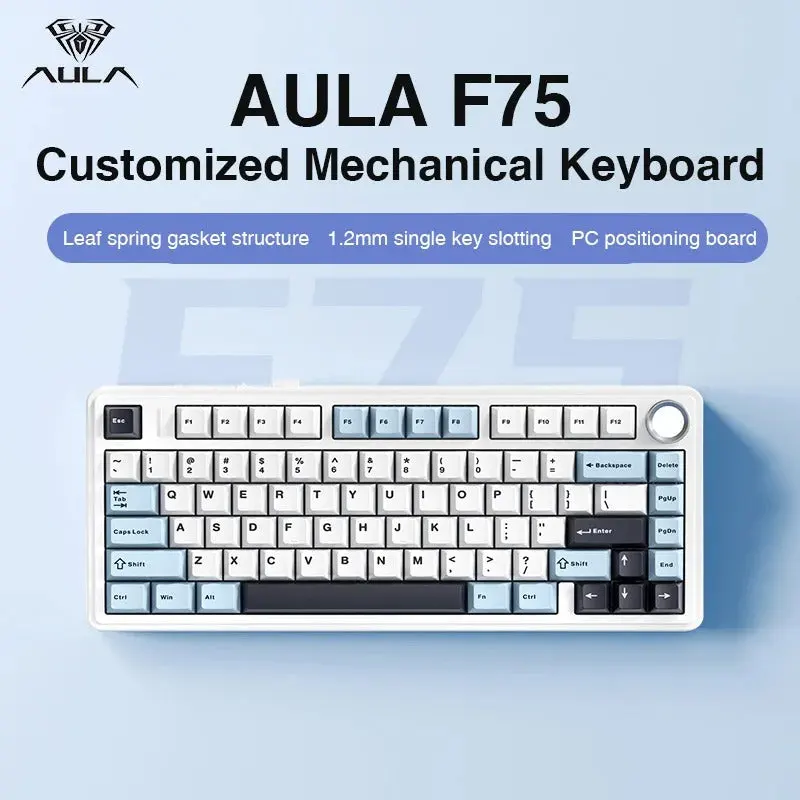
| EPOMAKER AULA F75 | £61.19 on Amazon UK at the time of writing (October 2026) |
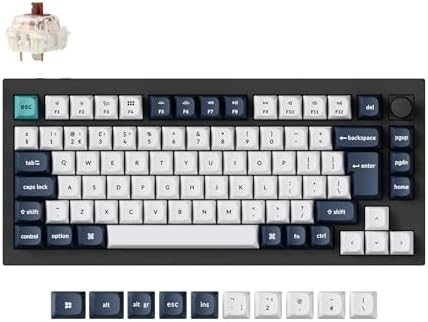
| Keychron Q1 Max | £169.99 on Amazon UK at the time of writing (October 2026) |
Which layout fits each use?
Measure the keyboard and mouse together. A shorter board can let the mouse sit closer to the typing hand, but the advantage depends on desk dimensions and sensitivity. Logitech G PRO X TKL LIGHTSPEED keeps the familiar TKL arrangement. EPOMAKER AULA F75 and Keychron Q1 Max use compact 75% layouts. Check the exact right-side key positions because 75% boards vary in navigation layers, knobs and spacing.
| Situation | Layout | Reason |
|---|---|---|
| Numpad | Neither | Both remove it |
| Function row | Both retain | Direct F-key access |
| Navigation keys | Separated on TKL | Compressed on 75% |
| Mouse width | More on 75% | Measure desk fit |
Radar · 0-100 scores
- Logitech G PRO X TKL LIGHTSPEED
- EPOMAKER AULA F75
- Keychron Q1 Max
What trade-offs matter?
The Logitech model is a wireless UK TKL keyboard with tactile switches. The AULA F75 is a 75% wireless mechanical model with hot-swap sockets, while Q1 Max combines 75% with wireless modes and programmability. Layout should come before switch customisation: a feature-rich board is still frustrating if the navigation keys you use every hour move to an unfamiliar layer.
A layout is a physical arrangement, not a measure of typing quality. Switch feel, keycap profile, stabilisers and case construction vary independently. Confirm the UK ISO layout and the exact model’s product page. The right comparison is the task repeated throughout the week, not the largest feature count on the box.
The distinction is spacing, not the presence of a function row: both layouts keep F keys and arrow keys, while neither has a number pad. TKL retains wider separation between the navigation block and the typing keys. A 75% board draws those groups together and can put some secondary commands on a function layer. Check whether the compact cluster remains legible when the user reaches without looking.
For players, compare the keyboard width against the mouse pad area rather than assuming a smaller layout is always better. The shorter 75% format gives up less lateral space; TKL is more familiar when moving from full-size. Both formats can be wired or wireless and use different switch types, so layout percentage should not stand in for latency or typing feel. Measure the desk, pick the key arrangement, then compare switches.
What should you buy?
Choose TKL when dedicated spacing around navigation keys matters; choose 75% when a smaller footprint matters more. Both omit the number pad and retain a function row. A TKL layout separates arrows and navigation keys, while 75% packs the groups more tightly. That is a desk-space gain balanced against a small learning curve, not a ranking of quality. The Logitech G PRO X TKL LIGHTSPEED costs £108.97 on Amazon UK at the time of writing (October 2026), checked on 27 October 2026.

Logitech G PRO X TKL LIGHTSPEED specifications
- Layout: TKL
- Switches: Tactile
- Connection: Wireless
- Key material: Not stated
- Polling rate: Not stated
EPOMAKER AULA F75 and Keychron Q1 Max offer the alternatives described above.
Logitech G PRO X TKL LIGHTSPEED - strengths and limits
Where to buy
Check price
Verdict
Choose TKL when dedicated spacing around navigation keys matters; choose 75% when a smaller footprint matters more. Both omit the number pad and retain a function row. A TKL layout separates arrows and navigation keys, while 75% packs the groups more tightly. That is a desk-space gain balanced against a small learning curve, not a ranking of quality. Check the dimensions against your desk and decide how often the number pad or navigation block is used. Compare the wider keyboard guide and the related explainer.
For another useful comparison, read best TKL keyboard guide.
Frequently asked questions
What is the difference between TKL and 75% keyboards?
TKL keeps the arrow and navigation groups separated in a familiar tenkeyless arrangement; 75% packs those keys closer to the main block. Both layouts remove the number pad and retain a function row. Logitech G PRO X TKL LIGHTSPEED is the TKL example here, while EPOMAKER AULA F75 and Keychron Q1 Max show 75% alternatives.
Does TKL or 75% have a number pad?
Neither TKL nor 75% keyboards include a dedicated number pad. Both keep the number row above the letters, so occasional figures remain accessible. A USB number pad can be added to either layout, but it takes desk space when attached. Spreadsheet users who enter numbers every day should compare full-size or 96% boards.
Which layout is better for gaming, TKL or 75%?
TKL is easier to adapt to when separate arrow and navigation clusters matter; 75% uses less horizontal space and may leave more room for a mouse. Neither layout improves aim by itself. Check the exact board width, game shortcuts and mouse position before choosing, especially if the keyboard will also serve for office work.
Is a 75% keyboard comfortable for office work?
A 75% keyboard can work well for office tasks when the user is comfortable with its more compact navigation keys. Keychron Q1 Max retains a function row and arrows, while EPOMAKER AULA F75 offers hot-swap switches. People who frequently use separate navigation keys should compare the spacing with a TKL layout first.
Does a 75% keyboard keep the function row?
Most 75% keyboards keep a physical function row, but the compact layout can place it closer to the number row. TKL keyboards also keep the function row and usually separate it more clearly. Check the exact key map and whether any navigation actions require a function-layer shortcut.
How should I choose between TKL and 75%?
Choose TKL when familiarity and visibly separated arrow and navigation keys are more useful than the smallest footprint. Choose 75% when the shorter width matters and a compact key map feels manageable. Logitech G PRO X TKL LIGHTSPEED, EPOMAKER AULA F75 and Keychron Q1 Max illustrate these layouts, but desk dimensions and key placement should decide.