
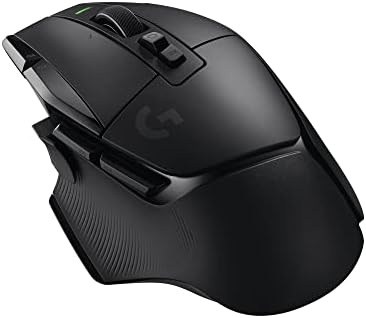

Wired vs wireless mouse
Modern 2.4 GHz gaming mice remove cable drag, while wired mice avoid charging. Compare Logitech options by desk setup, cable routing and battery habits.
On this page
At a glance
Choose wired to avoid charging and receiver management; choose wireless to remove cable drag and keep the desk clear. Logitech G502 X wired is the low-maintenance pick, while G502 X LIGHTSPEED and Razer DeathAdder V3 Pro offer wireless movement. Modern 2.4 GHz gaming receivers are designed for low-latency play, but actual convenience depends on cable routing and charging habits.
See the wider mouse buying guide and the related mouse explainer. The manufacturer’s Logitech G502 X wired product page provides the cited specifications. A separate gaming mouse and pad guide covers desk setup.
Which option fits each use?
The true cost is routine: wireless needs charging or battery replacement, while wired needs a cable path that does not catch on the desk edge. A mouse bungee can reduce drag but takes space. Place a wireless receiver close to the mouse. Bluetooth is convenient for general use but differs from a dedicated gaming receiver. The comparison is about connection upkeep, not implying the models have identical shapes.
| Situation | Pick | Decision reason |
|---|---|---|
| Cable drag | Wireless | No cord across the sweep |
| Charging | Wired | No battery to maintain |
| Desk routing | Wireless | Fewer cable snags |
| Receiver or USB | Wired | Port stays occupied |
Radar · 0-100 scores
- G502 X (wired)
- G502 X LIGHTSPEED
- Razer DeathAdder V3 Pro
What should you compare before buying?
Logitech lists a 1.8 m cable for G502 X wired. The G502 X LIGHTSPEED and DeathAdder V3 Pro remove the cable but have batteries to maintain. The wired G502 also occupies a USB port continuously. Choose wireless for a broad low-sensitivity sweep or a tidy shared desk; choose wired when readiness and zero charging matter most.
Do not treat DPI, polling rate and weight as interchangeable measures. DPI is the number of counts reported per inch; polling rate is how often the mouse reports updates; weight affects physical handling. Shape, grip and surface friction alter the experience as well. Choose a stable configuration that suits the game or task instead of buying the largest number on a spec sheet.
How much is removing the cable worth in this comparison?
The verified October prices put G502 X wired at £37.99 and G502 X LIGHTSPEED at £79.77, a £41.78 difference. Divided across a stated three-year period, the wireless premium is about £13.93 per year before accessories or resale. This calculation prices convenience, not a performance gain: the two models also have different weights and the wireless version needs charging. Logitech specifies 89 g for the wired G502 X and 102 g for LIGHTSPEED, so removing the cable adds 13 g to the body in this family. A broad, low-sensitivity sweep may make that trade attractive; a neatly routed cable on a fixed desk may make the saving more useful.
Which connection problems can be addressed before upgrading?
Check the setup first. Logitech's wired G502 X has a 1.8 m cable, so routing it away from the desk edge may remove an annoying snag without replacing the device. A wireless receiver placed behind a computer or next to other radio equipment may benefit from the supplied extension arrangement and closer placement. Neither adjustment establishes a measured latency result, but each addresses an obvious practical problem. Bluetooth and a dedicated 2.4 GHz receiver should also be treated as separate options rather than two names for the same connection. Choose wireless to solve cable drag, or wired to remove battery upkeep, after identifying which inconvenience is actually recurring.
What should you buy?
Choose wired to avoid charging and receiver management; choose wireless to remove cable drag and keep the desk clear. Logitech G502 X wired is the low-maintenance pick, while G502 X LIGHTSPEED and Razer DeathAdder V3 Pro offer wireless movement. Modern 2.4 GHz gaming receivers are designed for low-latency play, but actual convenience depends on cable routing and charging habits. Logitech G502 X wired costs £37.99 on Amazon UK at the time of writing (October 2026), checked on 27 October 2026.
Amazon UK listing prices at the time of writing (October 2026), checked on 27 October 2026. These figures refer to the exact linked configurations.
| Mouse | Amazon UK price | Specifications |
|---|---|---|
| G502 X (wired) | £37.99 | Manufacturer |
| G502 X LIGHTSPEED | £79.77 | Manufacturer |
| Razer DeathAdder V3 Pro | £69.97 | Manufacturer |

G502 X (wired) specifications
- Connectivity: wired USB
- Cable: 1.8 m
- Weight: 89 g
- Controls: 13 programmable controls
- Switches: LIGHTFORCE hybrid
G502 X LIGHTSPEED and Razer DeathAdder V3 Pro are the alternatives. Compare the exact hand fit, connection mode and software support before ordering.
G502 X (wired) - strengths and limits
Where to buy
Check price
Verdict
Choose wired to avoid charging and receiver management; choose wireless to remove cable drag and keep the desk clear. Logitech G502 X wired is the low-maintenance pick, while G502 X LIGHTSPEED and Razer DeathAdder V3 Pro offer wireless movement. Modern 2.4 GHz gaming receivers are designed for low-latency play, but actual convenience depends on cable routing and charging habits. Pick by grip, connection and repeated task, then verify exact configuration and price on Amazon UK. Continue with the wider buying guide, the related question and the mouse-weight explainer.
Frequently asked questions
Is a wired gaming mouse faster than a wireless mouse?
A wired connection is not automatically faster for every user. Modern wireless gaming mice use dedicated receivers, while Bluetooth is a separate mode with different behaviour. Compare the exact model and connection mode rather than assuming the word wireless guarantees a delay or that wired guarantees an advantage in play.
What does a cable-free mouse cost compared with wired?
The verified Amazon UK listings on 27 October 2026 price Logitech G502 X wired at £37.99 and G502 X LIGHTSPEED at £79.77, a £41.78 difference. That snapshot prices convenience, not a measured performance gain. The wireless model also weighs 13 g more in the listed specifications, so the comparison includes more than connectivity.
Does a wired gaming mouse need charging?
No. Logitech G502 X wired draws power through its USB connection and avoids battery charging and receiver pairing. Its listed cable is 1.8 m, so route it to avoid snagging at the desk edge. A wired design is convenient on a fixed setup, but the cable and occupied USB port remain part of the arrangement.
How much heavier is Logitech G502 X LIGHTSPEED than the wired model?
The listed weights are 102 g for G502 X LIGHTSPEED and 89 g for the wired G502 X, a 13 g difference. The wireless version removes the cable from the hand's movement path but adds mass and battery upkeep. Those figures describe the models; they do not predict which one a player will prefer.
Can moving a wireless receiver improve a mouse setup?
Receiver position can be adjusted to keep the dongle close to the mouse and away from a crowded rear computer port. That is a practical setup change, not a claim of measured latency improvement. Before replacing a mouse, check cable routing for a wired model and receiver placement for a wireless model to identify the actual source of inconvenience.
Is Bluetooth suitable for every wireless gaming mouse use?
No. Bluetooth is useful for pairing with compatible devices and avoiding a dedicated receiver, but it is distinct from a gaming mouse's 2.4 GHz receiver mode. Check which modes the exact mouse supports and use the mode appropriate to the task. Battery-life claims can also differ between Bluetooth and receiver operation.