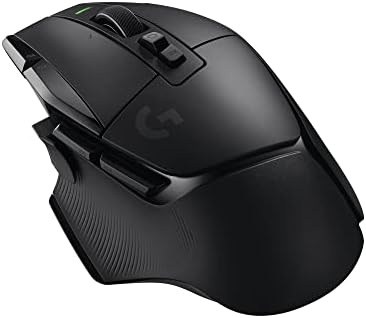


Gaming mouse for work?
A gaming mouse can help at work when programmable buttons and shape suit the tasks. Compare Logitech models by controls, weight and software support.
On this page
At a glance
A gaming mouse makes sense for work when its shape is comfortable and extra buttons replace repeated commands. Logitech G502 X LIGHTSPEED offers a high button count and wireless operation; G502 HERO is the wired alternative; Basilisk V3 X adds Bluetooth. A gaming label alone does not improve productivity. Software compatibility and desk comfort matter more.
See the wider mouse buying guide and the related mouse explainer. The manufacturer’s Logitech G502 X LIGHTSPEED product page provides the cited specifications. A separate gaming mouse and pad guide covers desk setup.
Which option fits each use?
Count repeated actions before assigning mouse buttons. Browser back and forward may be useful dozens of times each day; a rarely used macro may not justify added weight or configuration. The practical measure is the number of daily shortcuts a mouse can reach without changing grip. For managed workplace computers, software installation restrictions can make a basic mouse more convenient than a configurable model.
| Situation | Pick | Decision reason |
|---|---|---|
| Browser work | Side buttons | Back and forward |
| Repeated app command | Programmable button | Only if used daily |
| Managed computer | Basic wired mouse | Avoid software barrier |
| Laptop switching | Bluetooth mode | No receiver needed |
Radar · 0-100 scores
- G502 X LIGHTSPEED
- Logitech G502 HERO
- Razer Basilisk V3 X HyperSpeed
What should you compare before buying?
G502 X LIGHTSPEED is wireless and lists 13 buttons in the manufacturer specification; G502 HERO is wired with 11; Basilisk V3 X offers Bluetooth and 2.4 GHz modes. Logitech G HUB and Razer Synapse configure supported devices, but operating-system and application support varies. Check the workplace computer policy before relying on macros or custom button profiles.
Do not treat DPI, polling rate and weight as interchangeable measures. DPI is the number of counts reported per inch; polling rate is how often the mouse reports updates; weight affects physical handling. Shape, grip and surface friction alter the experience as well. Choose a stable configuration that suits the game or task instead of buying the largest number on a spec sheet.
Which work tasks justify a programmable mouse?
Repeated navigation and application commands are stronger reasons than a high sensor ceiling. Logitech's G502 X LIGHTSPEED offers 13 configurable controls, but the useful subset may be only two side buttons and a wheel mode. List the actions repeated during a normal hour: browser back, forward, document switching or a shortcut in a specialist application. Map the most frequent action to the most reachable control and leave the others unchanged until that mapping feels familiar. A simple illustrative budget is five minutes of setup against 20 seconds saved per day: the setup would be repaid after 15 working days if the assumed saving actually occurs. That is a decision method, not evidence that this mouse makes everyone faster.
Can workplace restrictions make a simpler mouse better?
Yes. A managed computer may prevent installation of G HUB or Synapse, and onboard-memory support does not guarantee that every application-specific command travels with the device. Check the actual profile functions required before spending extra. Logitech's 11-button wired G502 HERO can provide basic pointing without a charging routine, while Razer's Basilisk V3 X offers Bluetooth as a connection option. These are practical differences for a shared office or laptop desk. A user who needs only clicking and scrolling should not pay for configuration that the employer will not permit. The right work mouse has accessible controls and a supported connection before it has an impressive gaming specification.
What should you buy?
A gaming mouse makes sense for work when its shape is comfortable and extra buttons replace repeated commands. Logitech G502 X LIGHTSPEED offers a high button count and wireless operation; G502 HERO is the wired alternative; Basilisk V3 X adds Bluetooth. A gaming label alone does not improve productivity. Software compatibility and desk comfort matter more. Logitech G502 X LIGHTSPEED costs £79.77 on Amazon UK at the time of writing (October 2026), checked on 27 October 2026.
Amazon UK listing prices at the time of writing (October 2026), checked on 27 October 2026. These figures refer to the exact linked configurations.
| Mouse | Amazon UK price | Specifications |
|---|---|---|
| G502 X LIGHTSPEED | £79.77 | Manufacturer |
| Logitech G502 HERO | £37.79 | Manufacturer |
| Razer Basilisk V3 X HyperSpeed | £64.99 | Manufacturer |
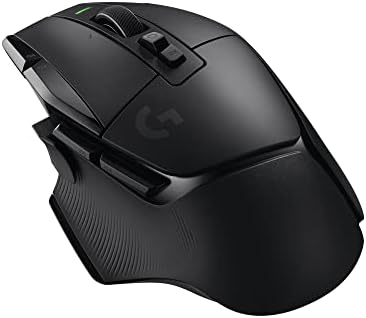
G502 X LIGHTSPEED specifications
- Controls: 13 programmable controls
- Weight: 102 g
- Connectivity: LIGHTSPEED wireless
- Battery: up to 140 hours under Logitech conditions
- Configuration: Logitech G HUB
Logitech G502 HERO and Razer Basilisk V3 X HyperSpeed are the alternatives. Compare the exact hand fit, connection mode and software support before ordering.
G502 X LIGHTSPEED - strengths and limits
Where to buy
Check price
Verdict
A gaming mouse makes sense for work when its shape is comfortable and extra buttons replace repeated commands. Logitech G502 X LIGHTSPEED offers a high button count and wireless operation; G502 HERO is the wired alternative; Basilisk V3 X adds Bluetooth. A gaming label alone does not improve productivity. Software compatibility and desk comfort matter more. Pick by grip, connection and repeated task, then verify exact configuration and price on Amazon UK. Continue with the wider buying guide, the related question and the mouse-weight explainer.
Frequently asked questions
Is a gaming mouse good for office work?
A gaming mouse can suit office work when its side buttons, wireless connection or adjustable sensitivity support repeated tasks. Logitech G502 X LIGHTSPEED provides 13 configurable controls and weighs 102 g; those features are useful only when the software and shape suit the desk. Basic pointing and scrolling remain the priority for simpler work.
Which work tasks benefit from programmable mouse buttons?
Repeated navigation and application commands are the clearest candidates, such as browser back, document switching or a shortcut in a specialist app. If a mapping saves an assumed 20 seconds per day, five minutes of setup would be repaid after 15 workdays. That is a planning calculation, not evidence that every user will save that time.
Can workplace restrictions block gaming mouse features?
Yes. A managed computer may prevent installing Logitech G HUB or another configuration app, and onboard profiles do not guarantee that every application command works on every machine. Check the employer's software policy and which settings are stored on the mouse before depending on a programmable control for daily work.
Is a wired gaming mouse better for an office desk?
A wired mouse avoids charging and receiver pairing, which can simplify a fixed desk. Logitech G502 HERO is a wired option with 11 programmable buttons. A wireless model such as G502 X LIGHTSPEED can clear cable clutter, but adds receiver and battery considerations. Choose based on the inconvenience that recurs in the actual workspace.
Will a 102 g gaming mouse feel comfortable for all-day work?
Logitech G502 X LIGHTSPEED weighs 102 g, but mass alone cannot predict all-day comfort. Hand size, grip, desk height and how often the mouse is moved all matter. Compare its shape with a familiar office mouse and check whether the thumb controls can be reached without repeatedly changing the grip.
Can a gaming mouse work on a laptop without custom software?
Yes, a supported wired or wireless connection can provide basic clicks and pointer movement without the gaming configuration app. Custom DPI stages or button profiles may need software, and some workplace devices restrict installation. Confirm which controls work from the mouse itself before relying on a custom setup away from a personal computer.